Unlock a world of possibilities! Login now and discover the exclusive benefits awaiting you.

- Qlik Community
- :
- All Forums
- :
- QlikView
- :
- Eliminate Null Dimensions
- Subscribe to RSS Feed
- Mark Topic as New
- Mark Topic as Read
- Float this Topic for Current User
- Bookmark
- Subscribe
- Mute
- Printer Friendly Page

- Mark as New
- Bookmark
- Subscribe
- Mute
- Subscribe to RSS Feed
- Permalink
- Report Inappropriate Content
Eliminate Null Dimensions
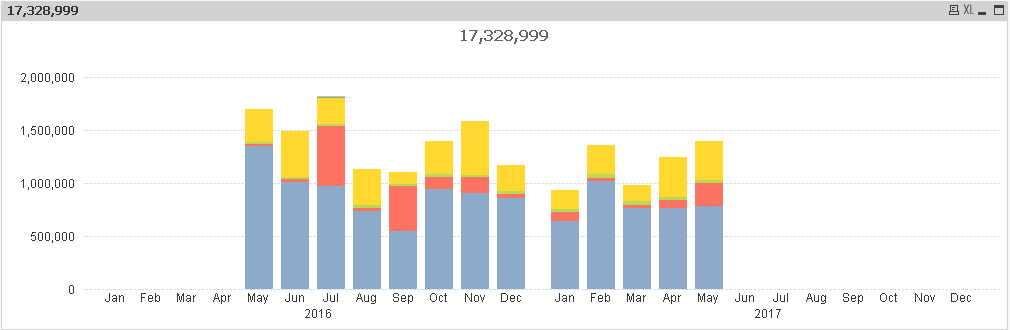
I created a bar graph that is a sum by month of the current month plus the previous 12 months. Now I want to remove the months that have no values. I already tried going into PROPERTIES => DIMENSIONS => And Checking the box that says Suppress When Value Is Null. This did not work. Any idea how to remove the blank months?
Formula:
=NUM(SUM({$<[Month End Date]={">=$(=MonthStart(AddMonths(Max([Month End Date]),-12))) <$(=MonthEnd(Max([Month End Date]),+1))"}, [Fact Setup ID]={"576817","576818","576819","576820","576821","401258"}>} [Metric Value]), '###,##0')
Thanks,
Seth

 sunny_talwar
- Mark as New
- Bookmark
- Subscribe
- Mute
- Subscribe to RSS Feed
- Permalink
- Report Inappropriate Content
Maybe check 'Suppress Zero Value' on the presentation tab

 Gysbert_Wassena
- Mark as New
- Bookmark
- Subscribe
- Mute
- Subscribe to RSS Feed
- Permalink
- Report Inappropriate Content
You're using two dimensions. In that case space will be reserved for each month even if there is a value for a month in only one of the two years. If you don't want that then you must use a single dimension. Something like =Year & '-' & Month
talk is cheap, supply exceeds demand
- Mark as New
- Bookmark
- Subscribe
- Mute
- Subscribe to RSS Feed
- Permalink
- Report Inappropriate Content
I also have the Suppress Zero Value checked in the presentation tab.
I want the year and month as 2 separate dimensions so it shows the summed values in chronological order. If I remove the year dimension then the chart orders the months as Jan - Dec and rolls up the 1 overlapping month into a single summed value. Is there no way around this? This is something basic that can be done in an excel graph.
- Mark as New
- Bookmark
- Subscribe
- Mute
- Subscribe to RSS Feed
- Permalink
- Report Inappropriate Content
I see what you are saying creating a "Year"&-&"Month" field. I just don't think that looks as nice. Is that the only way?
Gysbert_Wassena- Mark as New
- Bookmark
- Subscribe
- Mute
- Subscribe to RSS Feed
- Permalink
- Report Inappropriate Content
Yes.
talk is cheap, supply exceeds demand
- Mark as New
- Bookmark
- Subscribe
- Mute
- Subscribe to RSS Feed
- Permalink
- Report Inappropriate Content
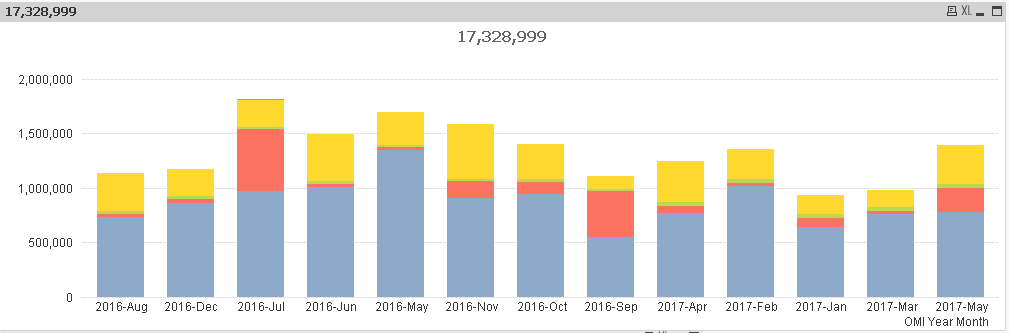
So if I use the 1 dimension how do I sort it so the months are in chronological order? It's like when I combined the month and year it can only see the month as text and wants to put it in alpha order. I would prefer not to use the month number unless that is my only option. I have tried a few different sort unsuccessfully. Thanks.
Gysbert_Wassena- Mark as New
- Bookmark
- Subscribe
- Mute
- Subscribe to RSS Feed
- Permalink
- Report Inappropriate Content
You seem to have a [Month End Date] field. You can use that as dimension and format it a bit: Date([Month End Date], 'YYYY-MMM'). If you sort that dimension numerically you'll get the sort order you want.
talk is cheap, supply exceeds demand