Unlock a world of possibilities! Login now and discover the exclusive benefits awaiting you.

- Qlik Community
- :
- All Forums
- :
- QlikView
- :
- Email Alerts
- Subscribe to RSS Feed
- Mark Topic as New
- Mark Topic as Read
- Float this Topic for Current User
- Bookmark
- Subscribe
- Mute
- Printer Friendly Page

- Mark as New
- Bookmark
- Subscribe
- Mute
- Subscribe to RSS Feed
- Permalink
- Report Inappropriate Content
Email Alerts
Hi Guys,
I am using qlikview desktop local licence version. Is it possible to send email alert with these version of qlikview?
Thanks
Simon
- « Previous Replies
-
- 1
- 2
- Next Replies »
- Mark as New
- Bookmark
- Subscribe
- Mute
- Subscribe to RSS Feed
- Permalink
- Report Inappropriate Content
Thanks Rama I appreciate it


- Mark as New
- Bookmark
- Subscribe
- Mute
- Subscribe to RSS Feed
- Permalink
- Report Inappropriate Content
Rama,
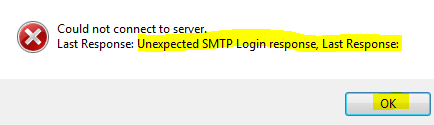
I got this Error.
I am using Gmail SMTP
Like Server name is : smtp.gmail / smtp.gmail.com / smtpserver.gmail / smtpserver.gmail.com
PFA.
I appreciate your help...!

- Mark as New
- Bookmark
- Subscribe
- Mute
- Subscribe to RSS Feed
- Permalink
- Report Inappropriate Content
Hi Anil
I checked regarding Gmail SMTP Server and its working fine for me
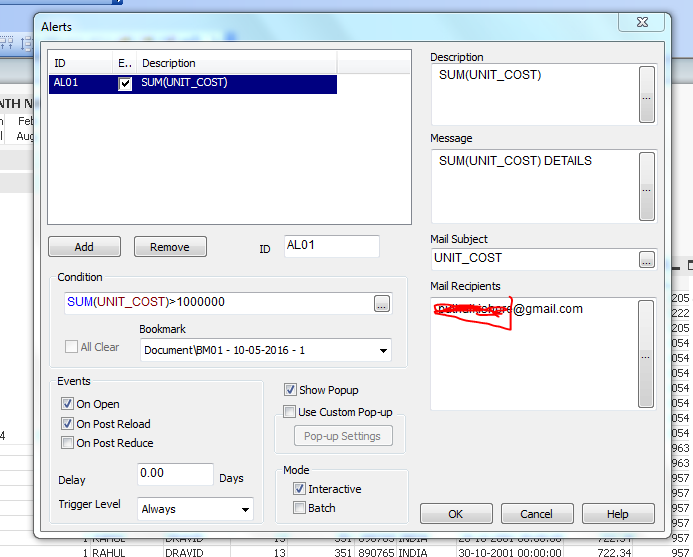
Have a look above screenshot, this will help you
Thanks
Reddi Kishor
- Mark as New
- Bookmark
- Subscribe
- Mute
- Subscribe to RSS Feed
- Permalink
- Report Inappropriate Content
Reddy,
Can you please share me the step-by-step in word format. So that, i can try that..!
Help Me...
- Mark as New
- Bookmark
- Subscribe
- Mute
- Subscribe to RSS Feed
- Permalink
- Report Inappropriate Content
Hi Reddi kishor,
I tried with your procedure and i am able to get the alerts by Gmail.
Note: The alerts will fire when the given condition must be satisfied, then only we will receive the alerts.
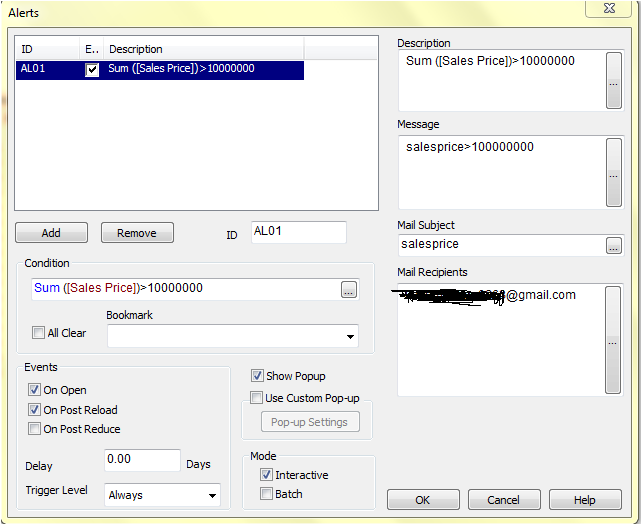
Thanks ,
Leela Madhav. V
- Mark as New
- Bookmark
- Subscribe
- Mute
- Subscribe to RSS Feed
- Permalink
- Report Inappropriate Content
Thanks Reddi,
But I want to know if these is possible with qlikview desktop local licence and not the server version.
- Mark as New
- Bookmark
- Subscribe
- Mute
- Subscribe to RSS Feed
- Permalink
- Report Inappropriate Content
Hi Simon
I just checked with QlikView Personal Edition in my PC, but i didn't checked with QlikView Desktop
Thanks
Reddi Kishor
Happy Viewing
- Mark as New
- Bookmark
- Subscribe
- Mute
- Subscribe to RSS Feed
- Permalink
- Report Inappropriate Content
Hey Reddi,
But I thought it does not work with qlikview personal edition. Because in the configuration under "Email" in Server Address, you must enter the server address and with personal edition you don't have such address.
But if you did that could you send me the steps on how you achieved that?
Thanks,Simon
- Mark as New
- Bookmark
- Subscribe
- Mute
- Subscribe to RSS Feed
- Permalink
- Report Inappropriate Content
Hi Simon
You have to give your server details like Server Address, Port no., select AUTH LOGIN, then give USER ID and Password at Mail tab in User Preferences .
PF the screenshot for your better understanding
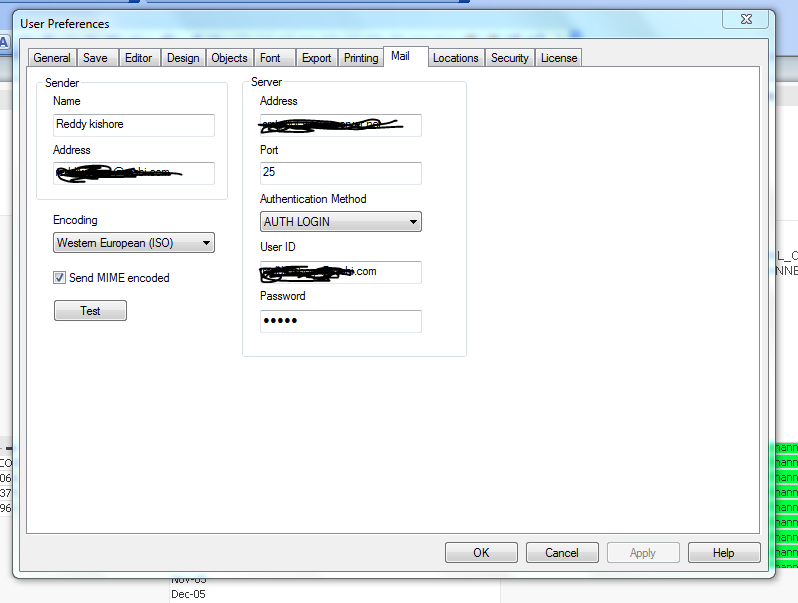
Thanks
Reddi Kishor
Happy Viewing
- Mark as New
- Bookmark
- Subscribe
- Mute
- Subscribe to RSS Feed
- Permalink
- Report Inappropriate Content
Hi Reddy,
These sample you posted works with QlikView Personal Edition on your PC? Because I am using Yahoo mail and check online for the SMTP address for Yahoo. Which is port no 465; server name: smtp.mail.yahoo.com. Then I used AUTH LOGIN my yahoo email and password. But after testing it gives me an error saying ' Could not connect to server Unexpected SMTP Login response,Last Response:'.
So I don't know what I am doing wrong since you said its works for your QlikView Personal Edition on your PC.
- « Previous Replies
-
- 1
- 2
- Next Replies »