Unlock a world of possibilities! Login now and discover the exclusive benefits awaiting you.

- Qlik Community
- :
- All Forums
- :
- QlikView
- :
- Error mesage in chart
- Subscribe to RSS Feed
- Mark Topic as New
- Mark Topic as Read
- Float this Topic for Current User
- Bookmark
- Subscribe
- Mute
- Printer Friendly Page

 manoranjan_d
- Mark as New
- Bookmark
- Subscribe
- Mute
- Subscribe to RSS Feed
- Permalink
- Report Inappropriate Content
Error mesage in chart
Hi all,
I m using two separate 2 bar charts,
In chart1 there is two stack bar data of 2015, 2016.
In chart2 there is only 2016 stack bar chart.
Now the scenario is, if user select any filters "example dept" and chart1 will show only 2015 data in chart1 bcoz there is no data in 2016,
so my chart2 has to show some error msg for this issue in chart2. how can i achieve the error msg in chart2 when there is no data.

- Mark as New
- Bookmark
- Subscribe
- Mute
- Subscribe to RSS Feed
- Permalink
- Report Inappropriate Content
Hi Manoranjan.
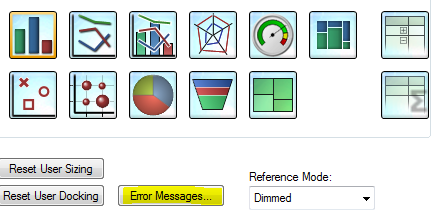
Use a calculation condition and on Error Messages, write do you want on Calculation Conditio Unfullfilled.
Regards!!

 swuehl
- Mark as New
- Bookmark
- Subscribe
- Mute
- Subscribe to RSS Feed
- Permalink
- Report Inappropriate Content
You can set a calculation condition that returns false if there is no data on general tab of your chart, maybe
=Sum({<Year = {2016}>} Amount) >0
or whatever you are using in your expression,
then adapt the error message text in error messages dialog for the calculation condition.
 migueldelval
- Mark as New
- Bookmark
- Subscribe
- Mute
- Subscribe to RSS Feed
- Permalink
- Report Inappropriate Content
Hi Manoranjan,
You use Conditional show. If(year=2015, 0, 1), and put at the same place other object.
Regards
Miguel del Valle
manoranjan_d
- Mark as New
- Bookmark
- Subscribe
- Mute
- Subscribe to RSS Feed
- Permalink
- Report Inappropriate Content
I can found lot of option in error message, so from that which one i can select
- Mark as New
- Bookmark
- Subscribe
- Mute
- Subscribe to RSS Feed
- Permalink
- Report Inappropriate Content
Look at my response Manoranjan.
Regards!
- Mark as New
- Bookmark
- Subscribe
- Mute
- Subscribe to RSS Feed
- Permalink
- Report Inappropriate Content
Hi,
Select " Calculation condition unfulfilled"
Hope it helps!!


- Mark as New
- Bookmark
- Subscribe
- Mute
- Subscribe to RSS Feed
- Permalink
- Report Inappropriate Content
If User Select any then????

 narendiran
- Mark as New
- Bookmark
- Subscribe
- Mute
- Subscribe to RSS Feed
- Permalink
- Report Inappropriate Content
Hi
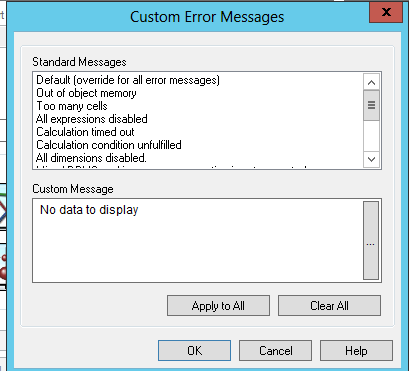
Use the relevant standard message or use custom message with either text or with expression.
swuehl
- Mark as New
- Bookmark
- Subscribe
- Mute
- Subscribe to RSS Feed
- Permalink
- Report Inappropriate Content
Again, two steps to take
1) Define a 'calculation condition' on general tab (see my previous post for an example)
2) Adapt the error message if needed, change the message for 'calculation condition unfulfilled' in the error messages dialog (button on general tab to open the dialog)