Unlock a world of possibilities! Login now and discover the exclusive benefits awaiting you.

- Qlik Community
- :
- All Forums
- :
- QlikView
- :
- Excel Export Formatting Issue
- Subscribe to RSS Feed
- Mark Topic as New
- Mark Topic as Read
- Float this Topic for Current User
- Bookmark
- Subscribe
- Mute
- Printer Friendly Page

- Mark as New
- Bookmark
- Subscribe
- Mute
- Subscribe to RSS Feed
- Permalink
- Report Inappropriate Content
Excel Export Formatting Issue
Hi
This is how my qlikview chart(straight table) looks like.

I am writing a MACRO to transpose and export to excel.This is the code :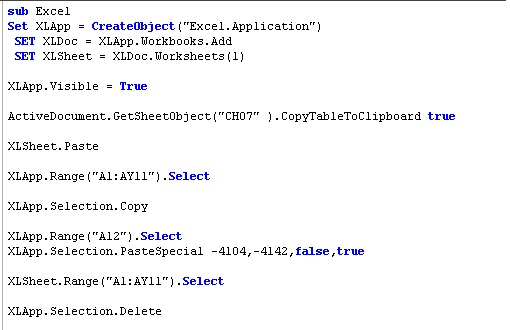
So i get the following output on button click event :

But the Expressions label alignment is centre.But in the Qlikview Straight table in the fig1 its left aligned.
All the data are properly populated with the correct format except for the expressions label.
Any idea on how to solve this alignment issue??
Accepted Solutions

 vikasmahajan
- Mark as New
- Bookmark
- Subscribe
- Mute
- Subscribe to RSS Feed
- Permalink
- Report Inappropriate Content
Add following code and check
'********* Format Excel **************
Set Selection = XLSheet.Cells
With Selection
.VerticalAlignment = 1
.WrapText = True
.Borders.ColorIndex = 0
.ColumnWidth = 11
'When the export finishes we display the below message:
'MSGBOX "Export Complete!",VbInformation
End With
Hope this helps you.
Vikas
If the issue is solved please mark the answer with Accept as Solution & like it.
If you want to go quickly, go alone. If you want to go far, go together.
vikasmahajan
- Mark as New
- Bookmark
- Subscribe
- Mute
- Subscribe to RSS Feed
- Permalink
- Report Inappropriate Content
Add following code and check
'********* Format Excel **************
Set Selection = XLSheet.Cells
With Selection
.VerticalAlignment = 1
.WrapText = True
.Borders.ColorIndex = 0
.ColumnWidth = 11
'When the export finishes we display the below message:
'MSGBOX "Export Complete!",VbInformation
End With
Hope this helps you.
Vikas
If the issue is solved please mark the answer with Accept as Solution & like it.
If you want to go quickly, go alone. If you want to go far, go together.

 tresB
tresB
- Mark as New
- Bookmark
- Subscribe
- Mute
- Subscribe to RSS Feed
- Permalink
- Report Inappropriate Content
See if this helps:
Columns("A:A").Select
With Selection
.HorizontalAlignment = xlLeft
.VerticalAlignment = xlBottom
.WrapText = False
.Orientation = 0
.AddIndent = False
.IndentLevel = 0
.ShrinkToFit = False
.ReadingOrder = xlContext
.MergeCells = False
End With
Modify accordingly.
- Mark as New
- Bookmark
- Subscribe
- Mute
- Subscribe to RSS Feed
- Permalink
- Report Inappropriate Content
Hey Vikas,
Thanks Yaar it helped.
But any idea how to Autofit row/Column based on the data??
- Mark as New
- Bookmark
- Subscribe
- Mute
- Subscribe to RSS Feed
- Permalink
- Report Inappropriate Content
Thanks tresesco.It worked !! 