Unlock a world of possibilities! Login now and discover the exclusive benefits awaiting you.

- Qlik Community
- :
- All Forums
- :
- QlikView
- :
- Excluding zero from Average **URGENT**
- Subscribe to RSS Feed
- Mark Topic as New
- Mark Topic as Read
- Float this Topic for Current User
- Bookmark
- Subscribe
- Mute
- Printer Friendly Page

- Mark as New
- Bookmark
- Subscribe
- Mute
- Subscribe to RSS Feed
- Permalink
- Report Inappropriate Content
Excluding zero from Average **URGENT**
Hi,
I have an application where i need to match my ADR values with the below report.
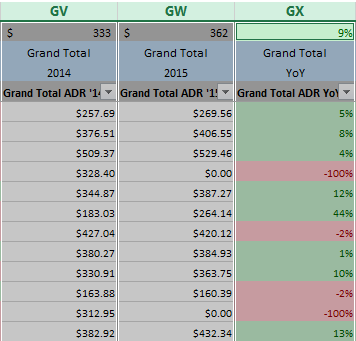
This is the expression they are using to caluculate 2014 ADR in excel
=AVERAGE((IF(SUBTOTAL(9,OFFSET($GV$5,ROW($GV$5:$GV$706)-ROW($GV$5),0))<>0,SUBTOTAL(9,OFFSET($GV$5,ROW($GV$5:$GV$706)-ROW($GV$5),0)))))
This is the expression they are using to caluculate 2015 ADR in excel
=AVERAGE((IF(SUBTOTAL(9,OFFSET($GW$5,ROW($GW$5:$GW$706)-ROW($GW$5),0))<>0,SUBTOTAL(9,OFFSET($GW$5,ROW($GW$5:$GW$706)-ROW($GW$5),0)))))
This is the expression they are using to caluculate 2015 YOY in excel
=IF(AND(GV1=0,GW1=0),0,IF(GV1=0,100%,IF(GW1=0,-100%,(GW1-GV1)/GV1)))
The values i get in my QV report are
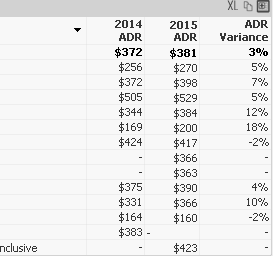
This is the expression am using to caluculate 2014 ADR in QV
=sum(Cost)/sum(Nights)
This is the expression am using to caluculate 2015 ADR in QV
Sum({< [Travel Year] = {$(=Max([Travel Year]) -1) }>} Cost )
/
Sum({< [Travel Year] = {$(=Max([Travel Year]) -1) }>} Nights )
This is the expression am using to caluculate YOY in QV
((sum(Cost)/sum(Nights))
/
(
Sum({< [Travel Year] = {$(=Max([Travel Year]) -1) }>} Cost )
/
Sum({< [Travel Year] = {$(=Max([Travel Year]) -1) }>} Nights )
)) -1
Can you please help me exclude zeros while calucationg the average to match their numbers
I tried
if((sum(Cost)/sum(Nights))>0,(sum(Cost)/sum(Nights))
but am not getting any closer.
Please help me fix this.
Thanks!
- Tags:
- new_to_qlikview

 Gysbert_Wassena
- Mark as New
- Bookmark
- Subscribe
- Mute
- Subscribe to RSS Feed
- Permalink
- Report Inappropriate Content
Maybe like this:
2015 ADR:
if((sum(Cost)/sum(Nights)>0,
Sum({< [Travel Year] = {$(=Max([Travel Year]) -1) }>} Cost )
/
Sum({< [Travel Year] = {$(=Max([Travel Year]) -1) }>} Nights ))
YOY:
alt( alt(sum(Cost)/sum(Nights),0)
/
(
Sum({< [Travel Year] = {$(=Max([Travel Year]) -1) }>} Cost )
/
Sum({< [Travel Year] = {$(=Max([Travel Year]) -1) }>} Nights )
),0) -1)
talk is cheap, supply exceeds demand
- Mark as New
- Bookmark
- Subscribe
- Mute
- Subscribe to RSS Feed
- Permalink
- Report Inappropriate Content
No it didn't work... 
With your expressions am getting the below values
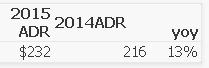
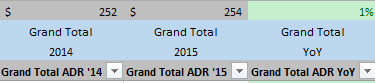
But am looking for
Gysbert_Wassena- Mark as New
- Bookmark
- Subscribe
- Mute
- Subscribe to RSS Feed
- Permalink
- Report Inappropriate Content
Please post a qlikview document that demonstrates the problem.
talk is cheap, supply exceeds demand
 ramoncova06
- Mark as New
- Bookmark
- Subscribe
- Mute
- Subscribe to RSS Feed
- Permalink
- Report Inappropriate Content
I am assuming the 0 are for the cost, right ?
then in your expression you could add a cost filter
Sum({< [Travel Year] = {$(=Max([Travel Year]) -1), Cost -={0} }>} Cost )
/
Sum({< [Travel Year] = {$(=Max([Travel Year]) -1) },Cost -={0} >} Nights )
- Mark as New
- Bookmark
- Subscribe
- Mute
- Subscribe to RSS Feed
- Permalink
- Report Inappropriate Content
The 0's are for ADR Totals
2014 ADR 2015ADR YOY
| $255.78 | $269.56 | 5% |
| $371.73 | $397.95 | 7% |
| $502.12 | $529.46 | 5% |
| $331.51 | $0.00 | -100% |
| $344.62 | $378.73 | 10% |
| $169.46 | $200.12 | 18% |
| $423.43 | $416.34 | -2% |
| $374.77 | $382.32 | 2% |
| $330.91 | $365.57 | 10% |
| $163.88 | $160.39 | -2% |
| $312.95 | $0.00 | -100% |
To get the ADR Totals from the above data they are excluding 0's
sum(values)/(count(values) <> 0) = total ADR


 agomes1971
- Mark as New
- Bookmark
- Subscribe
- Mute
- Subscribe to RSS Feed
- Permalink
- Report Inappropriate Content
Hi,
avg({< YourValue -= {0} >} YourValue)
or
avg({$-< YourValue = {0} >} YourValue)
HTH
André Gomes
- Mark as New
- Bookmark
- Subscribe
- Mute
- Subscribe to RSS Feed
- Permalink
- Report Inappropriate Content
I just see a null value now.. 😕