Unlock a world of possibilities! Login now and discover the exclusive benefits awaiting you.

- Qlik Community
- :
- All Forums
- :
- QlikView
- :
- Expired Balance by Date
- Subscribe to RSS Feed
- Mark Topic as New
- Mark Topic as Read
- Float this Topic for Current User
- Bookmark
- Subscribe
- Mute
- Printer Friendly Page

 cristian_av
- Mark as New
- Bookmark
- Subscribe
- Mute
- Subscribe to RSS Feed
- Permalink
- Report Inappropriate Content
Expired Balance by Date
Hi
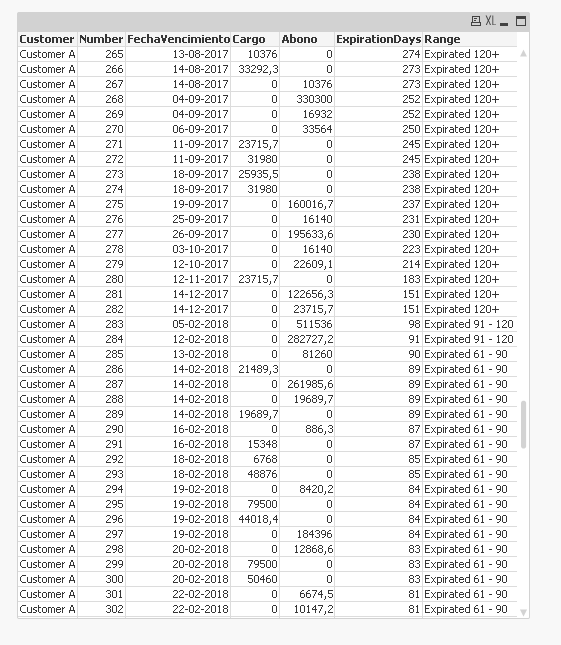
I need to get the expired balance by range. (ie. 0-30 days, 31-60 days, 61-90 days...) for the customers account.
I'm getting the total expired balance easily, but I don't k now how can I "split" this information into the ranges of how many days is the charge expired.
In the attached files, i've uploaded an excel that contains a simplified example that is almost working in QV, and real data of a customer (of course, i've anonymized it)
Also, i've uploaded a qvw file with the formulas i'm using, but this formulares are almost working for the simplified example, not the real one.
I don't know if there is a simple way to calculate this.
Hope somebody can help me.
Thank you!

 vvira1316
- Mark as New
- Bookmark
- Subscribe
- Mute
- Subscribe to RSS Feed
- Permalink
- Report Inappropriate Content
DataTableTmp:
LOAD Customer,
Number,
[Expiration Date] as FechaVencimiento,
Interval(Today() - Date([Expiration Date]), 'D') as ExpirationDays,
Charge as Cargo,
Payment as Abono
FROM [Example Balance.xlsx]
(ooxml, embedded labels, table is [Real Data]);
DataTable:
LOAD Customer,
Number,
FechaVencimiento,
ExpirationDays,
If(ExpirationDays > '120', 'Expirated 120+',
If(ExpirationDays <= '120' and ExpirationDays > '90', 'Expirated 91 - 120',
If(ExpirationDays <= '90' and ExpirationDays > '60', 'Expirated 61 - 90',
If(ExpirationDays <= '60' and ExpirationDays > '30', 'Expirated 31 - 60',
'Expirated 0 - 30')))) as Range,
Cargo,
Abono
Resident DataTableTmp;
DROP Table DataTableTmp;