Unlock a world of possibilities! Login now and discover the exclusive benefits awaiting you.

- Qlik Community
- :
- All Forums
- :
- QlikView
- :
- Exponential Forecast
- Subscribe to RSS Feed
- Mark Topic as New
- Mark Topic as Read
- Float this Topic for Current User
- Bookmark
- Subscribe
- Mute
- Printer Friendly Page

 tracycrown
- Mark as New
- Bookmark
- Subscribe
- Mute
- Subscribe to RSS Feed
- Permalink
- Report Inappropriate Content
Exponential Forecast
Dear all
Can someone help to show me an example on how to write a script in expression for exponential foreast by months?.
| YearMonth | Sales Volume | Exponential Forecast (0.1) | Exponential Forecast (0.7) |
| Oct-2014 | 90 | ||
| Nov-2014 | 106 | ||
| Dec-2014 | 152 | ||
| Jan-2015 | 244 | ||
| Feb-2015 | 302 | ||
| Mar-2015 | 274 | ||
| Apr-2015 | 162 | ||
| May-2015 | 194 | ||
| Jun-2015 | 312 | ||
| Jul-2015 | 359 | ||
| Aug-2015 | 215 | ||
| Sep-2015 | 126 | ||
| Oct-2015 | 94 | ||
| Nov-2015 | 125 | ||
| Dec-2015 | 147 |
Thank you very much
Tracy
- Tags:
- new_to_qlikview
- « Previous Replies
- Next Replies »
Accepted Solutions

 settu_periasamy
- Mark as New
- Bookmark
- Subscribe
- Mute
- Subscribe to RSS Feed
- Permalink
- Report Inappropriate Content
Hi,
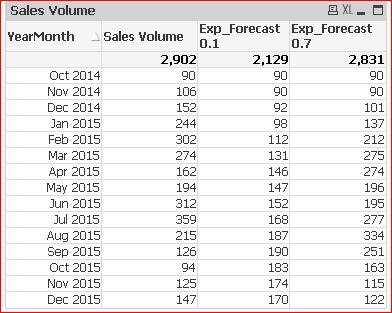
I don't understand, why the previous 2 rows coming under current. Anyhow, as i mentioned earlier, you can just use the previous() in script to get the 2 rows. And in in the expression use Peek().
Check the Attachment..

 sunny_talwar
- Mark as New
- Bookmark
- Subscribe
- Mute
- Subscribe to RSS Feed
- Permalink
- Report Inappropriate Content
What is the expected output? What does Exponential Forecast(0.1) translate into numbers?

 PaulVanSiclen
- Mark as New
- Bookmark
- Subscribe
- Mute
- Subscribe to RSS Feed
- Permalink
- Report Inappropriate Content
Tracy,
It appears you are trying to build a matrix of values based on month, 'Sales Volume' and a variable. You may want to take a look at my "Finance Toolkit" (link below)
I have several examples of building tables based on dimensions, expressions and variables that might be used as a guide. Specifically check out the loan amortization tab which is probably one of the easiest to understand.
Best,
PVS
settu_periasamy
- Mark as New
- Bookmark
- Subscribe
- Mute
- Subscribe to RSS Feed
- Permalink
- Report Inappropriate Content
Hi,
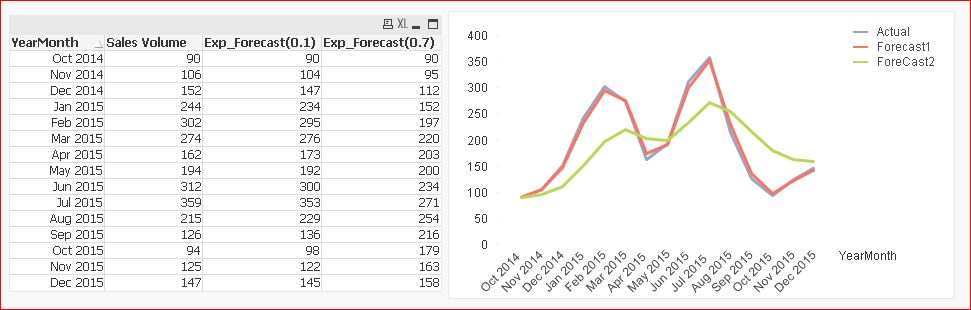
May be like this ?
LET vExp1=0.1;
LET vExp2=0.7;
T1:
Load MonthName(Date#(YearMonth,'MMM-YYYY'))as YearMonth,[Sales Volume];
LOAD * INLINE [
    YearMonth, Sales Volume
    Oct-2014, 90
    Nov-2014, 106
    Dec-2014, 152
    Jan-2015, 244
    Feb-2015, 302
    Mar-2015, 274
    Apr-2015, 162
    May-2015, 194
    Jun-2015, 312
    Jul-2015, 359
    Aug-2015, 215
    Sep-2015, 126
    Oct-2015, 94
    Nov-2015, 125
    Dec-2015, 147
];
NoConcatenate
T2:
LOAD YearMonth
  ,[Sales Volume]
  ,if(RowNo()=1,[Sales Volume],
  Num((1-$(vExp1))*[Sales Volume]+$(vExp1)*Peek([Exp_Forecast(0.1)],RowNo()-2),'#,##0')) as [Exp_Forecast(0.1)]
  ,if(RowNo()=1,[Sales Volume],
  Num((1-$(vExp2))*[Sales Volume]+$(vExp2)*Peek([Exp_Forecast(0.7)],RowNo()-2),'#,##0')) as [Exp_Forecast(0.7)]
Resident T1 Order by YearMonth;
DROP Table T1;
tracycrown
- Mark as New
- Bookmark
- Subscribe
- Mute
- Subscribe to RSS Feed
- Permalink
- Report Inappropriate Content
Dear Settu
Thanks for your quick response.
Kindly advise what is the logic or formula for following statement ?.
Num((1-$(vExp1))+$(vExp1)Peek(,RowNo()-2),'#,##0'))
Tracy
tracycrown
- Mark as New
- Bookmark
- Subscribe
- Mute
- Subscribe to RSS Feed
- Permalink
- Report Inappropriate Content
Dear Settu
The exponential result should be as follows, please help :
YearMonth
Sales Volume
Exponential Forecast (0.1)
Exponential Forecast (0.7)
Oct-2014
90
90
90
Nov-2014
106
90
90
Dec-2014
152
92
101
Jan-2015
244
98
137
Feb-2015
302
113
212
Mar-2015
274
132
275
Apr-2015
162
146
274
May-2015
194
148
196
Jun-2015
312
153
195
Jul-2015
359
169
277
Aug-2015
215
188
334
Sep-2015
126
191
251
Oct-2015
94
185
164
Nov-2015
125
176
115
Dec-2015
147
171
122
169
140
Thank You
Tracy
sunny_talwar
- Mark as New
- Bookmark
- Subscribe
- Mute
- Subscribe to RSS Feed
- Permalink
- Report Inappropriate Content
I guess would you be able to explain how did you get those outputs? I mean to ask what is the calculation behind those numbers?
settu_periasamy
- Mark as New
- Bookmark
- Subscribe
- Mute
- Subscribe to RSS Feed
- Permalink
- Report Inappropriate Content
Hi,
Num((1-$(vExp1))+$(vExp1)*Peek(,RowNo()-2),'#,##0'))
I just tried the Normal Excel expression into QV.. Like
=(1-Exp Value)*Current Month Sales+Previous Month Sales*Exp Value
Already i stored the Exp value into variable.
Check the excel attachment. May be if you give your expression, let us try to adapt in qv.
settu_periasamy
- Mark as New
- Bookmark
- Subscribe
- Mute
- Subscribe to RSS Feed
- Permalink
- Report Inappropriate Content
Hi,
I think i got your result. I have used the below expression..
=(1-Exp Value)*Current Month Sales+Previous Month Sales*Exp Value
if you just interchange the Current Month Sales and Previous Month Sales, you will get your desire result
like =(1-Exp Value)*Previous Month Sales+Current Month Sales*Exp Value
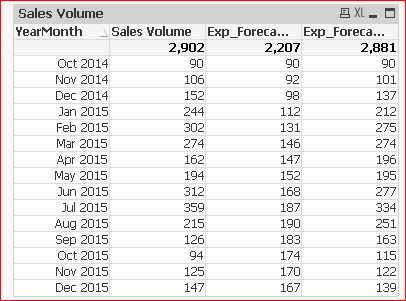
Just ensure which one is correct.
Check the sample attachment..
tracycrown
- Mark as New
- Bookmark
- Subscribe
- Mute
- Subscribe to RSS Feed
- Permalink
- Report Inappropriate Content
Dear Settu
The result should be as follows :
| YearMonth | Sales Volume | Exp(0.1) | Exp(0.7) |
| Oct-2014 | 90 | 90 | 90 |
| Nov-2014 | 106 | 90 | 90 |
| Dec-2014 | 152 | 92 | 101 |
| Jan-2015 | 244 | 98 | 136 |
| Feb-2015 | 302 | 112 | 211 |
| Mar-2015 | 274 | 131 | 274 |
| Apr-2015 | 162 | 145 | 273 |
| May-2015 | 194 | 147 | 195 |
| Jun-2015 | 312 | 152 | 194 |
| Jul-2015 | 259 | 167 | 275 |
| Aug-2015 | 215 | 186 | 333 |
| Sep-2015 | 126 | 189 | 249 |
| Oct-2015 | 94 | 183 | 162 |
| Nov-2015 | 125 | 174 | 113 |
| Dec-2015 | 147 | 168 | 120 |
| 166 | 137 |

- « Previous Replies
- Next Replies »