Unlock a world of possibilities! Login now and discover the exclusive benefits awaiting you.

- Qlik Community
- :
- All Forums
- :
- QlikView
- :
- Re: Expression Not working
- Subscribe to RSS Feed
- Mark Topic as New
- Mark Topic as Read
- Float this Topic for Current User
- Bookmark
- Subscribe
- Mute
- Printer Friendly Page

 soniasweety
- Mark as New
- Bookmark
- Subscribe
- Mute
- Subscribe to RSS Feed
- Permalink
- Report Inappropriate Content
Expression Not working
Hi all,
I created the variables
LastWeek =Week(today())-1 result:35
his week=week(today()) result:36
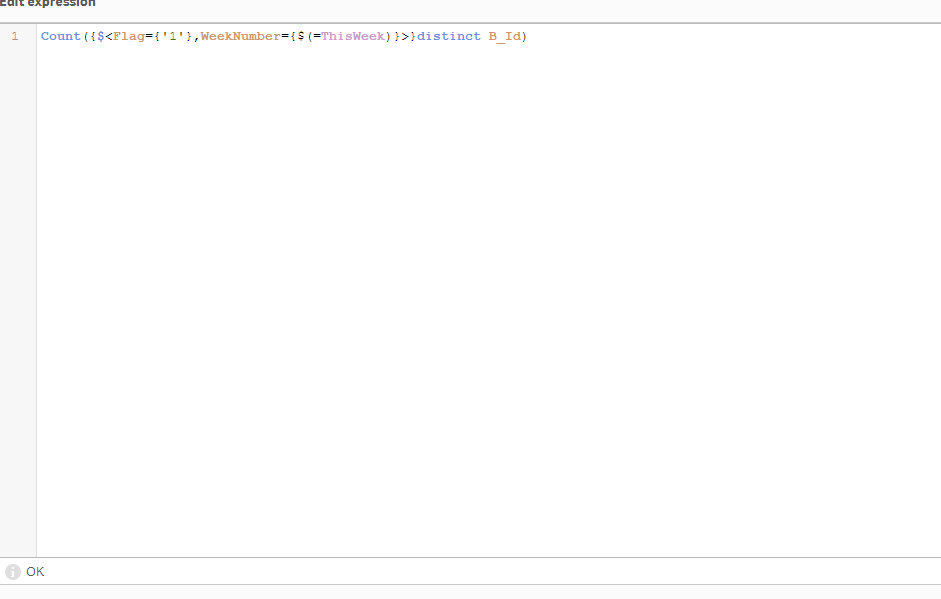
but when I use the below expression sometime its working some time its not working? what is the issue?
below separate expresions tried both giving some time correct sometime wrong.
=Count({<Flag={'1'},WeekNumber={'=$(ThisWeek)'}>}distinct Id)
=count({$<Week={$(=LastWeek)}>}distinct Number)
=Count({$<Flag={'0'},WeekNumber={$(=LastWeek)}>}distinct No)
- « Previous Replies
-
- 1
- 2
- Next Replies »
soniasweety
- Mark as New
- Bookmark
- Subscribe
- Mute
- Subscribe to RSS Feed
- Permalink
- Report Inappropriate Content

 sunny_talwar
- Mark as New
- Bookmark
- Subscribe
- Mute
- Subscribe to RSS Feed
- Permalink
- Report Inappropriate Content
Don't know...
soniasweety
- Mark as New
- Bookmark
- Subscribe
- Mute
- Subscribe to RSS Feed
- Permalink
- Report Inappropriate Content
is exp wrong? if I try flag separate selection and variable all working 
any other way to show variable with in set analysis?

 sam_grounds
- Mark as New
- Bookmark
- Subscribe
- Mute
- Subscribe to RSS Feed
- Permalink
- Report Inappropriate Content
Is this not to do with having two sets of '=' symbols? One in your expression and one in the variable.
Try setting This week to
week(today())
and LastWeek to
(Week(today())-1)
=Count(DISTINCT {$<Flag={1},WeekNumber={$(ThisWeek)}>} Id)
=Count(DISTINCT {$<Week={$(LastWeek)}>} Number)
=Count(DISTINCT {$<Flag={0},WeekNumber={$(LastWeek)}>} No)
soniasweety
- Mark as New
- Bookmark
- Subscribe
- Mute
- Subscribe to RSS Feed
- Permalink
- Report Inappropriate Content
thanks I will try and let you know
soniasweety
- Mark as New
- Bookmark
- Subscribe
- Mute
- Subscribe to RSS Feed
- Permalink
- Report Inappropriate Content
yes, its working fine thanks
sam_grounds
- Mark as New
- Bookmark
- Subscribe
- Mute
- Subscribe to RSS Feed
- Permalink
- Report Inappropriate Content
No problem, glad it helped! 

- « Previous Replies
-
- 1
- 2
- Next Replies »