Unlock a world of possibilities! Login now and discover the exclusive benefits awaiting you.

- Qlik Community
- :
- All Forums
- :
- QlikView
- :
- Expression Problem
Options
- Subscribe to RSS Feed
- Mark Topic as New
- Mark Topic as Read
- Float this Topic for Current User
- Bookmark
- Subscribe
- Mute
- Printer Friendly Page
Turn on suggestions
Auto-suggest helps you quickly narrow down your search results by suggesting possible matches as you type.
Showing results for

Not applicable
2017-07-05
04:23 AM
- Mark as New
- Bookmark
- Subscribe
- Mute
- Subscribe to RSS Feed
- Permalink
- Report Inappropriate Content
Expression Problem
Hi All,
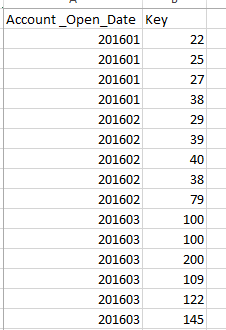
I have file like below, and I would to count number keys between 201601 and 201603 based on the Account _Open_Date using If condition.
831 Views
4 Replies

2017-07-05
04:58 AM
- Mark as New
- Bookmark
- Subscribe
- Mute
- Subscribe to RSS Feed
- Permalink
- Report Inappropriate Content
What was the logic behind for 201601 and 201603 ??
Best Anil, When applicable please mark the correct/appropriate replies as "solution" (you can mark up to 3 "solutions". Please LIKE threads if the provided solution is helpful
767 Views
Anonymous
Not applicable
2017-07-05
05:04 AM
Author
- Mark as New
- Bookmark
- Subscribe
- Mute
- Subscribe to RSS Feed
- Permalink
- Report Inappropriate Content
Hello!
Try this: count({<Account_Open_Date={"$(= '>=' & '201601' & '<=' & '201603')"}>} key)
767 Views

 jmvilaplanap
Specialist
2017-07-05
05:10 AM
- Mark as New
- Bookmark
- Subscribe
- Mute
- Subscribe to RSS Feed
- Permalink
- Report Inappropriate Content
Using Set Analysis:
- count({<Account_Open_Date={'201601','201602','201603'}>}Key)
- Because this have not date format, then I don't know if you can use < or > symbols
Usign If is almost the same (but I'm not sure if it works)
- count(if(Account_Open_Date = '201601' or Account_Open_Date = '201602' or Account_Open_Date = '201603', Key)
767 Views

 sunny_talwar
MVP
2017-07-05
08:04 AM
- Mark as New
- Bookmark
- Subscribe
- Mute
- Subscribe to RSS Feed
- Permalink
- Report Inappropriate Content
Key can repeat?
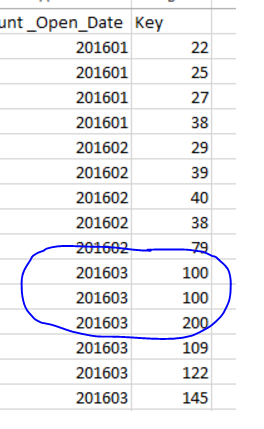
If you want distinct count
Count(DISTINCT {<Account_Open_Date = {'>=201601<=201603'}>} Key)
If you want count
Count({<Account_Open_Date = {'>=201601<=201603'}>} Key)
767 Views