Unlock a world of possibilities! Login now and discover the exclusive benefits awaiting you.

- Qlik Community
- :
- All Forums
- :
- QlikView
- :
- Expression by Dimension
- Subscribe to RSS Feed
- Mark Topic as New
- Mark Topic as Read
- Float this Topic for Current User
- Bookmark
- Subscribe
- Mute
- Printer Friendly Page

- Mark as New
- Bookmark
- Subscribe
- Mute
- Subscribe to RSS Feed
- Permalink
- Report Inappropriate Content
Expression by Dimension
I wanna display % Growth of Sale as follow the formula : (the current - last month ) / last month * 100 . Dimension is Quarter, Month, Week. Parameter is a store. Like a picture.
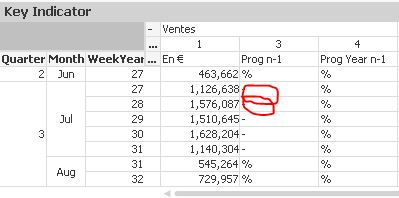
I try this expresion for a week but it doesnt work : If(WeekYear='29', (Sum(O_TriGiaBan) - Sum({<WeekYear={'28'}>} O_TriGiaBan))/ Sum({<WeekYear={'28'}>} O_TriGiaBan) * 100)
.I wanna calc all the week in the dimension. Please help me!
- « Previous Replies
-
- 1
- 2
- Next Replies »
- Mark as New
- Bookmark
- Subscribe
- Mute
- Subscribe to RSS Feed
- Permalink
- Report Inappropriate Content
yup , thank you so much 

 sunny_talwar
- Mark as New
- Bookmark
- Subscribe
- Mute
- Subscribe to RSS Feed
- Permalink
- Report Inappropriate Content
New Script:
Table:
LOAD *,
(Rand() * 100000) as Value,
'A' as Product,
Week(Date) as Week,
Month(Date) as Month,
Year(Date) as Year,
Ceil(Month(Date)/3) as Quarter,
Num#(Year(Date)&Ceil(Month(Date)/3)) as YearQuarter;
LOAD Date((YearStart(Today()) + 730) - RecNo()) as Date
AutoGenerate 1460;
Concatenate(Table)
LOAD *,
(Rand() * 100000) as Value,
'B' as Product,
Week(Date) as Week,
Month(Date) as Month,
Year(Date) as Year,
Ceil(Month(Date)/3) as Quarter,
Num#(Year(Date)&Ceil(Month(Date)/3)) as YearQuarter;
LOAD Date((YearStart(Today()) + 730) - RecNo()) as Date
AutoGenerate 1460;
Pivot Table with following:
Dimension: Product, Year, Quarter, Month
Expressions:
1) Current Value: =Sum(Value)
2) Previous Value:
=If(Dimensionality() = 2,
Aggr(Below(Sum(Value)), Product, Year),
If(Dimensionality() = 3,
Aggr(Below(Sum(Value)), Product, YearQuarter),
If(Above(TOTAL Product) = Product, Above(TOTAL Sum(Value)))))
3) % Change:
=If(Dimensionality() = 2,
Sum(Value)/Aggr(Below(Sum(Value)), Product, Year) - 1,
If(Dimensionality() = 3,
Sum(Value)/Aggr(Below(Sum(Value)), Product, YearQuarter) - 1,
Sum(Value)/If(Above(TOTAL Product) = Product, Above(TOTAL Sum(Value))) - 1))
Screenshot:
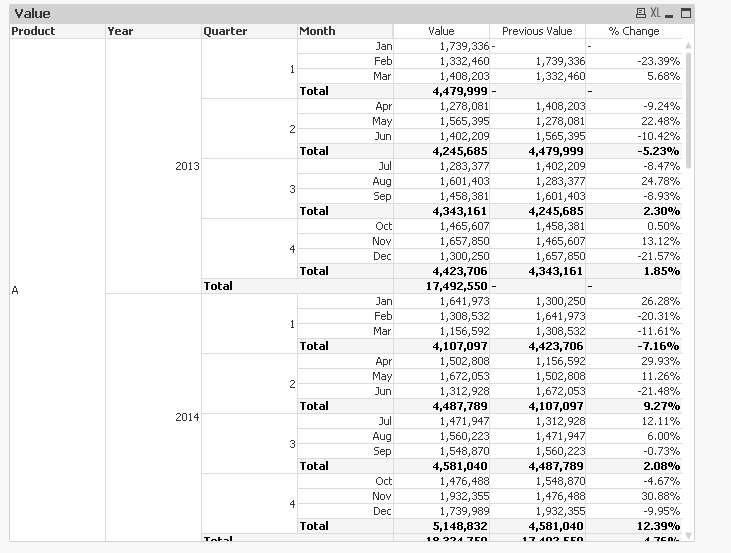
Now the Previous Value expression and % Change expression are using Below() instead of Above() function and I have no idea why is that the case. When I try it with Above, I don't get the results I am seeking, but when I use Below it gives me exactly what I am looking for. So you might have to see if Above or Below works for you. Because from logic I would have though Above to work.
I think it would be a good idea to involve some experts here to get better idea of why is this happening, plus they might be able to offer a much better solution also.
I request swuehl MarcoWedel MRKachhiaIMP hic rwunderlich jagan maxgro Marcus_Sommer to help us in understanding why Below is working here and not Above.
Thanks,
Sunny

 swuehl
- Mark as New
- Bookmark
- Subscribe
- Mute
- Subscribe to RSS Feed
- Permalink
- Report Inappropriate Content
You are creating dates, year and month in descending load order
LOAD Date((Today() + 365) - RecNo()) as Date
AutoGenerate 730;
And advanced aggregation uses load order to sort dimension values. That's why you need below() inside the aggr() function.
sunny_talwar
- Mark as New
- Bookmark
- Subscribe
- Mute
- Subscribe to RSS Feed
- Permalink
- Report Inappropriate Content
Super Stefan. I totally forgot that you mentioned this before also. I guess, I won't make this mistake one more time now
Thank you for your assistance.
Best,
Sunny
- Mark as New
- Bookmark
- Subscribe
- Mute
- Subscribe to RSS Feed
- Permalink
- Report Inappropriate Content
Hi sunindia,
Now, I wanna add 1 expression next to % Change. This expression is % Change compare with last year.
Ex: in the row week 28 in the 2015, the column % Change with Prior Year will display % change of week 28 in the 2015 compare with the week 28 in the 2014 like : (value of week 28-2015) / (value of week-2014) - 1.
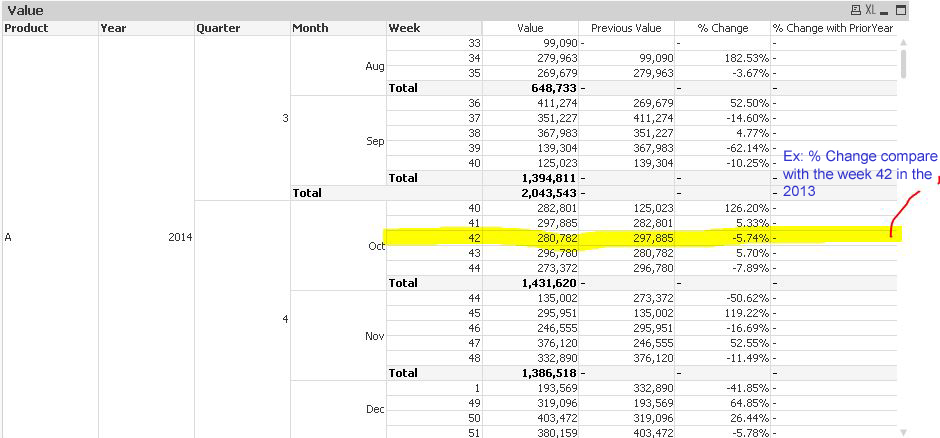
I have an idea, Can i make the total of quarter,month,week in Edit Script ? or Could you please give me another expresion, Sunny ?
- « Previous Replies
-
- 1
- 2
- Next Replies »