Unlock a world of possibilities! Login now and discover the exclusive benefits awaiting you.

- Qlik Community
- :
- All Forums
- :
- QlikView
- :
- Expression to calculate sum of difference between ...
- Subscribe to RSS Feed
- Mark Topic as New
- Mark Topic as Read
- Float this Topic for Current User
- Bookmark
- Subscribe
- Mute
- Printer Friendly Page

- Mark as New
- Bookmark
- Subscribe
- Mute
- Subscribe to RSS Feed
- Permalink
- Report Inappropriate Content
Expression to calculate sum of difference between two dates
Hi All,
I'm trying to put down an expression to calculate number of days for the following data. But, the expression is not working properly.
A B Date1 Date2
1 1 14/09/2010 28/02/2011
1 2 14/09/2010 13/05/2011
1 3 14/09/2010 17/05/2011
1 4 14/09/2010 17/05/2016
So, now i want to calculate number of days between the two dates for A for different B's and divide it by the count of number of B's for A. The calculation should be like (119+173+175+1480)/4=479.
i have my following expression as:
(AGGR( SUM({1} NetWorkDays(Date1 ,Date2)-1), A)
/
AGGR(COUNT({1} DISTINCT B), A))
But with this expression i'm getting different number like 3894.
Can someone suggest or correct me where i'm going wrong?
Any help will be much appreciated.
Kind Regards,
Kshitij

 JM
JM
- Mark as New
- Bookmark
- Subscribe
- Mute
- Subscribe to RSS Feed
- Permalink
- Report Inappropriate Content
Expression seems alright for the given data. Did you check in your data?
Cheers,
J.

 sunny_talwar
- Mark as New
- Bookmark
- Subscribe
- Mute
- Subscribe to RSS Feed
- Permalink
- Report Inappropriate Content
May be you just need this if A is your dimension
Sum({1} Aggr(NetWorkingDays(Date1, Date2), A, B))/Count({1} DISTINCT B)
- Mark as New
- Bookmark
- Subscribe
- Mute
- Subscribe to RSS Feed
- Permalink
- Report Inappropriate Content
Strange. It works fine for the first (/417) but gives weird result for (/57). The last column in the screenshot is just a simple expression to calculate the difference between two dates (NetWorkDays(date1,date2)-1
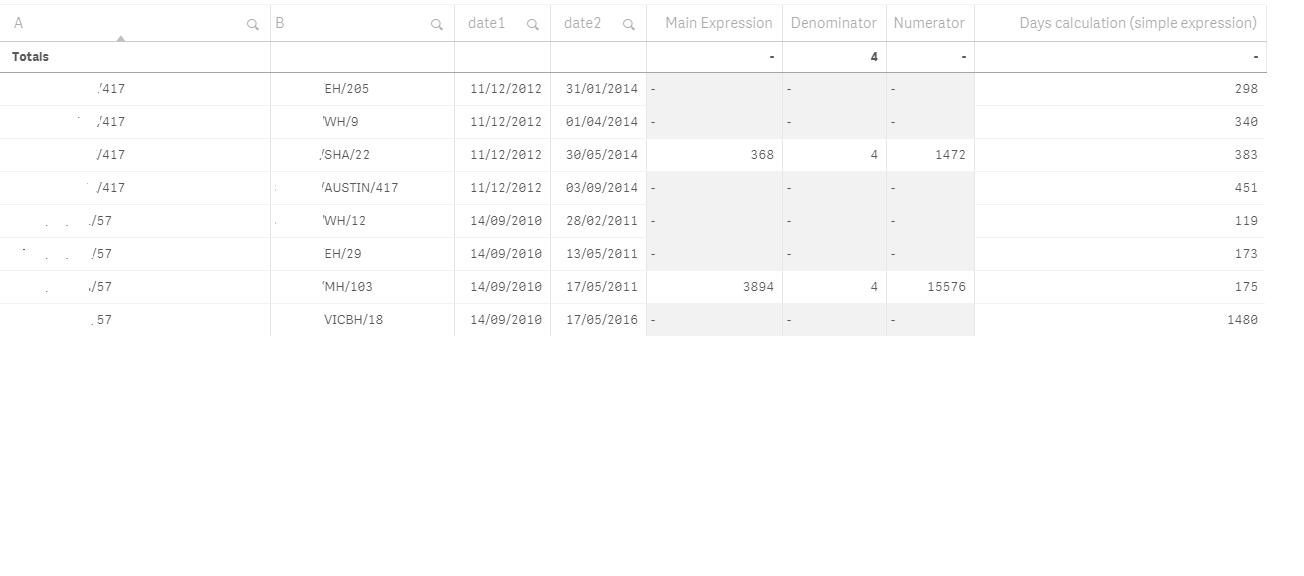
Any idea why there is output in only one of the rows. the result should be shown in all the rows for A?
sunny_talwar
- Mark as New
- Bookmark
- Subscribe
- Mute
- Subscribe to RSS Feed
- Permalink
- Report Inappropriate Content
Try this for Numerator
Sum({1} Aggr(NetWorkingDays(Date1, Date2), A, B)