Unlock a world of possibilities! Login now and discover the exclusive benefits awaiting you.

- Qlik Community
- :
- All Forums
- :
- QlikView
- :
- Extract Hierarchie
- Subscribe to RSS Feed
- Mark Topic as New
- Mark Topic as Read
- Float this Topic for Current User
- Bookmark
- Subscribe
- Mute
- Printer Friendly Page

- Mark as New
- Bookmark
- Subscribe
- Mute
- Subscribe to RSS Feed
- Permalink
- Report Inappropriate Content
Extract Hierarchie
Hey Guys
I am running into a problem when extracting a hierarchy from SAP using Extractor Connector 5.8 SR2.
What i did:
1. Select Hierarchy from GUI in QV
2. Select desired Node
3. Extract
After some seconds i get this errormessage:
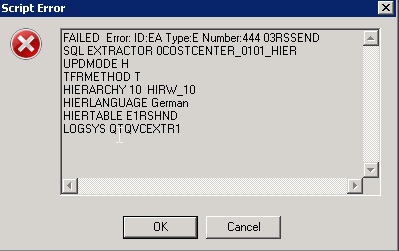
Does anyone has an idea what the problem might be?
best regards
Sebastian
Accepted Solutions
- Mark as New
- Bookmark
- Subscribe
- Mute
- Subscribe to RSS Feed
- Permalink
- Report Inappropriate Content
Hi Sebastian
The message number is: EA-444.
This message means that the extraction user (the username that you have for QlikView extractions) does not have sufficient authorizations.
I suggest 2 things:
1. Go through the SAP connector manual and make sure that you have all prerequisites in terms of security and user authorizations for QlikView Extractor connector.
2. Ask your SAP basis/authorizations personnel to debug/trace the issue in SAP and assign required authorizations to the QlikView extraction user.
Good Luck
Yaniv
- Mark as New
- Bookmark
- Subscribe
- Mute
- Subscribe to RSS Feed
- Permalink
- Report Inappropriate Content
Can you pls send the connector log ? (not the .qvw log)
- Mark as New
- Bookmark
- Subscribe
- Mute
- Subscribe to RSS Feed
- Permalink
- Report Inappropriate Content
There you go:
| 2014-06-17 08:01:57 | Connector: C:\Program Files\Common Files\QlikTech\Custom Data\QvSAPConnector\QvSAPEXTRConnector.dll Ver: 5.80 SR2, Build: 2014 | |
| 2014-06-17 08:01:57 | Using Server Host: localhost , Port: 8680 | |
| 2014-06-17 08:01:58 | Connected to SAP (ASHOST): /H/sr1/H/r4431 | |
| 2014-06-17 08:01:58 | Making new SAP Request | |
| 2014-06-17 08:01:58 | EXTRACTOR 0COSTCENTER_0101_HIER#UPDMODE H#TFRMETHOD T#HIERARCHY 10HIRW_10#HIERLANGUAGE GERMAN#HIERTABLE E1RSHND#LOGSYS QTQVCEXTR1# | |
| 2014-06-17 08:01:58 | EXTRACTOR = 0COSTCENTER_0101_HIER | |
| 2014-06-17 08:01:58 | UPDMODE = H | |
| 2014-06-17 08:01:58 | TFRMETHOD = T | |
| 2014-06-17 08:01:58 | HIERARCHY = 10HIRW_10 | |
| 2014-06-17 08:01:58 | HIERLANGUAGE = GERMAN | |
| 2014-06-17 08:01:58 | HIERTABLE = E1RSHND | |
| 2014-06-17 08:01:58 | LOGSYS = QTQVCEXTR1 | |
| 2014-06-17 08:01:58 | TimeoutSAP | :14400 |
| 2014-06-17 08:01:58 | TimeoutInit | :900 |
| 2014-06-17 08:01:58 | TimeoutActivity :7200 | |
| 2014-06-17 08:01:58 | TimeoutData | :3600 |
2014-06-17 08:03:00 Err FAILED Error: ID:EA Type:E Number:444 03RSSEND
END AT:
2014-06-17 08:03:03
Total run time: 00h 01m 06s
- Mark as New
- Bookmark
- Subscribe
- Mute
- Subscribe to RSS Feed
- Permalink
- Report Inappropriate Content
Hi Sebastian
The message number is: EA-444.
This message means that the extraction user (the username that you have for QlikView extractions) does not have sufficient authorizations.
I suggest 2 things:
1. Go through the SAP connector manual and make sure that you have all prerequisites in terms of security and user authorizations for QlikView Extractor connector.
2. Ask your SAP basis/authorizations personnel to debug/trace the issue in SAP and assign required authorizations to the QlikView extraction user.
Good Luck
Yaniv
- Mark as New
- Bookmark
- Subscribe
- Mute
- Subscribe to RSS Feed
- Permalink
- Report Inappropriate Content
Hi Yaniv,
indeed it was a problem with authorizations. Thanks for the hint!