Unlock a world of possibilities! Login now and discover the exclusive benefits awaiting you.

- Qlik Community
- :
- All Forums
- :
- QlikView
- :
- Fields Highlighted in Violet
- Subscribe to RSS Feed
- Mark Topic as New
- Mark Topic as Read
- Float this Topic for Current User
- Bookmark
- Subscribe
- Mute
- Printer Friendly Page

- Mark as New
- Bookmark
- Subscribe
- Mute
- Subscribe to RSS Feed
- Permalink
- Report Inappropriate Content
Fields Highlighted in Violet
Hello, I need to make some modifications on an existing qlikview application created by someone else.
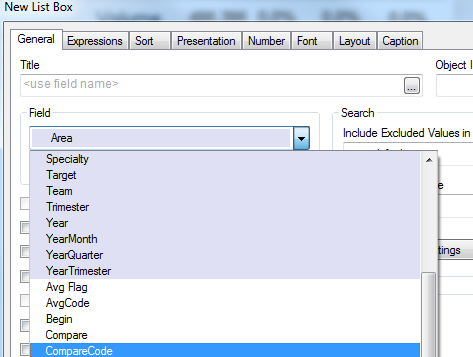
I see that the application has some fields that when I create a List Box for example, some of the fields are highlighted with a violet colour (I think is violet).
I attach a screen capture. Can anyone please tell me what does this mean and it's use?
Thanks!
Accepted Solutions

 Gysbert_Wassena
- Mark as New
- Bookmark
- Subscribe
- Mute
- Subscribe to RSS Feed
- Permalink
- Report Inappropriate Content
The different color means that the fields are tagged as dimensions. You can enable/disable that tag on the Tables tab of the Document Properties window.
talk is cheap, supply exceeds demand
Gysbert_Wassena- Mark as New
- Bookmark
- Subscribe
- Mute
- Subscribe to RSS Feed
- Permalink
- Report Inappropriate Content
The different color means that the fields are tagged as dimensions. You can enable/disable that tag on the Tables tab of the Document Properties window.
talk is cheap, supply exceeds demand
- Mark as New
- Bookmark
- Subscribe
- Mute
- Subscribe to RSS Feed
- Permalink
- Report Inappropriate Content
Thanks! I also found this article that explains it in more detail