Unlock a world of possibilities! Login now and discover the exclusive benefits awaiting you.

- Qlik Community
- :
- All Forums
- :
- QlikView
- :
- Fill In Missing Dates
- Subscribe to RSS Feed
- Mark Topic as New
- Mark Topic as Read
- Float this Topic for Current User
- Bookmark
- Subscribe
- Mute
- Printer Friendly Page

- Mark as New
- Bookmark
- Subscribe
- Mute
- Subscribe to RSS Feed
- Permalink
- Report Inappropriate Content
Fill In Missing Dates
Hello!
I have the following application, where there are IDs and PERIODs (Date Format: DD/MM/YYYY).
There is also a calendar where you can select between two dates to filter the information from the table.
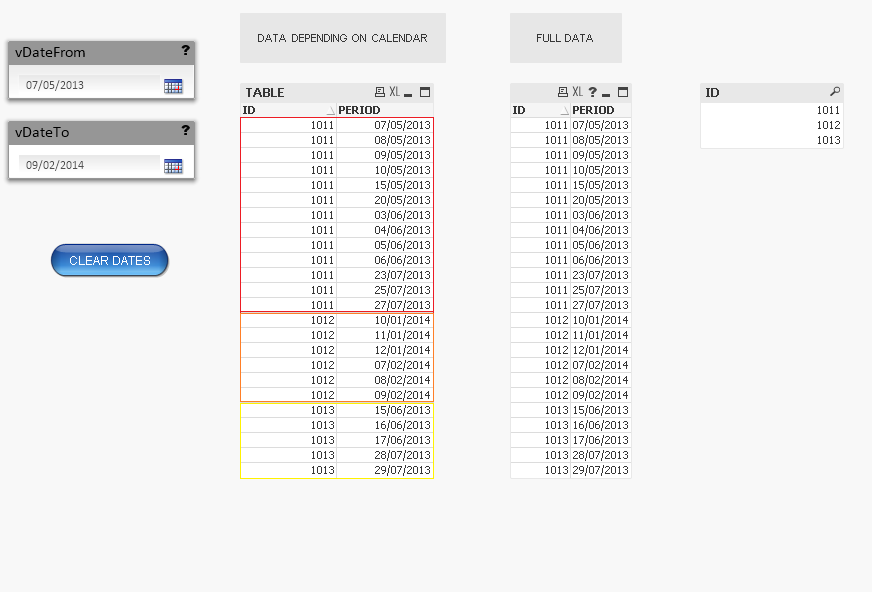
The calendar depends from a Master Calendar that I have implemented in my application:
LK_DATE_TMP:
LOAD *,
DATE(MAKEDATE(ID_TIME_YEAR,ID_TIME_MONTH,ID_TIME_DAY),'YYYYMMDD') AS KEY_PERIOD,
DATE(MAKEDATE(ID_TIME_YEAR,ID_TIME_MONTH),'YYYYMM') AS ID_TIME_YEARMONTH,
DATE(MAKEDATE(ID_TIME_YEAR,ID_TIME_MONTH),'MMM-YY') AS ID_TIME_YEARMONTHDESC,
DATE(MAKEDATE(ID_TIME_YEAR,ID_TIME_MONTH,ID_TIME_DAY),'YYYYMMDD') AS ID_TIME_YEARMONTHDAY,
'Q'&ceil(ID_TIME_MONTH/3) AS ID_TIME_QUARTER
;
LOAD ID_TIME_DATE,
YEAR(ID_TIME_DATE) AS ID_TIME_YEAR,
MONTH(ID_TIME_DATE) AS ID_TIME_MONTH,
NUM(MONTH(ID_TIME_DATE)) AS ID_TIME_MONTH#,
NUM(DAY(ID_TIME_DATE)) AS ID_TIME_DAY,
WEEKDAY(ID_TIME_DATE) AS ID_TIME_DAY_WEEK,
NUM(ID_TIME_DATE) AS ID_TIME_DATE#
;
LOAD
DATE(MAKEDATE(2007,1,1)+(ITERNO()-1),'YYYYMMDD') AS ID_TIME_DATE
AUTOGENERATE 1
WHILE DATE(MAKEDATE(2007,1,1)+(ITERNO()-1)) <= DATE(MAKEDATE(YEAR(TODAY()),MONTH(TODAY()),DAY(TODAY())));
MASTER_CALENDAR:
NOCONCATENATE
LOAD DISTINCT
*
RESIDENT LK_DATE_TMP
WHERE EXISTS(EFFECTIVE_DATE,ID_TIME_DATE);
// THE DATA IS REDUCED TO THOSE DATES WHO HAVE AN "EFFECTIVE DATE" IN THE TABLE
DROP FIELD EFFECTIVE_DATE;
DROP TABLE LK_DATE_TMP;
The thing is that, for example, for ID 1011, I have the following dates:
| ID 1011 |
|---|
| 07/05/2013 |
| 08/05/2013 |
| 09/05/2013 |
| 10/05/2013 |
| (Missing: 11/05/2013, 12/05/2013, 13/05/2013, 14/05/2013) |
| 15/05/2013 |
| (Missing: 16/05/2013, 17/05/2013, 18/05/2013, 19/05/2013) |
| 20/05/2013 |
| (Missing: 21..., 22..., 23..., 24..., 25..., 26..., 27..., 28..., 29..., 30..., 31..., 01..., 02...) |
| 03/06/2013 |
| 04/06/2013 |
| 05/06/2013 |
| 06/06/2013 |
| ... |
There you can see that there are missing dates. I would like to add those dates FOR EACH ID.
That means, for example, for ID 1011, the MIN is 07/05/2013 and the MAX is 27/07/2013.
I want to have the missing dates for ID 1011 between those values, and the same for IDs 1012 & 1013.
Do you know how could I do that, to get the missing dates for every ID and associate them to each ID?
I am really looking forward to do that since a couple of days. I attach you the QVW.
Thank you!!!
- Tags:
- new_to_qlikview
Accepted Solutions

 maxgro
- Mark as New
- Bookmark
- Subscribe
- Mute
- Subscribe to RSS Feed
- Permalink
- Report Inappropriate Content
replace your script tab INLINE with this
hope it helps
INLINE: // PERIOD Format Date: DD/MM/YYYY
LOAD * INLINE [
ID, PERIOD
1011, 06/06/2013
1011, 07/05/2013
1011, 08/05/2013
1011, 09/05/2013
1011, 10/05/2013
1011, 15/05/2013
1011, 20/05/2013
1011, 03/06/2013
1011, 04/06/2013
1011, 05/06/2013
1011, 23/07/2013
1011, 25/07/2013
1011, 27/07/2013
1012, 10/01/2014
1012, 11/01/2014
1012, 12/01/2014
1012, 07/02/2014
1012, 08/02/2014
1012, 09/02/2014
1013, 15/06/2013
1013, 16/06/2013
1013, 17/06/2013
1013, 28/07/2013
1013, 29/07/2013
];
NOCONCATENATE
TABLE:
LOAD
*,
DATE (FLOOR (PERIOD), 'YYYYMMDD') AS KEY_PERIOD,
DATE (FLOOR (PERIOD), 'YYYYMMDD') AS EFFECTIVE_DATE
RESIDENT INLINE;
DROP TABLE INLINE;
MinMax: // make min and max for every ID
load
ID,
min(PERIOD) as MinPeriod,
max(PERIOD) as MaxPeriod
Resident TABLE
group by ID;
TABLE2: // all required date between min and max (for every ID)
Load
ID,
date(MinPeriod -1 + IterNo()) as PERIOD
Resident MinMax
While IterNo() <= MaxPeriod - MinPeriod +1;
DROP Table MinMax;
Left join (TABLE2) // join with source table (in case you have to add some field from source)
load * resident TABLE;
DROP Table TABLE;
RENAME table TABLE2 to TABLE;
maxgro
- Mark as New
- Bookmark
- Subscribe
- Mute
- Subscribe to RSS Feed
- Permalink
- Report Inappropriate Content
replace your script tab INLINE with this
hope it helps
INLINE: // PERIOD Format Date: DD/MM/YYYY
LOAD * INLINE [
ID, PERIOD
1011, 06/06/2013
1011, 07/05/2013
1011, 08/05/2013
1011, 09/05/2013
1011, 10/05/2013
1011, 15/05/2013
1011, 20/05/2013
1011, 03/06/2013
1011, 04/06/2013
1011, 05/06/2013
1011, 23/07/2013
1011, 25/07/2013
1011, 27/07/2013
1012, 10/01/2014
1012, 11/01/2014
1012, 12/01/2014
1012, 07/02/2014
1012, 08/02/2014
1012, 09/02/2014
1013, 15/06/2013
1013, 16/06/2013
1013, 17/06/2013
1013, 28/07/2013
1013, 29/07/2013
];
NOCONCATENATE
TABLE:
LOAD
*,
DATE (FLOOR (PERIOD), 'YYYYMMDD') AS KEY_PERIOD,
DATE (FLOOR (PERIOD), 'YYYYMMDD') AS EFFECTIVE_DATE
RESIDENT INLINE;
DROP TABLE INLINE;
MinMax: // make min and max for every ID
load
ID,
min(PERIOD) as MinPeriod,
max(PERIOD) as MaxPeriod
Resident TABLE
group by ID;
TABLE2: // all required date between min and max (for every ID)
Load
ID,
date(MinPeriod -1 + IterNo()) as PERIOD
Resident MinMax
While IterNo() <= MaxPeriod - MinPeriod +1;
DROP Table MinMax;
Left join (TABLE2) // join with source table (in case you have to add some field from source)
load * resident TABLE;
DROP Table TABLE;
RENAME table TABLE2 to TABLE;
- Mark as New
- Bookmark
- Subscribe
- Mute
- Subscribe to RSS Feed
- Permalink
- Report Inappropriate Content
Thank you Massimo! I've tried it and it works perfectly!