Unlock a world of possibilities! Login now and discover the exclusive benefits awaiting you.

- Qlik Community
- :
- All Forums
- :
- QlikView
- :
- Fill empty values with last not null values
- Subscribe to RSS Feed
- Mark Topic as New
- Mark Topic as Read
- Float this Topic for Current User
- Bookmark
- Subscribe
- Mute
- Printer Friendly Page

- Mark as New
- Bookmark
- Subscribe
- Mute
- Subscribe to RSS Feed
- Permalink
- Report Inappropriate Content
Fill empty values with last not null values
Hi,
I need to resolve this issue in load script.
For every ID and Task I have WorkFlow Id (min Start Date), but I need the same Workflow Id for all next empty values.
I have tried Previous and Peek function but without success.
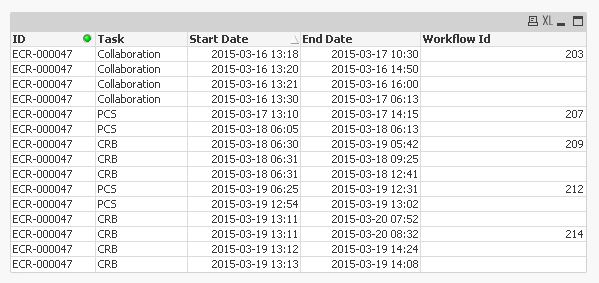
Any help?
Thanks.
T.
Accepted Solutions

 Kushal_Chawda
- Mark as New
- Bookmark
- Subscribe
- Mute
- Subscribe to RSS Feed
- Permalink
- Report Inappropriate Content
try this
Data:
LOAD
ID,
Task,
[Start Date],
[End Date],
[Workflow Id]
FROM Source;
Final:
noconcatenate
LOAD *,
if(len(trim([Workflow Id]))=0,peek([Workflow ID]),[Workflow Id]) as [Workflow ID]
Resident Data
order by ID,Task,[Start Date];
drop table Data;

- Mark as New
- Bookmark
- Subscribe
- Mute
- Subscribe to RSS Feed
- Permalink
- Report Inappropriate Content
Can you share sample instead of image. Or look at here Get previous row value when the value is null

 jonathandienst
- Mark as New
- Bookmark
- Subscribe
- Mute
- Subscribe to RSS Feed
- Permalink
- Report Inappropriate Content
Something like:
LOAD
ID,
Task,
[Start Date],
[End Date],
If(Len([Workflow Id]) = 0, Peek([Workflow Id]), [Workflow Id]) as [Workflow Id]
FROM ....
Have not tested this as you pasted your sample data as an image.
Kushal_Chawda
- Mark as New
- Bookmark
- Subscribe
- Mute
- Subscribe to RSS Feed
- Permalink
- Report Inappropriate Content
try this
Data:
LOAD
ID,
Task,
[Start Date],
[End Date],
[Workflow Id]
FROM Source;
Final:
noconcatenate
LOAD *,
if(len(trim([Workflow Id]))=0,peek([Workflow ID]),[Workflow Id]) as [Workflow ID]
Resident Data
order by ID,Task,[Start Date];
drop table Data;