Unlock a world of possibilities! Login now and discover the exclusive benefits awaiting you.

- Qlik Community
- :
- All Forums
- :
- QlikView
- :
- Fill in the blank data columns
- Subscribe to RSS Feed
- Mark Topic as New
- Mark Topic as Read
- Float this Topic for Current User
- Bookmark
- Subscribe
- Mute
- Printer Friendly Page

- Mark as New
- Bookmark
- Subscribe
- Mute
- Subscribe to RSS Feed
- Permalink
- Report Inappropriate Content
Fill in the blank data columns
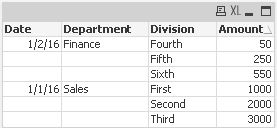
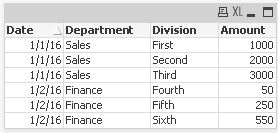
Can someone give me some help working through this issue. I need to fill blank columns with data from previous row. I tried several approach but no luck. Any insight is appreciated.
.
Original Table:
Desired Table
- Tags:
- qlikview_scripting

 manojkulkarni
- Mark as New
- Bookmark
- Subscribe
- Mute
- Subscribe to RSS Feed
- Permalink
- Report Inappropriate Content
This you can do while loading data. With Load Wizard , Select Enable Transformation & then use Fill option to do this operation.

 tresB
tresB
- Mark as New
- Bookmark
- Subscribe
- Mute
- Subscribe to RSS Feed
- Permalink
- Report Inappropriate Content
try like:
Load
If(Len(trim(Dim1))>0, Dim1, Peek(Dim1)) as Dim1,
Dim2,Amt;
Load * Inline [
Dim1, Dim2, Amt
AA, bbb, 100
, ccc, 200
, ddd, 300
BB, xxx, 400
, yyy, 500
, zzz, 600 ]
 NareshGuntur
- Mark as New
- Bookmark
- Subscribe
- Mute
- Subscribe to RSS Feed
- Permalink
- Report Inappropriate Content
- Mark as New
- Bookmark
- Subscribe
- Mute
- Subscribe to RSS Feed
- Permalink
- Report Inappropriate Content
Thanks for the reply. This works Great
tresB
- Mark as New
- Bookmark
- Subscribe
- Mute
- Subscribe to RSS Feed
- Permalink
- Report Inappropriate Content
Try to mark the 'Correct Answer' the one reply which is so. That will help many(including me) in many ways. 