Unlock a world of possibilities! Login now and discover the exclusive benefits awaiting you.

- Qlik Community
- :
- All Forums
- :
- QlikView
- :
- Filter values
- Subscribe to RSS Feed
- Mark Topic as New
- Mark Topic as Read
- Float this Topic for Current User
- Bookmark
- Subscribe
- Mute
- Printer Friendly Page

- Mark as New
- Bookmark
- Subscribe
- Mute
- Subscribe to RSS Feed
- Permalink
- Report Inappropriate Content
Filter values
Hello everyone,
So I have a small problem showing some data on qlikview.
I have a example attached.
On this example you can see a table box with some results that come from an excel sheet.
On the first two rows all the values are the same except for the values of column_7.
What I would like to know is how can I show only one of these lines (the first two), preferably the one with the smaller date.
Can anyone help?
Thank you in advance!
Best regards!
P.S. I have a personal version of qlikview so if anyone changes something and sends to me with the pro version of qlikview I wont be able to open the document.
Accepted Solutions

 tresB
tresB
- Mark as New
- Bookmark
- Subscribe
- Mute
- Subscribe to RSS Feed
- Permalink
- Report Inappropriate Content
Ivo Marques wrote:
...
What I would like to know is how can I show only one of these lines (the first two), preferably the one with the smaller date.
Assumg, you meant smaller column_7 value.
Take a straight table:
dimensions: all six coulmns
expression: Min(column_7)
tresB
- Mark as New
- Bookmark
- Subscribe
- Mute
- Subscribe to RSS Feed
- Permalink
- Report Inappropriate Content
Ivo Marques wrote:
...
What I would like to know is how can I show only one of these lines (the first two), preferably the one with the smaller date.
Assumg, you meant smaller column_7 value.
Take a straight table:
dimensions: all six coulmns
expression: Min(column_7)

 geert_gelade
- Mark as New
- Bookmark
- Subscribe
- Mute
- Subscribe to RSS Feed
- Permalink
- Report Inappropriate Content
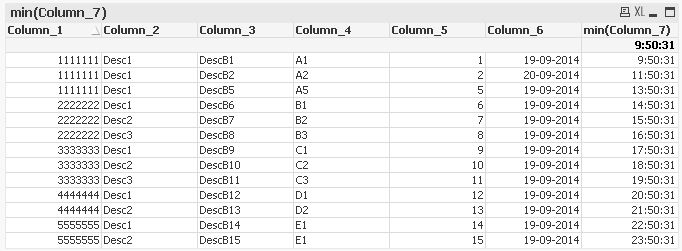
I think you can use a straight table instead of table box.
select the 6 columns as dimensions and as exrpession set "min(Column_7)".
Result:
 ashfaq_haseeb
- Mark as New
- Bookmark
- Subscribe
- Mute
- Subscribe to RSS Feed
- Permalink
- Report Inappropriate Content
Hi,
Create new chart --> Straight table
Dimensions
Column_1
Column_2
Column_3
Column_4
Column_5
Column_6
Expression
=min(Column_7)
Regards
ASHFAQ
- Mark as New
- Bookmark
- Subscribe
- Mute
- Subscribe to RSS Feed
- Permalink
- Report Inappropriate Content
Hello gentleman,
The solution provided worked.
Thank you for the help!
Regards