Unlock a world of possibilities! Login now and discover the exclusive benefits awaiting you.

Announcements
Share your agentic AI experience, learn from others, and earn a new badge: Put Agentic AI to Work
- Qlik Community
- :
- All Forums
- :
- QlikView
- :
- Filters hide / unhide
Options
- Subscribe to RSS Feed
- Mark Topic as New
- Mark Topic as Read
- Float this Topic for Current User
- Bookmark
- Subscribe
- Mute
- Printer Friendly Page
Turn on suggestions
Auto-suggest helps you quickly narrow down your search results by suggesting possible matches as you type.
Showing results for

Not applicable
2017-06-13
05:47 AM
- Mark as New
- Bookmark
- Subscribe
- Mute
- Subscribe to RSS Feed
- Permalink
- Report Inappropriate Content
Filters hide / unhide
Hi Team,
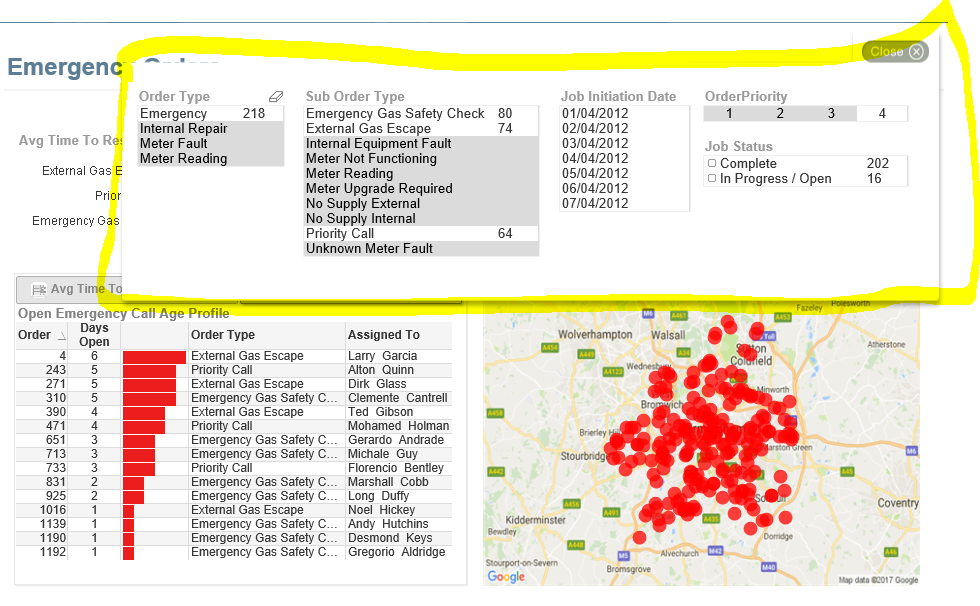
I have seen button to hide/ unhide filters. Screen shot attached here.
can anyone explain me logic / procedure behind to create same button.

After click on Filters
2,296 Views
6 Replies

 marcus_malinow
Partner - Specialist III
2017-06-13
05:52 AM
- Mark as New
- Bookmark
- Subscribe
- Mute
- Subscribe to RSS Feed
- Permalink
- Report Inappropriate Content
1 - Add a variable to your application, for example vShowFilters
2 - Add a text object, or button, with an Action to Set Variable
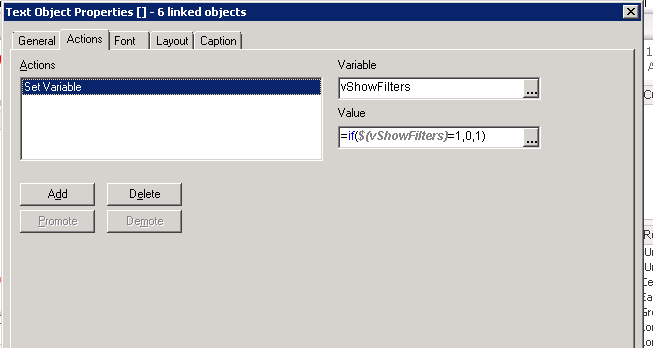
3 - On your filters - in the Layout tab, set Show to Conditional

Ta Daa
Not applicable
2017-06-13
06:01 AM
Author
- Mark as New
- Bookmark
- Subscribe
- Mute
- Subscribe to RSS Feed
- Permalink
- Report Inappropriate Content
Great !!!!
Thanks
1,957 Views
Anonymous
Not applicable
2017-06-13
07:18 AM
Author
- Mark as New
- Bookmark
- Subscribe
- Mute
- Subscribe to RSS Feed
- Permalink
- Report Inappropriate Content
1,957 Views

 beck_bakytbek
Master
2017-06-13
07:40 AM
- Mark as New
- Bookmark
- Subscribe
- Mute
- Subscribe to RSS Feed
- Permalink
- Report Inappropriate Content
1,957 Views
Not applicable
2017-06-27
03:02 AM
Author
- Mark as New
- Bookmark
- Subscribe
- Mute
- Subscribe to RSS Feed
- Permalink
- Report Inappropriate Content
hi all,
Its not working in my existing dashboard but when I create new qlikview file and implement this, it works.
Please help me on this
1,957 Views
marcus_malinow
Partner - Specialist III
2017-06-27
03:42 AM
- Mark as New
- Bookmark
- Subscribe
- Mute
- Subscribe to RSS Feed
- Permalink
- Report Inappropriate Content
Hi Narendra,
I'd suggest sharing a copy of the document you're having issues with. Reduce data prior to uploading though!
Marcs
1,957 Views