Unlock a world of possibilities! Login now and discover the exclusive benefits awaiting you.

- Qlik Community
- :
- All Forums
- :
- QlikView
- :
- Re: Format Number with apostrophe
- Subscribe to RSS Feed
- Mark Topic as New
- Mark Topic as Read
- Float this Topic for Current User
- Bookmark
- Subscribe
- Mute
- Printer Friendly Page

- Mark as New
- Bookmark
- Subscribe
- Mute
- Subscribe to RSS Feed
- Permalink
- Report Inappropriate Content
Format Number with apostrophe
Hi all,
I would like to format a number in an expression. The format should look like this: 999'999.00
I've tried several things, but I cant get the result I whish.
if i use; =num(amount,'#''##0.00','.',chr(39)) the result looks like this: 99'9'999.00
when replacing the 2 apostrophe with a comma =num(amount,'#,##0.00','.',chr(39)) the result looks like this: 999999,# #0.00
Can someone tell me how to format this number correctly?
Thanks
Ilonka
- « Previous Replies
-
- 1
- 2
- Next Replies »

 jonathandienst
- Mark as New
- Bookmark
- Subscribe
- Mute
- Subscribe to RSS Feed
- Permalink
- Report Inappropriate Content
I agree with Nick Hoff
=Num(999999999.99, '#''##0.00', '.', chr(39)) --> 999'999'999.99
Can you show use the exact expression you are using that is giving the wrong result. I don't think its system settings as the 2nd and 3rd parameters are overriding the system settings.
Note that the apostrophes in the format string is a pair of single apostrophes, not a double apostrophe.
HTH
Jonathan
- Mark as New
- Bookmark
- Subscribe
- Mute
- Subscribe to RSS Feed
- Permalink
- Report Inappropriate Content
Thanks for all the suggestions. Unfortunately none of them gives the correct result. (I used 2 single apostrophes, not double). The picture below shows the different results I've got.
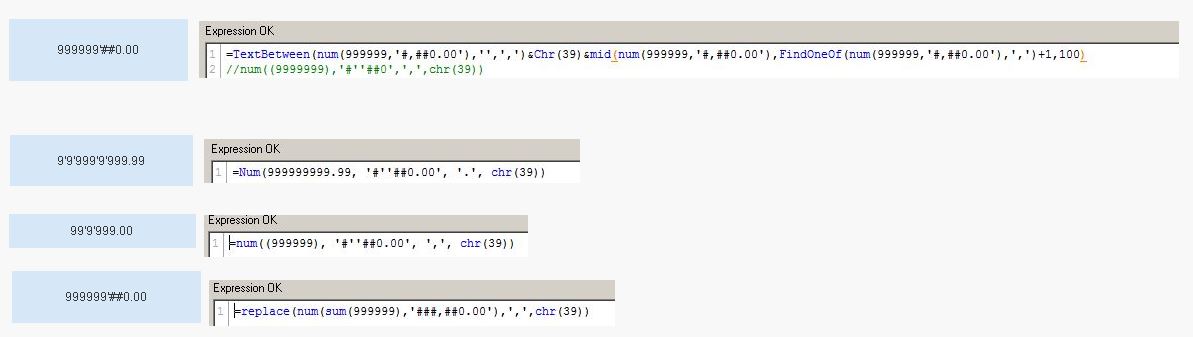
What is interesting, if I format a number in the 'number' tab with 'money' I get the same result as with =Num(999999999.99, '#''##0.00', '.', chr(39)). Only when I remove one of the 2 single apostrophes in the format, I get the correct result. (which made me believe that some system settings may mess up the result). I'll go for the comma as thousands-sep. for the moment.
kind regards

 robert_mika
- Mark as New
- Bookmark
- Subscribe
- Mute
- Subscribe to RSS Feed
- Permalink
- Report Inappropriate Content
Could you attached your app or sample of your data?
 PrashantSangle
- Mark as New
- Bookmark
- Subscribe
- Mute
- Subscribe to RSS Feed
- Permalink
- Report Inappropriate Content
Hi,
What is your
SET ThousandSep=',';
in script.
Regards
Please appreciate our Qlik community members by giving Kudos for sharing their time for your query. If your query is answered, please mark the topic as resolved 🙂
- Mark as New
- Bookmark
- Subscribe
- Mute
- Subscribe to RSS Feed
- Permalink
- Report Inappropriate Content
SET ThousandSep="'"; (double quote, single quote, double quote)
PrashantSangle
- Mark as New
- Bookmark
- Subscribe
- Mute
- Subscribe to RSS Feed
- Permalink
- Report Inappropriate Content
Hi,
Modify as i suggested in my earlier post then reload.
and then use
=replace(num(999999,'###,##0.00'),',',chr(39))
in
text object
Regards
Please appreciate our Qlik community members by giving Kudos for sharing their time for your query. If your query is answered, please mark the topic as resolved 🙂
- Mark as New
- Bookmark
- Subscribe
- Mute
- Subscribe to RSS Feed
- Permalink
- Report Inappropriate Content
wow! It's working now!
Many thanks and kind regards.
- « Previous Replies
-
- 1
- 2
- Next Replies »