Unlock a world of possibilities! Login now and discover the exclusive benefits awaiting you.

- Qlik Community
- :
- All Forums
- :
- QlikView
- :
- Format week
- Subscribe to RSS Feed
- Mark Topic as New
- Mark Topic as Read
- Float this Topic for Current User
- Bookmark
- Subscribe
- Mute
- Printer Friendly Page

 smilingjohn
- Mark as New
- Bookmark
- Subscribe
- Mute
- Subscribe to RSS Feed
- Permalink
- Report Inappropriate Content
Format week
Hi All ,
Please find the attachment of the QVW file ,
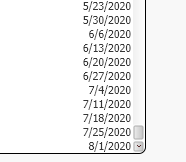
I want to show the weekeknd format like DD-MMM-YY ( 28-Jul-20) I tried conevrting it in the calendare in load script but still this doesnot change . Please suggest me .
Accepted Solutions
 zhadrakas
- Mark as New
- Bookmark
- Subscribe
- Mute
- Subscribe to RSS Feed
- Permalink
- Report Inappropriate Content
try to change the default variables or comment them out
SET TimeFormat='h:mm:ss TT';
SET DateFormat='M/D/YYYY';
SET TimestampFormat='M/D/YYYY h:mm:ss[.fff] TT';
regards
zhadrakas
- Mark as New
- Bookmark
- Subscribe
- Mute
- Subscribe to RSS Feed
- Permalink
- Report Inappropriate Content
try to change the default variables or comment them out
SET TimeFormat='h:mm:ss TT';
SET DateFormat='M/D/YYYY';
SET TimestampFormat='M/D/YYYY h:mm:ss[.fff] TT';
regards

 Taoufiq_Zarra
- Mark as New
- Bookmark
- Subscribe
- Mute
- Subscribe to RSS Feed
- Permalink
- Report Inappropriate Content
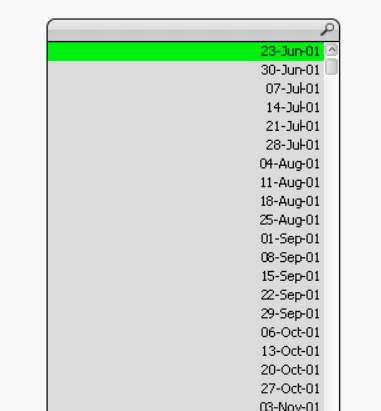
if I understood correctly
Date(Weekend,'DD-MMM-YY')
attached qlik file
output :
Taoufiq ZARRA
"Please LIKE posts and "Accept as Solution" if the provided solution is helpful "
(you can mark up to 3 "solutions") 😉
smilingjohn
- Mark as New
- Bookmark
- Subscribe
- Mute
- Subscribe to RSS Feed
- Permalink
- Report Inappropriate Content
Hi
You have changed the format of weekend within the listbix edit mode .
But i want the same format in the Load script . WHich I am strugling to do it
 Kushal_Chawda
- Mark as New
- Bookmark
- Subscribe
- Mute
- Subscribe to RSS Feed
- Permalink
- Report Inappropriate Content
try change below script.
Test:
LOAD
Date(Date#(Created),'DD-MMM-YYYY') as Created,
//Date(Created,'MM/DD/YYYY') as Date1,
Date(Date#(Created),'DD-MMM-YYYY') as Date
FROM
[C:\STestWeekend]
(qvd);
You can now simple change the format using Date function on Calendar
