Unlock a world of possibilities! Login now and discover the exclusive benefits awaiting you.

- Qlik Community
- :
- All Forums
- :
- QlikView
- :
- Formula
- Subscribe to RSS Feed
- Mark Topic as New
- Mark Topic as Read
- Float this Topic for Current User
- Bookmark
- Subscribe
- Mute
- Printer Friendly Page

 smilingjohn
- Mark as New
- Bookmark
- Subscribe
- Mute
- Subscribe to RSS Feed
- Permalink
- Report Inappropriate Content
Formula
Hi Al,
Iam writng the below expression which is showing me an error , can someone please correct this
Please find the attachment as well
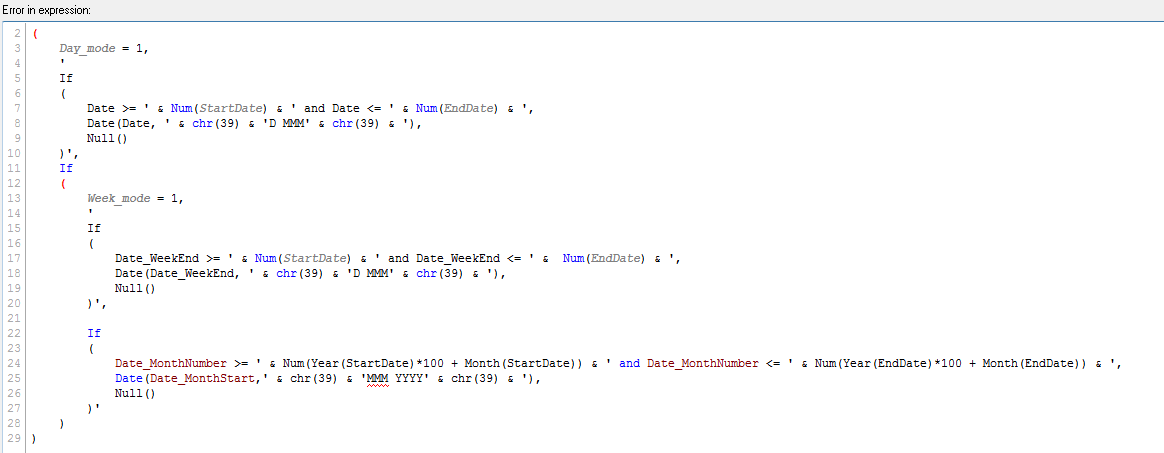
This is the expression Ima using :
=If
(
Day_mode = 1,
'
If
(
Date >= ' & Num(StartDate) & ' and Date <= ' & Num(EndDate) & ',
Date(Date, ' & chr(39) & 'D MMM' & chr(39) & '),
Null()
)',
If
(
Week_mode = 1,
'
If
(
Date_WeekEnd >= ' & Num(StartDate) & ' and Date_WeekEnd <= ' & Num(EndDate) & ',
Date(Date_WeekEnd, ' & chr(39) & 'D MMM' & chr(39) & '),
Null()
)',
If
(
Date_MonthNumber >= ' & Num(Year(StartDate)*100 + Month(StartDate)) & ' and Date_MonthNumber <= ' & Num(Year(EndDate)*100 + Month(EndDate)) & ',
Date(Date_MonthStart,' & chr(39) & 'MMM YYYY' & chr(39) & '),
Null()
)'
)
)
Accepted Solutions

 settu_periasamy
- Mark as New
- Bookmark
- Subscribe
- Mute
- Subscribe to RSS Feed
- Permalink
- Report Inappropriate Content
Can you give the Label name for this and check in your dimension?
settu_periasamy
- Mark as New
- Bookmark
- Subscribe
- Mute
- Subscribe to RSS Feed
- Permalink
- Report Inappropriate Content
Hi,
Try this..
=If
(
Day_mode = 1,
'
If
(
Date >= ' & Num(StartDate) & ' and Date <= ' & Num(EndDate) & ',
Date(Date, ' & chr(39) & 'D MMM' & chr(39) & '),
Null()
)',
If
(
Week_mode = 1,
'
If
(
Date_WeekEnd >= ' & Num(StartDate) & ' and Date_WeekEnd <= ' & Num(EndDate) & ',
Date(Date_WeekEnd, ' & chr(39) & 'D MMM' & chr(39) & '),
Null()
)',
'If //I think single quote missing here
(
Date_MonthNumber >= ' & Num(Year(StartDate)*100 + Month(StartDate)) & ' and Date_MonthNumber <= ' & Num(Year(EndDate)*100 + Month(EndDate)) & ',
Date(Date_MonthStart,' & chr(39) & 'MMM YYYY' & chr(39) & '),
Null()
)'
)
)
smilingjohn
- Mark as New
- Bookmark
- Subscribe
- Mute
- Subscribe to RSS Feed
- Permalink
- Report Inappropriate Content
Thanks Settu,
After implementing your expression it works and i have the line charts perfectly .
But when i place my mouse cursor over the line it shows correct date , week and month but somethign like this 
smilingjohn
- Mark as New
- Bookmark
- Subscribe
- Mute
- Subscribe to RSS Feed
- Permalink
- Report Inappropriate Content
Hi Settu,
Can you please tell me that when we put ' single quote the the if will not turn to blue ?
Why so ? and i trid with your above expression its giving the line charts for all week , day and mnth but when i plce my cursor over the line it shows above atached error , if the mode is in day it shows error: garbage after expression "D"=7jul
settu_periasamy
- Mark as New
- Bookmark
- Subscribe
- Mute
- Subscribe to RSS Feed
- Permalink
- Report Inappropriate Content
Just a question.. Are you assigning this expression to any variable? or you are using this as a Calculated dimension?
i don't have an idea how your data looks.
smilingjohn
- Mark as New
- Bookmark
- Subscribe
- Mute
- Subscribe to RSS Feed
- Permalink
- Report Inappropriate Content
Great
Yes exactly iam assigning this expression to the variable , and under calculated dimension iam taking that vairable as
$(date_dim)
settu_periasamy
- Mark as New
- Bookmark
- Subscribe
- Mute
- Subscribe to RSS Feed
- Permalink
- Report Inappropriate Content
Can you give the Label name for this and check in your dimension?
smilingjohn
- Mark as New
- Bookmark
- Subscribe
- Mute
- Subscribe to RSS Feed
- Permalink
- Report Inappropriate Content
Super , now it does work perfectly
Thanks settu
settu_periasamy
- Mark as New
- Bookmark
- Subscribe
- Mute
- Subscribe to RSS Feed
- Permalink
- Report Inappropriate Content
Good to Know 🙂
