Unlock a world of possibilities! Login now and discover the exclusive benefits awaiting you.

- Qlik Community
- :
- All Forums
- :
- QlikView
- :
- Front end Selection Working and Set Analysis not w...
- Subscribe to RSS Feed
- Mark Topic as New
- Mark Topic as Read
- Float this Topic for Current User
- Bookmark
- Subscribe
- Mute
- Printer Friendly Page

- Mark as New
- Bookmark
- Subscribe
- Mute
- Subscribe to RSS Feed
- Permalink
- Report Inappropriate Content
Front end Selection Working and Set Analysis not working
Hi All
By Selecting March from Month_New List Box I am getting the Correct Result.
But when I am adding Current Month in Calculated Dimension Set Analysis than I am
getting Wrong Result.
How to achieve the desired Output.
See this:
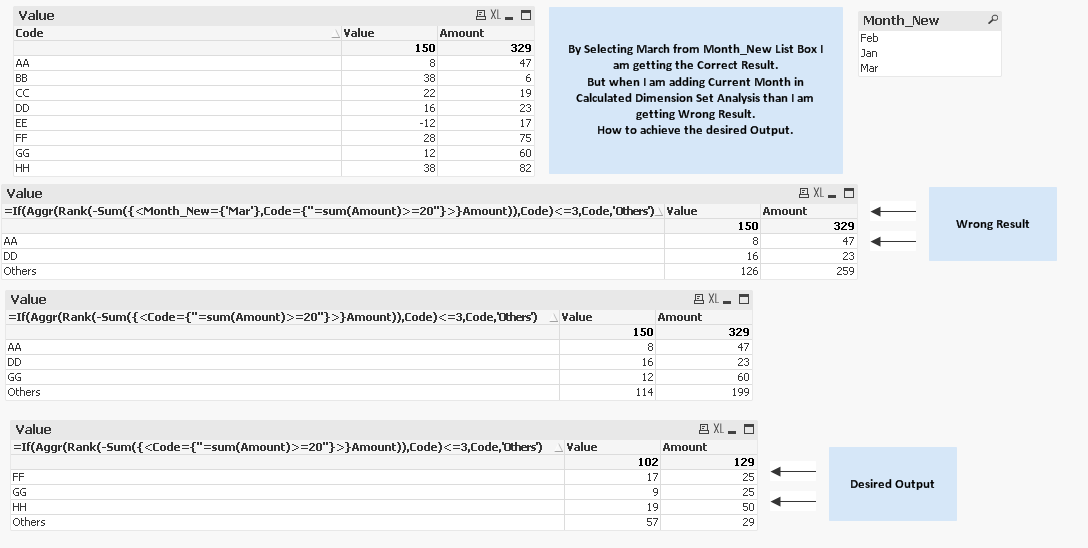
I have Attached the qvw for Reference.
Regards
Cire
- « Previous Replies
-
- 1
- 2
- Next Replies »
Accepted Solutions

 sunny_talwar
- Mark as New
- Bookmark
- Subscribe
- Mute
- Subscribe to RSS Feed
- Permalink
- Report Inappropriate Content
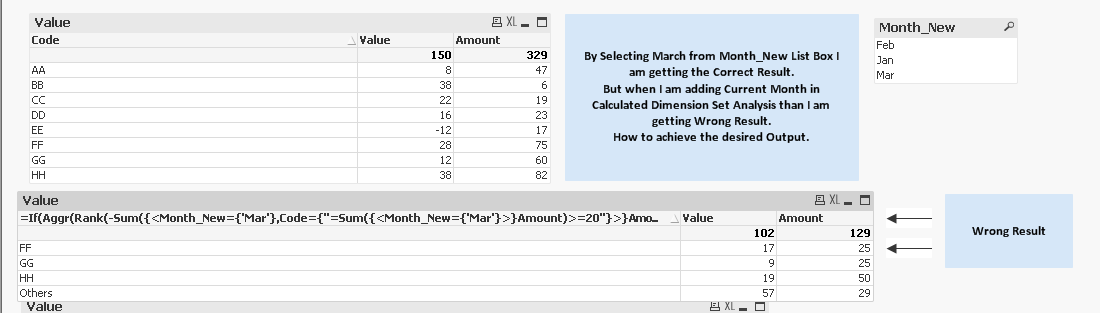
Here are the changes that you need
Calculated dimension:
=If(Aggr(Rank(-Sum({<Month_New={'Mar'},Code={"=Sum({<Month_New={'Mar'}>}Amount)>=20"}>}Amount)),Code)<=3,Code,'Others')
Expressions
Sum({<Month_New={'Mar'}>} Value)
Sum({<Month_New={'Mar'}>} Amount)
- Mark as New
- Bookmark
- Subscribe
- Mute
- Subscribe to RSS Feed
- Permalink
- Report Inappropriate Content
sunny_talwar
- Mark as New
- Bookmark
- Subscribe
- Mute
- Subscribe to RSS Feed
- Permalink
- Report Inappropriate Content
Here are the changes that you need
Calculated dimension:
=If(Aggr(Rank(-Sum({<Month_New={'Mar'},Code={"=Sum({<Month_New={'Mar'}>}Amount)>=20"}>}Amount)),Code)<=3,Code,'Others')
Expressions
Sum({<Month_New={'Mar'}>} Value)
Sum({<Month_New={'Mar'}>} Amount)
- Mark as New
- Bookmark
- Subscribe
- Mute
- Subscribe to RSS Feed
- Permalink
- Report Inappropriate Content
Sir I can only use the Max Month in Calculated Dimension.
In my Actual Application, the Expressions are so complex.
What to do now??? Any workaround for this.
sunny_talwar
- Mark as New
- Bookmark
- Subscribe
- Mute
- Subscribe to RSS Feed
- Permalink
- Report Inappropriate Content
Use Max Month? Not sure I understand your question
- Mark as New
- Bookmark
- Subscribe
- Mute
- Subscribe to RSS Feed
- Permalink
- Report Inappropriate Content
Sir I am saying that I can't use Max Month in my Expressions like this:
Expressions
Sum({<Month_New={'Mar'}>} Value)
Sum({<Month_New={'Mar'}>} Amount)
In my Actual Application, the Expressions are very complex.
I just had shared the sample Application.
Hope you understood my question???
I have to Apply Logic only in the Calculated Dimension.
Calculated dimension:
=If(Aggr(Rank(-Sum({<Code={"=Sum(Amount)>=20"}>}Amount)),Code)<=3,Code,'Others')
Is there a way or any workaround.
sunny_talwar
- Mark as New
- Bookmark
- Subscribe
- Mute
- Subscribe to RSS Feed
- Permalink
- Report Inappropriate Content
I don't think this can be done without changing the expression. You might be able to make use of alternate state to get this done. Is alternate state an option?
- Mark as New
- Bookmark
- Subscribe
- Mute
- Subscribe to RSS Feed
- Permalink
- Report Inappropriate Content
If we are using Sum(Amount)>=20 in Set Analysis in Calculated Dimension than why can't we use other condition for Max Month in set Analysis.
That's very strange behaviour or is there something Logical here which I am missing.
sunny_talwar
- Mark as New
- Bookmark
- Subscribe
- Mute
- Subscribe to RSS Feed
- Permalink
- Report Inappropriate Content
You bring up a good point, let me take a look at this 
sunny_talwar
- Mark as New
- Bookmark
- Subscribe
- Mute
- Subscribe to RSS Feed
- Permalink
- Report Inappropriate Content
Sir you were right, try this:
=If(Aggr(Rank(-Sum({<Month_New={'Mar'},Code={"=Sum({<Month_New={'Mar'}>}Amount)>=20"}>}Amount)),Code, Month_New)<=3,Code,'Others')
Thank you for pushing me to think it through

- « Previous Replies
-
- 1
- 2
- Next Replies »