Unlock a world of possibilities! Login now and discover the exclusive benefits awaiting you.

- Qlik Community
- :
- All Forums
- :
- QlikView
- :
- Get Top Customer Name based on Sales
- Subscribe to RSS Feed
- Mark Topic as New
- Mark Topic as Read
- Float this Topic for Current User
- Bookmark
- Subscribe
- Mute
- Printer Friendly Page

- Mark as New
- Bookmark
- Subscribe
- Mute
- Subscribe to RSS Feed
- Permalink
- Report Inappropriate Content
Get Top Customer Name based on Sales
Hello Community,
I am trying to display the top result from Customer field based on maximum value in Sales field; in this case (refer below table), I want to display Customer "XYZ" in a text box. How can I achieve this?
Also Note: Below Values are dynamic and will change
| Customer | Sales |
|---|---|
| ABC | 30 |
| XYZ | 100 |
| QWE | 25 |
| ASD | 20 |
| OPL | 20 |
Thanks,
Accepted Solutions

 fvelascog72
- Mark as New
- Bookmark
- Subscribe
- Mute
- Subscribe to RSS Feed
- Permalink
- Report Inappropriate Content
Hi,
Try this in the text Object:
=Concat({<Sales={'$(=Max(Sales))'}>}Customer, ',')
fvelascog72
- Mark as New
- Bookmark
- Subscribe
- Mute
- Subscribe to RSS Feed
- Permalink
- Report Inappropriate Content
Hi,
Try this in the text Object:
=Concat({<Sales={'$(=Max(Sales))'}>}Customer, ',')

 buzzy996
- Mark as New
- Bookmark
- Subscribe
- Mute
- Subscribe to RSS Feed
- Permalink
- Report Inappropriate Content
try tis,
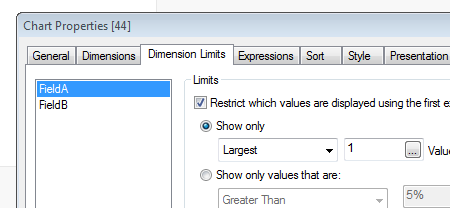
- Mark as New
- Bookmark
- Subscribe
- Mute
- Subscribe to RSS Feed
- Permalink
- Report Inappropriate Content
It worked!! Thanks Federico!!
=only({<sales={'$(=Max(sales))'}>}customer) --> returns only 1 value...
but
=concat({<sales={'$(=Max(sales))'}>}customer) --> return all possible value
eg: if i wanted customers doing low or least sales..then I will use concat in my case since it has two values.
=concat({<sales={'$(=Min(sales))'}>}customer) --> returns ASD,OPL
 sushil353
- Mark as New
- Bookmark
- Subscribe
- Mute
- Subscribe to RSS Feed
- Permalink
- Report Inappropriate Content
Try:
firstsortedvalue(Customer,-Aggr(Sum(Sales),Customer))
fvelascog72
- Mark as New
- Bookmark
- Subscribe
- Mute
- Subscribe to RSS Feed
- Permalink
- Report Inappropriate Content
Yes, you are right,
First I posted only, but later I edit post with concat option.
Regards
- Mark as New
- Bookmark
- Subscribe
- Mute
- Subscribe to RSS Feed
- Permalink
- Report Inappropriate Content
This works as well!!
firstsortedvalue(Customer,-Aggr(Sum(Sales),Customer))