Unlock a world of possibilities! Login now and discover the exclusive benefits awaiting you.

- Qlik Community
- :
- All Forums
- :
- QlikView
- :
- GetFieldselections Help !!
- Subscribe to RSS Feed
- Mark Topic as New
- Mark Topic as Read
- Float this Topic for Current User
- Bookmark
- Subscribe
- Mute
- Printer Friendly Page

 MuraliPrasath
- Mark as New
- Bookmark
- Subscribe
- Mute
- Subscribe to RSS Feed
- Permalink
- Report Inappropriate Content
GetFieldselections Help !!
Hi,
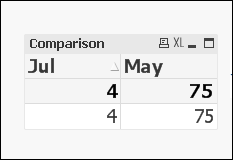
I've attached the example .qvw. I am using alternate state for comparing months.
In the table second expression's label should dispaly the selected Month as May to display in the table.
Need help!!
Accepted Solutions

- Mark as New
- Bookmark
- Subscribe
- Mute
- Subscribe to RSS Feed
- Permalink
- Report Inappropriate Content
Hi Murali,
Use this :
=only({DateCompare<Month=DateCompare::Month>}Month)
Attached document with changes.
Regards,
Anjali Gupta
- Mark as New
- Bookmark
- Subscribe
- Mute
- Subscribe to RSS Feed
- Permalink
- Report Inappropriate Content
Hi Murali,
Use this :
=only({DateCompare<Month=DateCompare::Month>}Month)
Attached document with changes.
Regards,
Anjali Gupta

 tamilarasu
- Mark as New
- Bookmark
- Subscribe
- Mute
- Subscribe to RSS Feed
- Permalink
- Report Inappropriate Content
Hi,
Use,
=Concat(DISTINCT {[DateCompare]}Month,', ')
 t_chetirbok
- Mark as New
- Bookmark
- Subscribe
- Mute
- Subscribe to RSS Feed
- Permalink
- Report Inappropriate Content
Hello!
Use in your second label
=GetFieldSelections(Month,'','','DateCompare')
MuraliPrasath
- Mark as New
- Bookmark
- Subscribe
- Mute
- Subscribe to RSS Feed
- Permalink
- Report Inappropriate Content
thank you sooooo much.
t_chetirbok
- Mark as New
- Bookmark
- Subscribe
- Mute
- Subscribe to RSS Feed
- Permalink
- Report Inappropriate Content
I think it is not optimized solution to use expression
- Mark as New
- Bookmark
- Subscribe
- Mute
- Subscribe to RSS Feed
- Permalink
- Report Inappropriate Content
Welcome Murali 
tamilarasu
- Mark as New
- Bookmark
- Subscribe
- Mute
- Subscribe to RSS Feed
- Permalink
- Report Inappropriate Content
I have already tried this and it's not working for me. I am not sure which version supports the third parameter.