Unlock a world of possibilities! Login now and discover the exclusive benefits awaiting you.

- Qlik Community
- :
- All Forums
- :
- QlikView
- :
- Re: Getcurrentfield in TOTAL expression
- Subscribe to RSS Feed
- Mark Topic as New
- Mark Topic as Read
- Float this Topic for Current User
- Bookmark
- Subscribe
- Mute
- Printer Friendly Page

 dafnis14
- Mark as New
- Bookmark
- Subscribe
- Mute
- Subscribe to RSS Feed
- Permalink
- Report Inappropriate Content
Getcurrentfield in TOTAL expression
Hi,
My bar chart has 2 dimensions:
1.periods - cyclic selection
2. metric code (1-4)
expressions:
1.bar - order quantity
2.text - average duration of all segments for the current period (e.g., date)
I need to display an average for each column, according to a selected cyclic dimension.
But the following expression doesn't work, as all the values are the same.
sum(TOTAL <$(='[' & GetCurrentField([Cyc_SaleOrd_Periods]) & ']')> Order_OpenTarget_TimeDiff)
/count(TOTAL <$(='[' & GetCurrentField([Cyc_SaleOrd_Periods]) & ']')> DISTINCT SaleOrder_ID)
Would appreciate another way to display it...
Thanks!
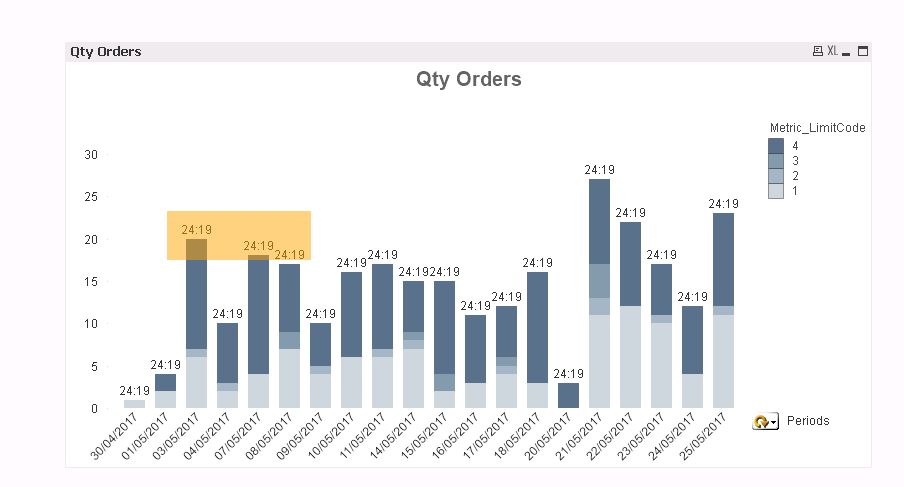
Message was edited by: Dafnis X Attached sample data
- « Previous Replies
-
- 1
- 2
- Next Replies »
dafnis14
- Mark as New
- Bookmark
- Subscribe
- Mute
- Subscribe to RSS Feed
- Permalink
- Report Inappropriate Content
Hi Sergey,
So you offer to actually include all the fields in the group in the expression.
Thak you very much.
I didn't mark your answer as correct because it is a workaround.. 🙂
Thanks a lot!
 Sergey_Shuklin
- Mark as New
- Bookmark
- Subscribe
- Mute
- Subscribe to RSS Feed
- Permalink
- Report Inappropriate Content
Hello, Dafnis!
It's a great experience to solve your problem. Thank you 😃
There is one more solution which can be the one you lookin' for:
=sum(total <$(=GetCurrentField(Periods))> Duration)/sum(total <$(=GetCurrentField(Periods))> [Qty Orders])
We've finnaly reached the GetCurrentField() function =D
dafnis14
- Mark as New
- Bookmark
- Subscribe
- Mute
- Subscribe to RSS Feed
- Permalink
- Report Inappropriate Content
Kudos!
I have tried some variations of this expession which but none worked!
Count(TOTAL <$(='[' & GetCurrentField([Group Name]) & ']')> [Respondent ID])
Thanks!

- « Previous Replies
-
- 1
- 2
- Next Replies »