Unlock a world of possibilities! Login now and discover the exclusive benefits awaiting you.

- Qlik Community
- :
- All Forums
- :
- QlikView
- :
- Getting a total percentage
- Subscribe to RSS Feed
- Mark Topic as New
- Mark Topic as Read
- Float this Topic for Current User
- Bookmark
- Subscribe
- Mute
- Printer Friendly Page

 lsmith48461
- Mark as New
- Bookmark
- Subscribe
- Mute
- Subscribe to RSS Feed
- Permalink
- Report Inappropriate Content
Getting a total percentage
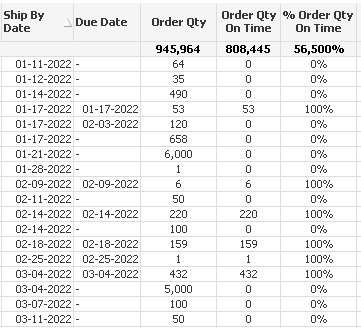
I have a chart where I want to show quantity delivered on the due date is or isn't the same as the actual ship date. The Dimension is City. I have two expressions:
Order Qty =sum(OrderQuantity)
and
Order Qty On Time =If(DueDate = ShipDate, sum(OrderQuantity), 0)
Everything is fine except when I add a third column for percentage.
% Order Qty On Time =[Order Qty On Time] / [Order Qty]
The column detail naturally shows either 100% or 0%
The problem is on the Total line where nothing I have tried shows the correct percentage which should be around 85%. I've tried multiple combinations using the AGGR or TOTAL functions, but nothing seems to work.
Suggestions?
See below.