Unlock a world of possibilities! Login now and discover the exclusive benefits awaiting you.

- Qlik Community
- :
- All Forums
- :
- QlikView
- :
- Google Maps - Cluster
- Subscribe to RSS Feed
- Mark Topic as New
- Mark Topic as Read
- Float this Topic for Current User
- Bookmark
- Subscribe
- Mute
- Printer Friendly Page

 Alexander_Thor
- Mark as New
- Bookmark
- Subscribe
- Mute
- Subscribe to RSS Feed
- Permalink
- Report Inappropriate Content
Google Maps - Cluster
Google Maps Extension with Cluster support.
QlikTech takes no responsibility for any code and QlikTech Support Agreement does not cover issues with this extension.
Please review Googles license agreement before you put this into production.
Introduction
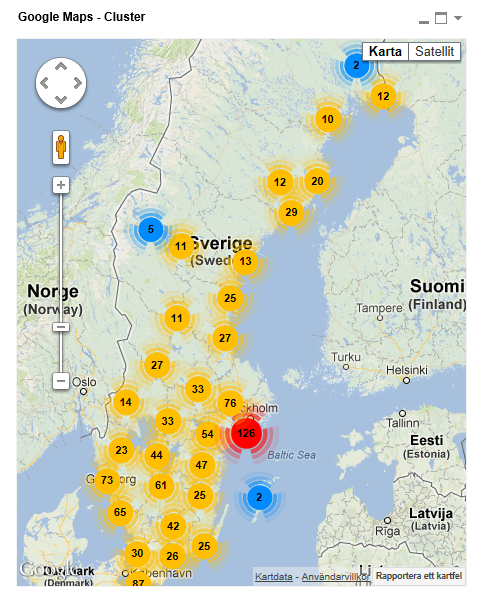
This is a QlikView extension object that integrates Google Maps Javascript API V3 and a third party library called MarkerClusterPlus into QlikView.
Load a set a coordinates into QlikView and visualize them together with this extension. The clustering feature is create when you have alot of data points and needs to group/cluster them together for greater visability and performance.
The maxzoom property defines at what zoom level you want your markers clustered. The grid size property controls how big or small cluster grid size you want.
You can either use the extension 'as is' or use it as a base to further customize it to fit your needs.
Download the extension and view source code at: https://github.com/mindspank/GoogleMaps-Cluster-QV11
If you build something awesome please share it with the community!
Live long and prosper.
2015-02-15
Removed download from post, please grab the latest version from Github instead.
2014-02-03
Various fixes.
2014-01-09
There has been numerous upgrades to the extension.
Now clusters now display the value of your expression and with added support to include more information in pop-up labels.
Example grayscale styled map included.
Possibility to show only a single cluster icon style if you do not want it to scale according to the number of markers in the cluster.
2013-06-17
Added custom marker support. Now you can specify a url for an custom marker. Accepts all major image file types.
- Tags:
- clustering
- extension
- extension_object
- geospatial
- google cluster maps
- google maps
- javascript
- map
- mapping
- qlikview extensions
- qlikview_extensions

- Mark as New
- Bookmark
- Subscribe
- Mute
- Subscribe to RSS Feed
- Permalink
- Report Inappropriate Content
Great ! Many thanks Alexander.
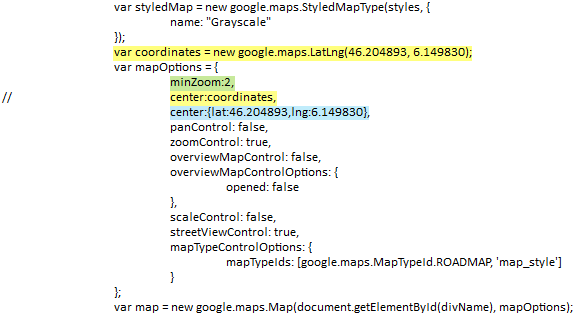
I added the (green) line to limit the initial zoom. It works.
Then I tried to recenter the map on Europe.
But with Yellow lines and then with Blue line syntax : No result.
I am still initialy positioned on the US.
Have you got an idea ?
Alexander_Thor
- Mark as New
- Bookmark
- Subscribe
- Mute
- Subscribe to RSS Feed
- Permalink
- Report Inappropriate Content
The extension will automatically adjust the zoom and center the map to fit all of your markers.
You can turn that off by getting rid of this map.fitBounds(latlngbounds);
You could instead call map.setCenter(latlngbounds.getCenter()) that would set the center based on the visible markers.
- Mark as New
- Bookmark
- Subscribe
- Mute
- Subscribe to RSS Feed
- Permalink
- Report Inappropriate Content
Hi Alex,
How to set default location as United States in this extension
Thanks,
Sam
- Mark as New
- Bookmark
- Subscribe
- Mute
- Subscribe to RSS Feed
- Permalink
- Report Inappropriate Content
HI Alex,
I am using Qlikview 10. I trying to implement Google map with extensional object (using .QAR file) and
I have installed QAR file for extension object. i am able to drag the extn object into Qlikview also. but it is not showing map, and it is blank. Please help me out. how can achieve this.
Thanks..
Mohan R
- Mark as New
- Bookmark
- Subscribe
- Mute
- Subscribe to RSS Feed
- Permalink
- Report Inappropriate Content
Hello Alexander,
I would like to have the Satellite option instead of the Grayscale.
How can I manage this?
Regards,
Philippe
- Mark as New
- Bookmark
- Subscribe
- Mute
- Subscribe to RSS Feed
- Permalink
- Report Inappropriate Content
Hi alex,
i have created Google Map with extensional object, but it is coming blank.... other extnsional objects are comingg. but this google map is not coming.. Please help me out..
- Mark as New
- Bookmark
- Subscribe
- Mute
- Subscribe to RSS Feed
- Permalink
- Report Inappropriate Content
Hi alexander,
I have tried to use this extension.
I need to show the population of US states. When i drill down to state it should show the population of cities present in my table.
Can you help me.
- Mark as New
- Bookmark
- Subscribe
- Mute
- Subscribe to RSS Feed
- Permalink
- Report Inappropriate Content
Alexander I'm grateful for your work, amazing!
How can I treat a coordinate which is the location of two of my clients and only one is shown on the map?
- Mark as New
- Bookmark
- Subscribe
- Mute
- Subscribe to RSS Feed
- Permalink
- Report Inappropriate Content
Hi Alex,
first of all thanks a lot for your work and for sharing it!
One question: I have a big memory problem using cluster maps, meaning that the same document without maps “weights” 170Mb (task manager), with maps memory usage raises instantly to 270Mb. This is ok, but the real problem is that each simple action - selecting a different folder, refreshing the same data, small selections… - refreshes the map, and this allocates memory exponentially, with steps 5-9-17-23Mb (without maps cache increases as well, but in steps of 400Kb). After a few steps, the dashboard is nearly locked, while without maps no problem.
So, the question is: do you think it’s possible to solve this thing in some way? Or this problem occurs just to me? Your work is absolutely aswesome, I want to use it and spread it for my job, but I definitely have to solve this before, it’s a killing problem grrr 
I’m working on a desktop, I3 Ivy Core + 8Gb RAM, Windows 8, but same numbers on a far less powerful Core Duo Win 7 laptop. Both systems are 64Bit, Qlik 11 x64 Destkop. 3.000 points geo tracked.
Thanks a lot
Fabio
- Mark as New
- Bookmark
- Subscribe
- Mute
- Subscribe to RSS Feed
- Permalink
- Report Inappropriate Content
Hi Alexander,
Thanks for your extension.
First question:
Is it possible to use in desktop view too?
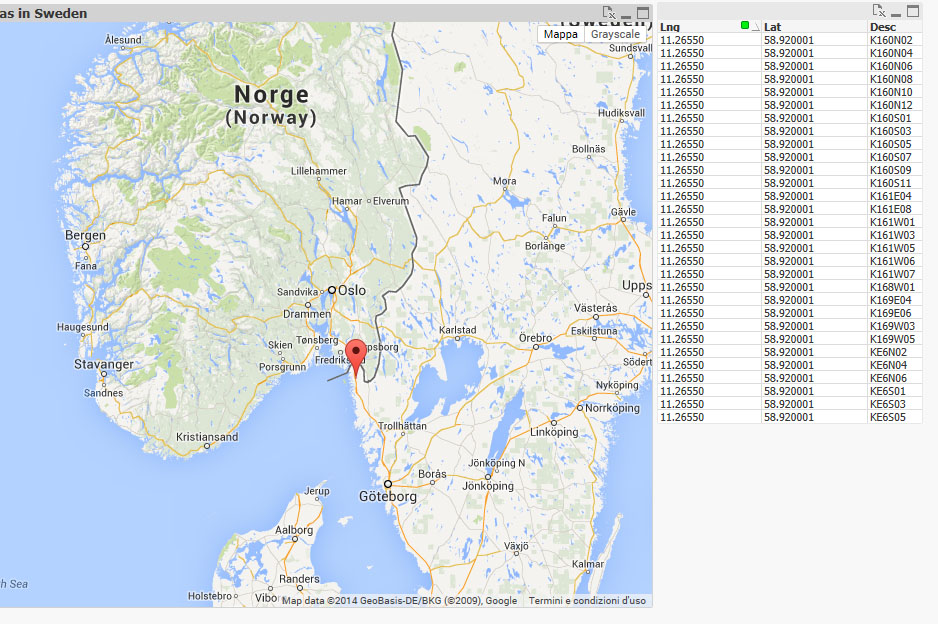
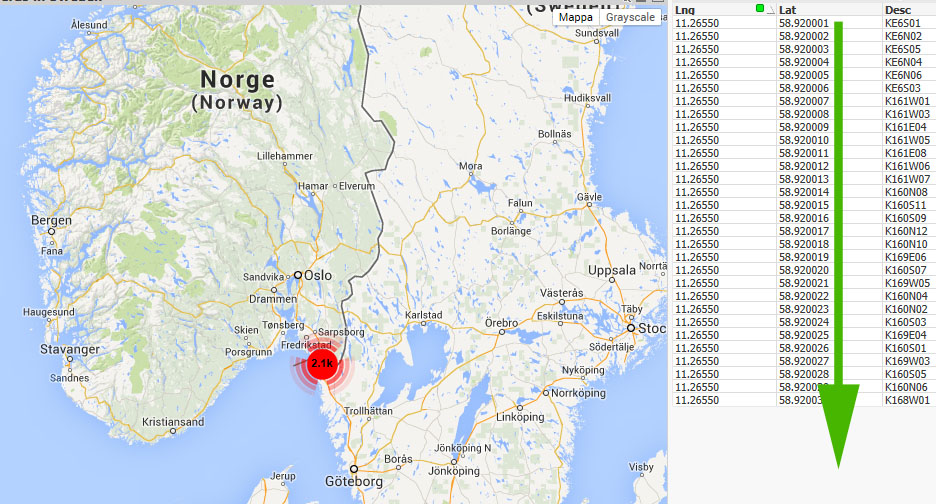
Second question: (see images)
My database contains records with the same Lat e Lng but the map alwais show a marker and does not groups.
If instead I make little changes to coordinates, it works correctly.
Can you help me to solve this issue?
Third question:
If I had 1 record for each State
State Lat Lng Value
Italy 10.000 12.000 15000€
Germany 11.000 13.000 30000€
Etc...
Is it possible to show the value above the map over the respective Stetes?
Not the clickable marker, but the values.
Thank you
Thank you.