Unlock a world of possibilities! Login now and discover the exclusive benefits awaiting you.

- Qlik Community
- :
- All Forums
- :
- QlikView
- :
- Group by dimension
- Subscribe to RSS Feed
- Mark Topic as New
- Mark Topic as Read
- Float this Topic for Current User
- Bookmark
- Subscribe
- Mute
- Printer Friendly Page

 devarasu07
- Mark as New
- Bookmark
- Subscribe
- Mute
- Subscribe to RSS Feed
- Permalink
- Report Inappropriate Content
Group by dimension
Hi All,
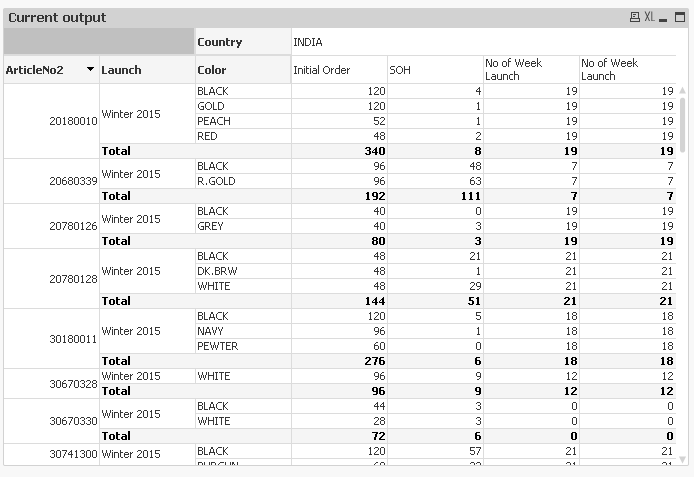
I'm trying to achieve No of week launch by article level with below expected output format, can you advise me. Thanks
No of week launch:
=Aggr((Max(maxSalesDate)-min(minSalesDate))/7,ArticleNo2)
.JPG) !
!
Accepted Solutions

 sunny_talwar
- Mark as New
- Bookmark
- Subscribe
- Mute
- Subscribe to RSS Feed
- Permalink
- Report Inappropriate Content
Or a better solution would be this:
=(Max(TOTAL <ArticleNo2> maxSalesDate)-min(TOTAL <ArticleNo2>minSalesDate))/7
sunny_talwar
- Mark as New
- Bookmark
- Subscribe
- Mute
- Subscribe to RSS Feed
- Permalink
- Report Inappropriate Content
You can try this:
=Aggr(NODISTINCT(Max(maxSalesDate)-min(minSalesDate))/7,ArticleNo2)
sunny_talwar
- Mark as New
- Bookmark
- Subscribe
- Mute
- Subscribe to RSS Feed
- Permalink
- Report Inappropriate Content
Or a better solution would be this:
=(Max(TOTAL <ArticleNo2> maxSalesDate)-min(TOTAL <ArticleNo2>minSalesDate))/7

 jayanttibhe
- Mark as New
- Bookmark
- Subscribe
- Mute
- Subscribe to RSS Feed
- Permalink
- Report Inappropriate Content
Hi,
Please note that - NODISTINCT Vs TOTAL - there is huge diff. I.e. if there are more than 1 instance of the chart dimensions - in this case suppose 2 Rows of the dimensions as mentioned following in data model - then NODISTINCT take account the Facts associated with those separately. However, this is not the Case with TOTAL.
| ArticleNo2 | Launch | Color |
| 20180010 | Winter 2015 | BLACK |
| 20180010 | Winter 2015 | BLACK |
sunny_talwar
- Mark as New
- Bookmark
- Subscribe
- Mute
- Subscribe to RSS Feed
- Permalink
- Report Inappropriate Content
I am not sure I understand the difference between NODISTINCT and TOTAL here. Can you may be elaborate?
jayanttibhe
- Mark as New
- Bookmark
- Subscribe
- Mute
- Subscribe to RSS Feed
- Permalink
- Report Inappropriate Content
Hi Sunny,
Please find attached example to elaborate my point.
sunny_talwar
- Mark as New
- Bookmark
- Subscribe
- Mute
- Subscribe to RSS Feed
- Permalink
- Report Inappropriate Content
I guess I wouldn't use Sum around the aggr() function if I plan to use NODISTINCT, So as long as you are not looking to get a total (which in case of straight table can be achieved using Sum of Rows under Total mode, I will always get the same result for row wise data
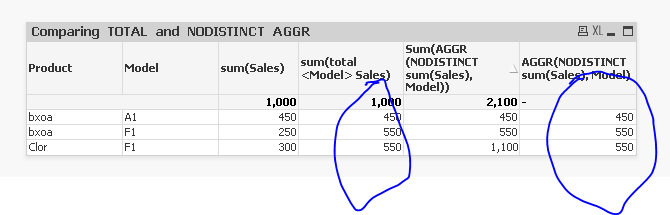
No are these two functions different? Yes.
Do they have different purposes? Yes
Can one replace the others? Not always, but in this case it can. Also, I would suggest to use TOTAL over NODISTINCT for this particular case 
jayanttibhe
- Mark as New
- Bookmark
- Subscribe
- Mute
- Subscribe to RSS Feed
- Permalink
- Report Inappropriate Content
Hey Sunny,
I agree with you. But when Set Analysis comes in play, things become bit complicated.
Quoted swuehl
"The set analysis expression in your inner aggregation function does not define the set of possible values for the AGGR dimension fields. If you need to modify this set (i.e. you want a different set than defined by the selections), you need to use a second set expression in the outer aggregation function."
I always prefer to wrap AGGR with the appropriate Aggregate Function (Most of the cases the Inner aggregate function)
This gives a greater flexibility and accurate results when we amend the expressions with set analysis.
In short, I will never prefer to use the AGGR function without wrapping up the aggregate function
Thanks
Jayant
sunny_talwar
- Mark as New
- Bookmark
- Subscribe
- Mute
- Subscribe to RSS Feed
- Permalink
- Report Inappropriate Content
Then why only wrap with Sum my friend? Why not Only or Avg or Min or Max? What made you choose Sum?
