Unlock a world of possibilities! Login now and discover the exclusive benefits awaiting you.

- Qlik Community
- :
- All Forums
- :
- QlikView
- :
- Grouping table columns by Business names
- Subscribe to RSS Feed
- Mark Topic as New
- Mark Topic as Read
- Float this Topic for Current User
- Bookmark
- Subscribe
- Mute
- Printer Friendly Page

- Mark as New
- Bookmark
- Subscribe
- Mute
- Subscribe to RSS Feed
- Permalink
- Report Inappropriate Content
Grouping table columns by Business names
Hi Gurus,
Grouping column by subject area from single fact table.
My fact (FACT1) table has six columns col1,col2,col3,col4,col5,col6. joined with all the dimensions.
FACT1:
col1,
col2,
col3,
col4,
col5,
col6.
Now i want to group columns of the FACT1 into Actuals and Bugets. When user opens the document, want to see table names and columns as follows.
Actuals:
col1,
col2,
col3
Budgets:
col4,
col5,
col6.
Please suggest me approach to provide solution to user.
Thanks,
Sherry
- Tags:
- new_to_qlikview
Accepted Solutions

 sinanozdemir
- Mark as New
- Bookmark
- Subscribe
- Mute
- Subscribe to RSS Feed
- Permalink
- Report Inappropriate Content
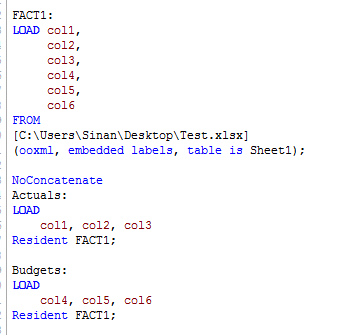
Maybe try something like this. I am just guessing since we don't have an excerpt of your script or data:
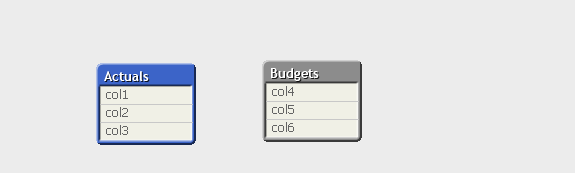
Data model will have two tables:
Hope this helps.

 sunny_talwar
- Mark as New
- Bookmark
- Subscribe
- Mute
- Subscribe to RSS Feed
- Permalink
- Report Inappropriate Content
Not sure what you mean group? Are you trying to create a cycle or dirll-down group for a table? Can you share an example to understand your requirement?
Best,
Sunny
sinanozdemir
- Mark as New
- Bookmark
- Subscribe
- Mute
- Subscribe to RSS Feed
- Permalink
- Report Inappropriate Content
Maybe try something like this. I am just guessing since we don't have an excerpt of your script or data:
Data model will have two tables:
Hope this helps.