Unlock a world of possibilities! Login now and discover the exclusive benefits awaiting you.

Announcements
Talend Cloud AWS EU Scheduled Outage: Starting Tues 26 May 21:00 CEST with expected completion Wed 27 May 01:00 CEST
- Qlik Community
- :
- All Forums
- :
- QlikView
- :
- Re: Grouping the records in pivot table
Options
- Subscribe to RSS Feed
- Mark Topic as New
- Mark Topic as Read
- Float this Topic for Current User
- Bookmark
- Subscribe
- Mute
- Printer Friendly Page
Turn on suggestions
Auto-suggest helps you quickly narrow down your search results by suggesting possible matches as you type.
Showing results for

 sijojoseph22
Creator II
2015-08-10
08:00 AM
- Mark as New
- Bookmark
- Subscribe
- Mute
- Subscribe to RSS Feed
- Permalink
- Report Inappropriate Content
Grouping the records in pivot table
Hi All,
We are having 15 records in the attached qvw.
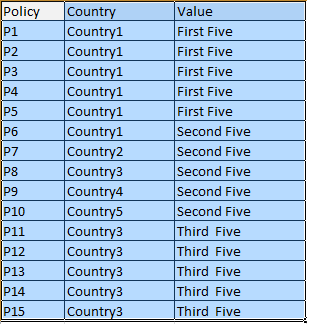
We need to make the as per the screen shot. We need this to generate a report in Nprinting.
1-5 records as value 'First Five'
6-10 records as value 'Second Five'
11-15 records as value 'Third Five'
Thanks,
Sijo
783 Views
1 Solution
Accepted Solutions

 rubenmarin
MVP
2015-08-10
08:08 AM
- Mark as New
- Bookmark
- Subscribe
- Mute
- Subscribe to RSS Feed
- Permalink
- Report Inappropriate Content
Hi Sijo, you can use this expression:
=If(RowNo(TOTAL)<=5, 'First five',
If(RowNo(TOTAL)<=10, 'Second five',
If(RowNo(TOTAL)<=15, 'Third five')))
719 Views
2 Replies
rubenmarin
MVP
2015-08-10
08:08 AM
- Mark as New
- Bookmark
- Subscribe
- Mute
- Subscribe to RSS Feed
- Permalink
- Report Inappropriate Content
Hi Sijo, you can use this expression:
=If(RowNo(TOTAL)<=5, 'First five',
If(RowNo(TOTAL)<=10, 'Second five',
If(RowNo(TOTAL)<=15, 'Third five')))
720 Views

 maximiliano_vel
Partner - Creator III
2015-08-10
08:18 AM
- Mark as New
- Bookmark
- Subscribe
- Mute
- Subscribe to RSS Feed
- Permalink
- Report Inappropriate Content
Your records should be in order.
See attached file
