Unlock a world of possibilities! Login now and discover the exclusive benefits awaiting you.

- Qlik Community
- :
- All Forums
- :
- QlikView
- :
- HOW TO LOAD IMAGES INTO QLIKVIEW?
- Subscribe to RSS Feed
- Mark Topic as New
- Mark Topic as Read
- Float this Topic for Current User
- Bookmark
- Subscribe
- Mute
- Printer Friendly Page

- Mark as New
- Bookmark
- Subscribe
- Mute
- Subscribe to RSS Feed
- Permalink
- Report Inappropriate Content
HOW TO LOAD IMAGES INTO QLIKVIEW?
HI GUYS,
I created list box with attached country images but that images displayed only one. how to display all images on the sheet . in this scenario i used bundle function. i attached my script and images this box ple tell me out how to display all images and when i select item automatically change country flag . ple tell me out how to do it.
Regards:
madhu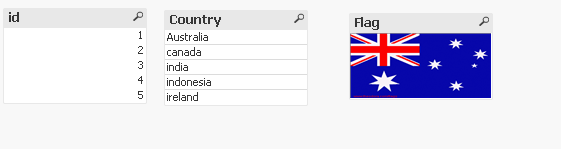

- Tags:
- qlikview_scripting
- « Previous Replies
-
- 1
- 2
- Next Replies »

 MK_QSL
- Mark as New
- Bookmark
- Subscribe
- Mute
- Subscribe to RSS Feed
- Permalink
- Report Inappropriate Content
- Mark as New
- Bookmark
- Subscribe
- Mute
- Subscribe to RSS Feed
- Permalink
- Report Inappropriate Content
PFA.
HTH
RAVI N
- Mark as New
- Bookmark
- Subscribe
- Mute
- Subscribe to RSS Feed
- Permalink
- Report Inappropriate Content
as it is I did but the country images not change.if I select one item automatically change the image but here it is not change image. for example : I select Id 1 in listbox automatically change the image in images box but it is not work here. how to change automatically images. forexample when I select one item in listbox. automatically change the image in another list box . i want to do that how to do it please tell me out manish. i attached imagefile below.
MK_QSL
- Mark as New
- Bookmark
- Subscribe
- Mute
- Subscribe to RSS Feed
- Permalink
- Report Inappropriate Content
Load you QVW please.
- Mark as New
- Bookmark
- Subscribe
- Mute
- Subscribe to RSS Feed
- Permalink
- Report Inappropriate Content
i do see your qvw because i used qlikview personal edition.

 its_anandrjs
- Mark as New
- Bookmark
- Subscribe
- Mute
- Subscribe to RSS Feed
- Permalink
- Report Inappropriate Content
In a flag list box write =Info(Flag) as expression and try.
- Mark as New
- Bookmark
- Subscribe
- Mute
- Subscribe to RSS Feed
- Permalink
- Report Inappropriate Content
- Mark as New
- Bookmark
- Subscribe
- Mute
- Subscribe to RSS Feed
- Permalink
- Report Inappropriate Content
manish i attached bundle above see there
MK_QSL
- Mark as New
- Bookmark
- Subscribe
- Mute
- Subscribe to RSS Feed
- Permalink
- Report Inappropriate Content
I want your qvw to see why it's now working !
- « Previous Replies
-
- 1
- 2
- Next Replies »