Unlock a world of possibilities! Login now and discover the exclusive benefits awaiting you.

- Qlik Community
- :
- All Forums
- :
- QlikView
- :
- Help For calculation
- Subscribe to RSS Feed
- Mark Topic as New
- Mark Topic as Read
- Float this Topic for Current User
- Bookmark
- Subscribe
- Mute
- Printer Friendly Page

- Mark as New
- Bookmark
- Subscribe
- Mute
- Subscribe to RSS Feed
- Permalink
- Report Inappropriate Content
Help For calculation
HI all ,
I have below data as input
| Ticket No | Pending Start Date | Pending End Date | Duration (h:m:s) |
| ABC7264 | 4/1/2014 19:48 | 4/30/2014 19:51 | 696:02:24 |
| ABC7264 | 8/1/2013 2:52 | 8/31/2013 2:56 | 720:03:50 |
| ABC7264 | 5/1/2014 3:07 | 34:01:43 | |
| ABC7264 | 6/5/2013 6:13 | 6/14/2013 12:08 | 221:55:16 |
| ABC7264 | 2/6/2014 2:32 | 4/1/2014 2:36 | 1296:03:39 |
| ABC7669 | 12/1/2013 12:04 | 12/2/2013 14:15 | 1407:19:43 |
| ABC9139 | 12/1/2013 12:04 | 12/2/2013 12:15 | 24:11:03 |
| ABC9139 | 12/2/2013 12:22 | 1/31/2014 12:26 | 1440:03:06 |
| ABC9139 | 10/4/2013 18:13 | 11/30/2013 18:16 | 1368:02:14 |
| ABC9139 | 1/31/2014 12:28 | 2184:40:29 |
I need output as below
| Ticket No | Pending end date | Total Duration |
| ABC7264 | 4/1/2014 2:36 | 2968:06:52 |
| ABC7669 | 12/2/2013 14:15 | 1407:19:43 |
| ABC9139 | 5016:56:52 |
Pending end data should me Last End date shown in the list w.r.t the Ticket.
Duratoin should be sum of total duration (w.r.t Ticket)
Your help will be higly appriciated .
Thanks!
D J
- Tags:
- developer

 swuehl
- Mark as New
- Bookmark
- Subscribe
- Mute
- Subscribe to RSS Feed
- Permalink
- Report Inappropriate Content
Try something like
Set TimestampFormat = 'M/D/YYYY h:mm';

INPUT:
LOAD *, RecNo() as ID INLINE [
Ticket No, Pending Start Date, Pending End Date, Duration (h:m:s)
ABC7264, 4/1/2014 19:48, 4/30/2014 19:51, 696:02:24
ABC7264, 8/1/2013 2:52, 8/31/2013 2:56, 720:03:50
ABC7264, 5/1/2014 3:07, ,34:01:43
ABC7264, 6/5/2013 6:13, 6/14/2013 12:08, 221:55:16
ABC7264, 2/6/2014 2:32, 4/1/2014 2:36, 1296:03:39
ABC7669, 12/1/2013 12:04, 12/2/2013 14:15, 1407:19:43
ABC9139, 12/1/2013 12:04, 12/2/2013 12:15, 24:11:03
ABC9139, 12/2/2013 12:22, 1/31/2014 12:26, 1440:03:06
ABC9139, 10/4/2013 18:13, 11/30/2013 18:16, 1368:02:14
ABC9139, 1/31/2014 12:28, ,2184:40:29
];

AGGREGATES:
LOAD [Ticket No],
  Timestamp(FirstSortedValue([Pending End Date],-ID)) as [Pending end date],
  interval(sum([Duration (h:m:s)])) as [Total Duration]
Resident INPUT Group by [Ticket No];

 MarcoWedel
- Mark as New
- Bookmark
- Subscribe
- Mute
- Subscribe to RSS Feed
- Permalink
- Report Inappropriate Content
Hi D J,
one solution could be:
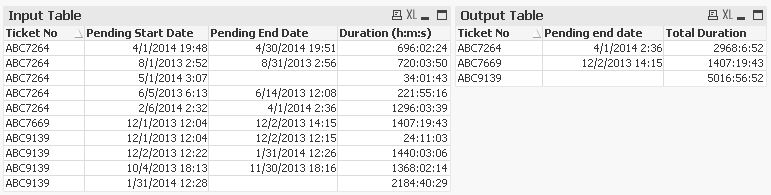
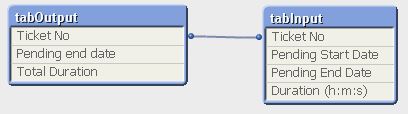
SET TimestampFormat='MM/DD/YYYY hh:mm';

tabInput:
LOAD * FROM [http://community.qlik.com/thread/117106]
(html, codepage is 1252, embedded labels, table is @1);

tabOutput:
LOAD [Ticket No],
    LastValue([Pending End Date]) as [Pending end date],
    Interval(Sum([Duration (h:m:s)]), 'h:m:s') as [Total Duration]
Resident tabInput
Group By [Ticket No];
regards
Marco