Unlock a world of possibilities! Login now and discover the exclusive benefits awaiting you.

- Qlik Community
- :
- All Forums
- :
- QlikView
- :
- Help!!! With obtaining percentage
- Subscribe to RSS Feed
- Mark Topic as New
- Mark Topic as Read
- Float this Topic for Current User
- Bookmark
- Subscribe
- Mute
- Printer Friendly Page

 jgarciaf106
- Mark as New
- Bookmark
- Subscribe
- Mute
- Subscribe to RSS Feed
- Permalink
- Report Inappropriate Content
Help!!! With obtaining percentage
Hi,
I need sime help to obtain a percentage based on two data tables that contains 2 common dimensions (Month)
Here I added some details:
Please find the following attachment with the results of each expression:
1) First Expression using TO_MONTH as Dimension “(count({$<[TO_Employee/CW_Type]={"Regular"},TO_RATE_1_or_2={"Yes"},[TO_Voluntary/Involuntary_Terminations]={"Voluntary"}>}TO_Employee_ID)”
2) Second Expression Using TO_MONTH as Dimension gives me the result correctly but not when a dimension from another table is used“
count({$<HC_Employee\CW_Type={"Regular"},HC_RATE_1_or_2={"Yes"}>} HC_Employee_ID))”
3)Second Expression Using HC_MONTH as Dimension
4)Complete Expression Using TO_MONTH as Dimension “(count({$<[TO_Employee/CW_Type]={"Regular"},TO_RATE_1_or_2={"Yes"},[TO_Voluntary/Involuntary_Terminations]={"Voluntary"}>}TO_Employee_ID)/
count({$<HC_Employee\CW_Type={"Regular"},HC_RATE_1_or_2={"Yes"}>} TOTALHC_Employee_ID))”
5)Expected results from excel sheet I currently have my dashboard
Two dimension
TO_Month
HC_Month
As you can see on the second expression if I use another dimension that is not from the same table it count the entire year results as monthly results, and I need that the complete expressions Use the first expression using TO_Month as dimension and divided in to the second expression using HC_MOnth as dimension in order to
obtain the correct results.
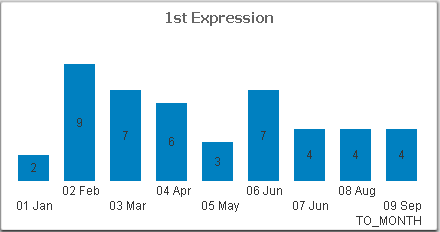


I need to obtain the results show on the last capture. But for that I need the complete expression recognized the dimensions in a proper way.
I need a work around to make this expression work in some sort of way that if a certain expression is used the dimension should look for is X dimension, and with the other expression as well.
Thanks,

 swuehl
- Mark as New
- Bookmark
- Subscribe
- Mute
- Subscribe to RSS Feed
- Permalink
- Report Inappropriate Content
You need to describe your data model, i.e. how all your fields used in your expressions are related in your model.
If possible, post a small sample application.

 rubenmarin
- Mark as New
- Bookmark
- Subscribe
- Mute
- Subscribe to RSS Feed
- Permalink
- Report Inappropriate Content
Hi Andres, it's not good for performance but maybe this works:
Count({$<HC_Employee\CW_Type={"Regular"},HC_RATE_1_or_2={"Yes"}>} If(HC_MONTH=TO_MONTH, HC_Employee_ID)))
It would be better to review the model and try to make this work avoiding the use of 'If' inside the 'Count'
