Unlock a world of possibilities! Login now and discover the exclusive benefits awaiting you.

- Qlik Community
- :
- All Forums
- :
- QlikView
- :
- Help with Data format
- Subscribe to RSS Feed
- Mark Topic as New
- Mark Topic as Read
- Float this Topic for Current User
- Bookmark
- Subscribe
- Mute
- Printer Friendly Page

- Mark as New
- Bookmark
- Subscribe
- Mute
- Subscribe to RSS Feed
- Permalink
- Report Inappropriate Content
Help with Data format
Hi,
I have my date columns are showing up as below.. I tried to change the number format settings and used date(date#()) function..I need it to be displayed as MM/DD/YYYY HH:MM:SS.
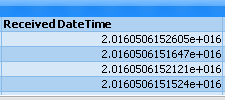
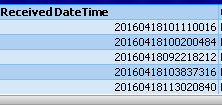
Please advice.. Thanks in advance
Accepted Solutions

 sunny_talwar
- Mark as New
- Bookmark
- Subscribe
- Mute
- Subscribe to RSS Feed
- Permalink
- Report Inappropriate Content
May be like this:
TimeStamp(TimeStamp#(Left(ReceivedDateTime, 14), 'YYYYMMDDhhmmss'), 'MM/DD/YYYY hh:mm:ss') as ReceivedDateTime
sunny_talwar
- Mark as New
- Bookmark
- Subscribe
- Mute
- Subscribe to RSS Feed
- Permalink
- Report Inappropriate Content
May be like this:
TimeStamp(TimeStamp#(Left(ReceivedDateTime, 14), 'YYYYMMDDhhmmss'), 'MM/DD/YYYY hh:mm:ss') as ReceivedDateTime

 engishfaque
- Mark as New
- Bookmark
- Subscribe
- Mute
- Subscribe to RSS Feed
- Permalink
- Report Inappropriate Content
Dear Mohan,
Here it is,
inline_table:
LOAD Date(Timestamp#(Date, 'YYYYMMDDhhmmss'), 'MM/DD/YYYY hh:mm:ss') as Date Inline [
Date
20160418101110016
];
Kind regards,
Ishfaque Ahmed
- Mark as New
- Bookmark
- Subscribe
- Mute
- Subscribe to RSS Feed
- Permalink
- Report Inappropriate Content
Thanks sunny and Ishfaque Ahmed.. Both worked for date in format "20160418101110016" but didn't work for date in exponent form...