Unlock a world of possibilities! Login now and discover the exclusive benefits awaiting you.

- Qlik Community
- :
- All Forums
- :
- QlikView
- :
- Help with date format in QV12 Loadbalancer file
- Subscribe to RSS Feed
- Mark Topic as New
- Mark Topic as Read
- Float this Topic for Current User
- Bookmark
- Subscribe
- Mute
- Printer Friendly Page

 ebalmelli
- Mark as New
- Bookmark
- Subscribe
- Mute
- Subscribe to RSS Feed
- Permalink
- Report Inappropriate Content
Help with date format in QV12 Loadbalancer file
Want to load the records from the QV12 LoadBalancer_YYYYMMDD.txt file. An example of what is in the file is shown here.
20191202T000003.608-0500 Information LoadMeasurer: The system is currently overloaded. Memory value: 2.8838482560129 CPU value: 100
20191202T000103.715-0500 Information LoadMeasurer: The system is not overloaded anymore.
Tried manually using ConvertToLocalTime('20191202T000003.608-0500') as well as =timestamp('20191202T000003.608-0500'). Also tried removing the -500. Not having any luck.
Anyone else figured out how to convert this format into a Date? Month? h:mm:ss?
thanks,
Ed
- Tags:
- qlikview_scripting
Accepted Solutions
ebalmelli
- Mark as New
- Bookmark
- Subscribe
- Mute
- Subscribe to RSS Feed
- Permalink
- Report Inappropriate Content
Thanks Adrian!
From the research I did, it appears that the timestamp and the date/time functions in QV12 are different than the same functions in QV12. For example the Timestamp() function in QV12 can interpret different date formats than the same function in QV11.
I was using QV11.2 Desktop to look at the Loadbalancer file from our QV12 Server. The problem is looking at a QV12 logfile with the new timestamp format in QV11 desktop doesn't work. However, looking at a QV12 logfile with the new timestamp format in QV12 Desktop works as expected.
Thanks again for helping out!

 atoz1158
- Mark as New
- Bookmark
- Subscribe
- Mute
- Subscribe to RSS Feed
- Permalink
- Report Inappropriate Content
Hi
Try the following which for me on the timestamp field out of QV session files.
date([yourTSField],'DD/MM/YYYY hh:mm:ss')
Regards
Adrian
ebalmelli
- Mark as New
- Bookmark
- Subscribe
- Mute
- Subscribe to RSS Feed
- Permalink
- Report Inappropriate Content
Thanks Adrian, unfortunately it didn't work.
=date('20191202T000003.608-0500','DD/MM/YYYY hh:mm:ss')
atoz1158
- Mark as New
- Bookmark
- Subscribe
- Mute
- Subscribe to RSS Feed
- Permalink
- Report Inappropriate Content
Hi
Did it not work at all or did it not return what you expected?
It can be a little confusing thinking that the -0500 should be reducing the time but of course what it means is that the local time is 5 hours behind UTC (GMT) and therefore converted to UTC it will add on 5 hours.
Regards
Adrian
ebalmelli
- Mark as New
- Bookmark
- Subscribe
- Mute
- Subscribe to RSS Feed
- Permalink
- Report Inappropriate Content
Does not work at all.
If you add a text box to a QlikView report and add the following
=date('20191202T000003.608-0500','DD/MM/YYYY hh:mm:ss')
what do you see?
atoz1158
- Mark as New
- Bookmark
- Subscribe
- Mute
- Subscribe to RSS Feed
- Permalink
- Report Inappropriate Content
Hi
This is what I get
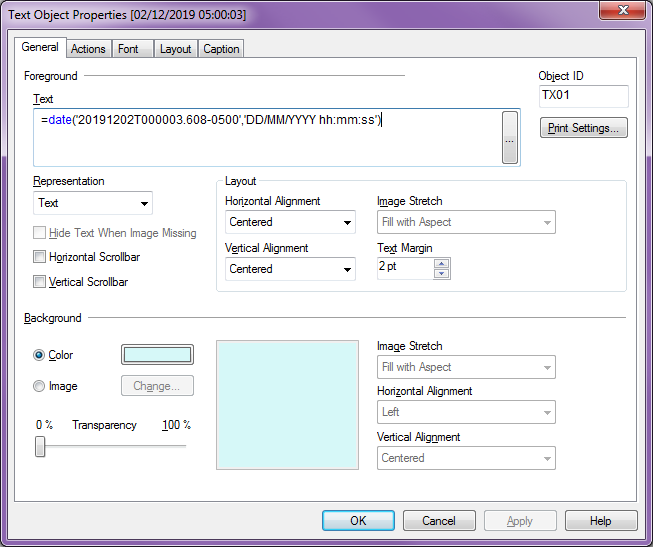

Regards
Adrian
ebalmelli
- Mark as New
- Bookmark
- Subscribe
- Mute
- Subscribe to RSS Feed
- Permalink
- Report Inappropriate Content
Thanks Adrian!
From the research I did, it appears that the timestamp and the date/time functions in QV12 are different than the same functions in QV12. For example the Timestamp() function in QV12 can interpret different date formats than the same function in QV11.
I was using QV11.2 Desktop to look at the Loadbalancer file from our QV12 Server. The problem is looking at a QV12 logfile with the new timestamp format in QV11 desktop doesn't work. However, looking at a QV12 logfile with the new timestamp format in QV12 Desktop works as expected.
Thanks again for helping out!
