Unlock a world of possibilities! Login now and discover the exclusive benefits awaiting you.

- Qlik Community
- :
- All Forums
- :
- QlikView
- :
- Help with date
- Subscribe to RSS Feed
- Mark Topic as New
- Mark Topic as Read
- Float this Topic for Current User
- Bookmark
- Subscribe
- Mute
- Printer Friendly Page

 qvqfqlik
- Mark as New
- Bookmark
- Subscribe
- Mute
- Subscribe to RSS Feed
- Permalink
- Report Inappropriate Content
Help with date
I need to read date values from excel file which is in format of Jan 31 2017 7:00:41:000AM
I am unable to change the date format in excel, but how to read and change the date format in Qlikview ?
Please suggest all possible ways of reading and changing the format of this in Qlikview
Read just the date . timestamp is not necessary.
- « Previous Replies
-
- 1
- 2
- Next Replies »

 sunny_talwar
- Mark as New
- Bookmark
- Subscribe
- Mute
- Subscribe to RSS Feed
- Permalink
- Report Inappropriate Content
My first response worked (with two spaces between Year and Time....
Date(Floor(TimeStamp#(DateField, 'MMM DD YYYY h:mm:ss:fffTT'))) as Date
qvqfqlik
- Mark as New
- Bookmark
- Subscribe
- Mute
- Subscribe to RSS Feed
- Permalink
- Report Inappropriate Content
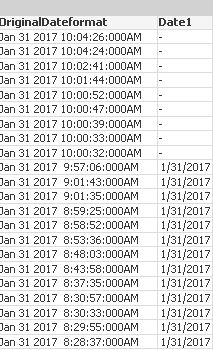
Thanks Sunny! But for few dates it seems not converting.
sunny_talwar
- Mark as New
- Bookmark
- Subscribe
- Mute
- Subscribe to RSS Feed
- Permalink
- Report Inappropriate Content
Try this:
Table:
LOAD Date as Old_Date,
Date(Floor(TimeStamp#(Replace(Date, ' ', ' '), 'MMM D YYYY h:mm:ss:fffTT'))) as Date
FROM
[..\..\Downloads\Dates.xlsx]
(ooxml, embedded labels, table is Sheet1);
qvqfqlik
- Mark as New
- Bookmark
- Subscribe
- Mute
- Subscribe to RSS Feed
- Permalink
- Report Inappropriate Content
Thank you very much Sunny. It worked awesome 

- « Previous Replies
-
- 1
- 2
- Next Replies »