Unlock a world of possibilities! Login now and discover the exclusive benefits awaiting you.

- Qlik Community
- :
- All Forums
- :
- QlikView
- :
- Help with expression
- Subscribe to RSS Feed
- Mark Topic as New
- Mark Topic as Read
- Float this Topic for Current User
- Bookmark
- Subscribe
- Mute
- Printer Friendly Page

- Mark as New
- Bookmark
- Subscribe
- Mute
- Subscribe to RSS Feed
- Permalink
- Report Inappropriate Content
Help with expression
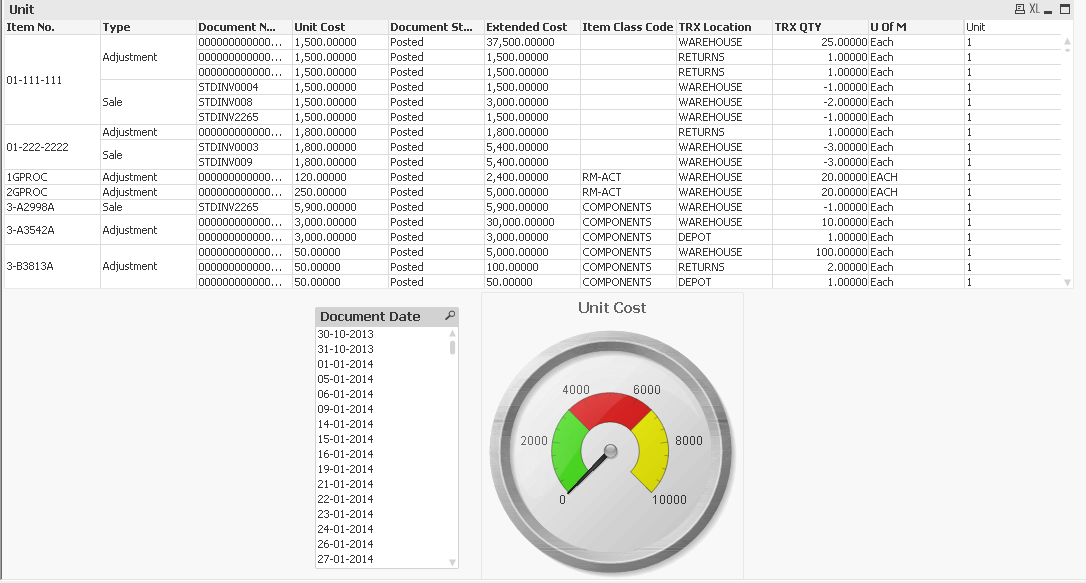
am trying to get the total count for [TRX QTY] from the date i select it and the previous date
for example:
Date TRX QTY
01/01/2013 50
01/02/2013 40
04/12/2014 90
05/02/2015 85
selecting 04/12/2014, the gauge chart calculates the total Items for 04/12/2014 + 01/02/2013 + 01/01/2013 = 180
I try this expression but it doesn't work.
if(yeartodate([Document Date],-1),SUM([TRX QTY]),0)
sum(([TRX QTY])/1)
- Tags:
- new_to_qlikview
- Mark as New
- Bookmark
- Subscribe
- Mute
- Subscribe to RSS Feed
- Permalink
- Report Inappropriate Content
Hi,
You can try this at scripting itself.
LOAD
F1,
F2,
RangeSum(F2, Peek('CumSum')) AS CumSum;
LOAD * INLINE [
F1, F2
01/01/2013, 10
02/02/2014, 50
03/03/2014, 60
04/04/2015, 20
];
Regards,
Sudha

 robert_mika
- Mark as New
- Bookmark
- Subscribe
- Mute
- Subscribe to RSS Feed
- Permalink
- Report Inappropriate Content
Could you attached your file?