Unlock a world of possibilities! Login now and discover the exclusive benefits awaiting you.

- Qlik Community
- :
- All Forums
- :
- QlikView
- :
- Hidding Multiple Values
- Subscribe to RSS Feed
- Mark Topic as New
- Mark Topic as Read
- Float this Topic for Current User
- Bookmark
- Subscribe
- Mute
- Printer Friendly Page

- Mark as New
- Bookmark
- Subscribe
- Mute
- Subscribe to RSS Feed
- Permalink
- Report Inappropriate Content
Hidding Multiple Values
Some of my data has two values displayed when I filter on a month-by-month basis. I'm tracking both Actuals and Forecasts, thus for months that have already occurred, Actuals and Forecasts are displayed simultaneously. How can I hide Forecasts if and only if values are present within Actuals?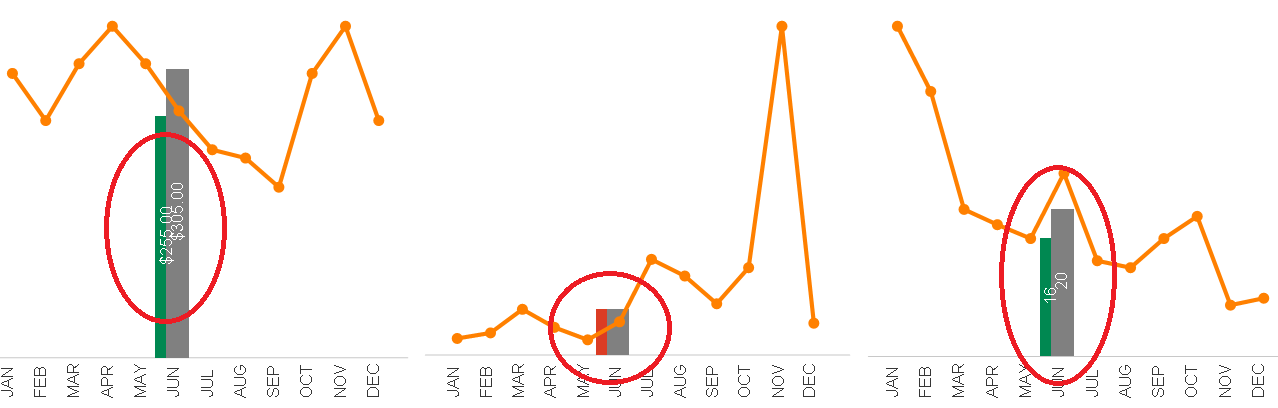
- Tags:
- qlikview_scripting
Accepted Solutions

 swuehl
- Mark as New
- Bookmark
- Subscribe
- Mute
- Subscribe to RSS Feed
- Permalink
- Report Inappropriate Content
You want to do this in the chart or the script? How do your expressions look like?
Mayb it's enough to filter Forecast expression like
=if("ActualExpression">0, YourForecastExpression)
swuehl
- Mark as New
- Bookmark
- Subscribe
- Mute
- Subscribe to RSS Feed
- Permalink
- Report Inappropriate Content
You want to do this in the chart or the script? How do your expressions look like?
Mayb it's enough to filter Forecast expression like
=if("ActualExpression">0, YourForecastExpression)
- Mark as New
- Bookmark
- Subscribe
- Mute
- Subscribe to RSS Feed
- Permalink
- Report Inappropriate Content
PERFECT!