Unlock a world of possibilities! Login now and discover the exclusive benefits awaiting you.

- Qlik Community
- :
- All Forums
- :
- QlikView
- :
- Hide Column in Pivot Table
- Subscribe to RSS Feed
- Mark Topic as New
- Mark Topic as Read
- Float this Topic for Current User
- Bookmark
- Subscribe
- Mute
- Printer Friendly Page

 manojkulkarni
- Mark as New
- Bookmark
- Subscribe
- Mute
- Subscribe to RSS Feed
- Permalink
- Report Inappropriate Content
Hide Column in Pivot Table
Hi Friends,
I want to hide few columns in Pivot table, do we have any option to hide ?
- « Previous Replies
-
- 1
- 2
- Next Replies »

 sunny_talwar
- Mark as New
- Bookmark
- Subscribe
- Mute
- Subscribe to RSS Feed
- Permalink
- Report Inappropriate Content
Nothing that QlikView has, but may be using a Macro
manojkulkarni
- Mark as New
- Bookmark
- Subscribe
- Mute
- Subscribe to RSS Feed
- Permalink
- Report Inappropriate Content
Will this work on Access Point ?
sunny_talwar
- Mark as New
- Bookmark
- Subscribe
- Mute
- Subscribe to RSS Feed
- Permalink
- Report Inappropriate Content
Yes, this is a one time macro which can be removed after you have hidden your column.
manojkulkarni
- Mark as New
- Bookmark
- Subscribe
- Mute
- Subscribe to RSS Feed
- Permalink
- Report Inappropriate Content
Thanks Sunny, if you don't mind pls can you send me one sample how to make call to macro & where to use in chart ?
manojkulkarni
- Mark as New
- Bookmark
- Subscribe
- Mute
- Subscribe to RSS Feed
- Permalink
- Report Inappropriate Content
Thanks Sunny, It worked. I would able to do it
sunny_talwar
- Mark as New
- Bookmark
- Subscribe
- Mute
- Subscribe to RSS Feed
- Permalink
- Report Inappropriate Content
Don't need a sample anymore? Cool... I am glad you figured it out 
 vishsaggi
- Mark as New
- Bookmark
- Subscribe
- Mute
- Subscribe to RSS Feed
- Permalink
- Report Inappropriate Content
Can you close the thread marking one of the responses as Correct/helpful please.

 kamal_sanguri
- Mark as New
- Bookmark
- Subscribe
- Mute
- Subscribe to RSS Feed
- Permalink
- Report Inappropriate Content
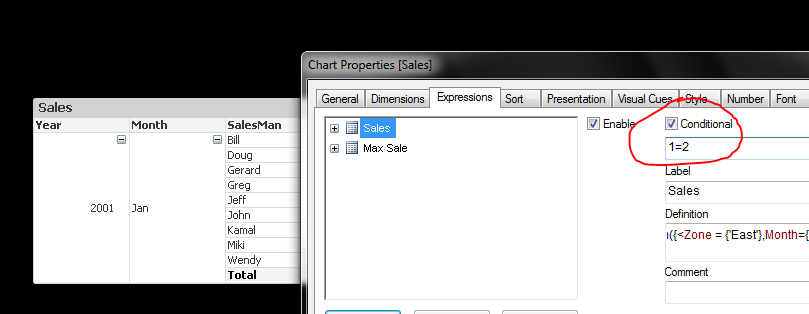
We can hide them..
Use conditional enable feature and write 1=2. The expression would be hide, Dimensions can also be hide using same way.
 jonathandienst
- Mark as New
- Bookmark
- Subscribe
- Mute
- Subscribe to RSS Feed
- Permalink
- Report Inappropriate Content
Conditionally disabling/enabling is not the same as hiding.
A hidden (zero width) column is still calculated, can be referenced by another expression, and if a dimension, still causes lines to be generated. A disabled column is not calculated, cannot be referenced and does not participate in the dimensioning of the object.

- « Previous Replies
-
- 1
- 2
- Next Replies »