Unlock a world of possibilities! Login now and discover the exclusive benefits awaiting you.

- Qlik Community
- :
- All Forums
- :
- QlikView
- :
- Hide Rows with Suma 0 in Table Simple
- Subscribe to RSS Feed
- Mark Topic as New
- Mark Topic as Read
- Float this Topic for Current User
- Bookmark
- Subscribe
- Mute
- Printer Friendly Page

 stvn_003
- Mark as New
- Bookmark
- Subscribe
- Mute
- Subscribe to RSS Feed
- Permalink
- Report Inappropriate Content
Hide Rows with Suma 0 in Table Simple
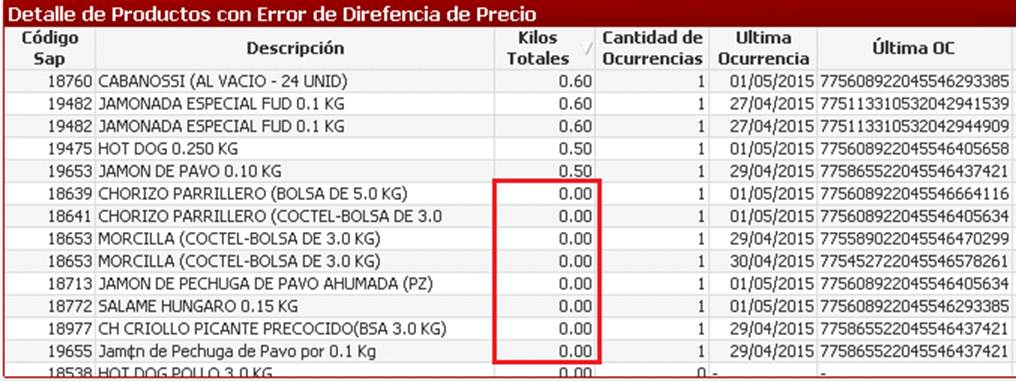
Hi buddies, I'm new in QlikView and emerged me a doubt, I have a simple table object in which I have calculated expressions, some of which are sums and other counters, what I want is that the rows are not displayed whose sum is zero .
Note: The 4 last columns of the image are computed expressions.

- Mark as New
- Bookmark
- Subscribe
- Mute
- Subscribe to RSS Feed
- Permalink
- Report Inappropriate Content
Hi Steven,
you have the zero coming through as the other expressions are returning values and so lines are populating.
If you put a condition on them to be based on your first column, those rows should drop out.
e.g If([Kilos Totales]<>0,Ultima Ocurrencia expression here)
hope that helps
Joe

 stigchel
- Mark as New
- Bookmark
- Subscribe
- Mute
- Subscribe to RSS Feed
- Permalink
- Report Inappropriate Content
Try adding a calculated dimension instead of the Código Sap dimension like this:
Aggr(Only({<[Código Sap]={"=Sum(Kilos)>0"}>} [Código Sap]),[Código Sap])

 buzzy996
- Mark as New
- Bookmark
- Subscribe
- Mute
- Subscribe to RSS Feed
- Permalink
- Report Inappropriate Content
try tis,write a expression on ur field "Kilos totales",
=sum/count/num({$<Kilos totales<>'0'>}Kilos totales)