Unlock a world of possibilities! Login now and discover the exclusive benefits awaiting you.

- Qlik Community
- :
- All Forums
- :
- QlikView
- :
- Hide Selections in the Current Selections Box
- Subscribe to RSS Feed
- Mark Topic as New
- Mark Topic as Read
- Float this Topic for Current User
- Bookmark
- Subscribe
- Mute
- Printer Friendly Page

- Mark as New
- Bookmark
- Subscribe
- Mute
- Subscribe to RSS Feed
- Permalink
- Report Inappropriate Content
Hide Selections in the Current Selections Box
Hi All,
Hope someone can help with this... I have an case where I have created a chart using the expression:
Sum({$<Measure={'Trade Units'}>}Data) . Now, in a different Tab, let's call it Tab2, I have another Chart where the User selects the Measure to apply to the chart. My problem is that when the user selects a different Measure in Tab2, say Margin%, that Measure shows up in the Current Selections box in the first tab. I'm trying to prevent this from happening as I don't want to confuse the user.
I tried using Hide Prefix to Create [~Measure] and use that in the expression in the first tab,
Sum ({$<[~Measure]={'Trade Units'}>}Data)
However, this isn't very useful because there are other tabs where I do want the Measures to appear in the Current Selections box.
Does anyone know of a way to have Measure and [~Measure] exist within the same document but can be delineated across Tabs? I'm thinking that the best way is to remove the Measure fiels and leave only [~Measure] as a partial compromisse solution.
I know this is confusing and hope it makes some sense.
Cheers
John
- Tags:
- new_to_qlikview

 marthacano01
- Mark as New
- Bookmark
- Subscribe
- Mute
- Subscribe to RSS Feed
- Permalink
- Report Inappropriate Content
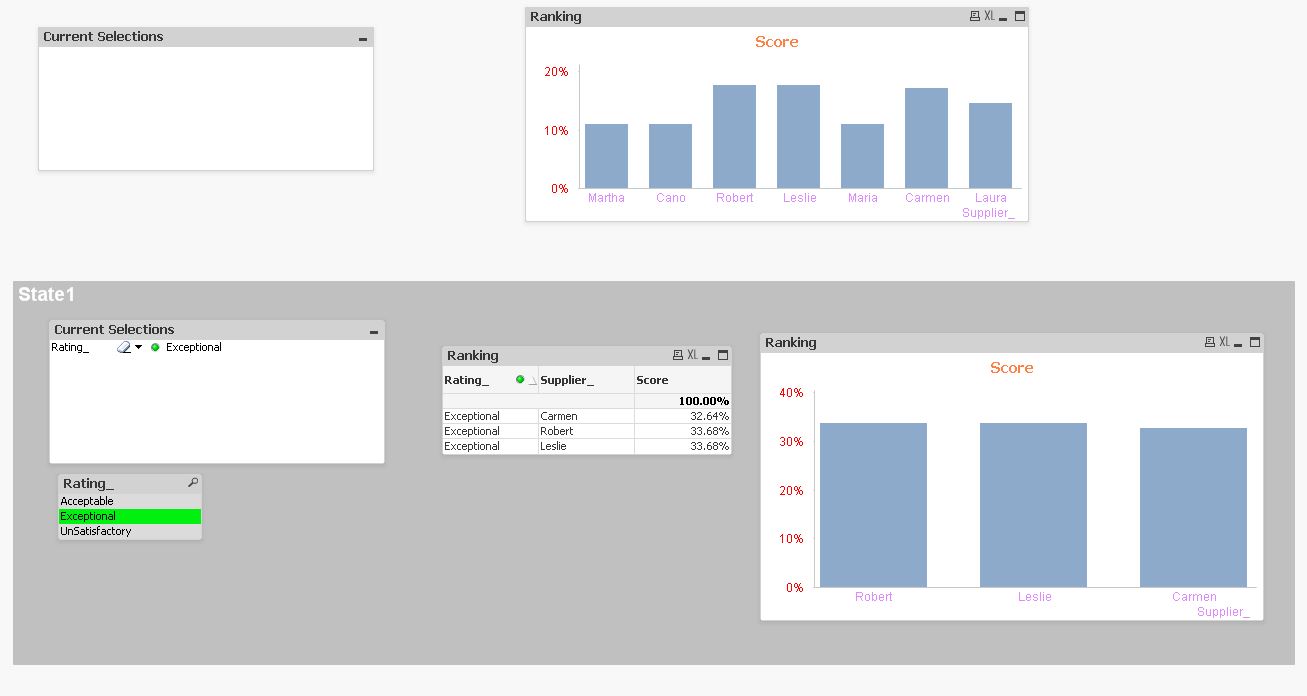
Maybe you need to use Alternate States. I attached an example. I hope it helps you.

 rustyfishbones
- Mark as New
- Bookmark
- Subscribe
- Mute
- Subscribe to RSS Feed
- Permalink
- Report Inappropriate Content
Hi John,
I think using Alternate State will help you achieve this, Document Properties, General Tab, click on Alternate States
Click Add, type the name of your new Alternate State and click ok

Then in your Current Selection Box change the Alternate State to your new Alt1 state

 praveenak
- Mark as New
- Bookmark
- Subscribe
- Mute
- Subscribe to RSS Feed
- Permalink
- Report Inappropriate Content
Hi,
I think the only way is to use "Alternate States."
Please try it.
Will surely get back to u if some other way is possible.