Unlock a world of possibilities! Login now and discover the exclusive benefits awaiting you.

- Qlik Community
- :
- All Forums
- :
- QlikView
- :
- Hide expression value from hover-over popup
- Subscribe to RSS Feed
- Mark Topic as New
- Mark Topic as Read
- Float this Topic for Current User
- Bookmark
- Subscribe
- Mute
- Printer Friendly Page

- Mark as New
- Bookmark
- Subscribe
- Mute
- Subscribe to RSS Feed
- Permalink
- Report Inappropriate Content
Hide expression value from hover-over popup
Hello,
I'm trying to hide the default expression value that populates the hover-over popup screen. (I do not want to hide the popup in it's entirety, just the default expression value)
See attachment for example. There are 2 metric shown in the graph and there is a 3rd invisible one that creates a text-line.
When I now hover over the bars for Metrics 1 & 2 for period 6 I respectively get:
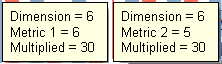
I want to hide the default textline in the middle so that no matter which bar in period 6 I hover-over, I get:
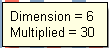
How can I hide the default value expression value so that it only shows the dimension & the textline? (Alternatively I would also be happy when I can ONLY show the textline)
Thanks in advance.
Regards, Jorrit
- « Previous Replies
-
- 1
- 2
- Next Replies »
- Mark as New
- Bookmark
- Subscribe
- Mute
- Subscribe to RSS Feed
- Permalink
- Report Inappropriate Content
Hello all,
Some more searching on this led me to find that this is a confirmed bug since 11.20 SR7 which is solved in 11.20 SR10.
The release notes of SR10 contain this line under "Bugs solved in SR10":
69025 [Text as Pop-up] in [Chart Properties] -> [Expressions] doesn't pop up custom message since QV11.2 SR7
See this on page 24 of this release notes document:
So I guess we'll have to upgrade to get this functionality back.
Thanks for the help.
Jorrit

 Gabriel
- Mark as New
- Bookmark
- Subscribe
- Mute
- Subscribe to RSS Feed
- Permalink
- Report Inappropriate Content
Hi,
It works for me. I tried my suggestion above.
- « Previous Replies
-
- 1
- 2
- Next Replies »