Unlock a world of possibilities! Login now and discover the exclusive benefits awaiting you.

- Qlik Community
- :
- All Forums
- :
- QlikView
- :
- Hide some fields in current selection box
- Subscribe to RSS Feed
- Mark Topic as New
- Mark Topic as Read
- Float this Topic for Current User
- Bookmark
- Subscribe
- Mute
- Printer Friendly Page

 sergio0592
- Mark as New
- Bookmark
- Subscribe
- Mute
- Subscribe to RSS Feed
- Permalink
- Report Inappropriate Content
Hide some fields in current selection box
Hi all,
I often use customizables tables as described in a post from Jennell McIntire https://community.qlik.com/blogs/qlikviewdesignblog/2014/01/31/customizable-straight-table
But, in my qvw. when user makes selections on dimension or metrics/metrics no fields, the selection appears in the current selection box. I'd like to avoid that, is there a way fir choose wich field must appear in the current box?
I have probably missed a step because the post refers to http://us-d.demo.qlik.com/QvAJAXZfc/opendoc.htm?document=qvdocs%2FCall%20Detail%20Record%20Analysis....
(report tab) and dimensions and metrics don't appear in box.
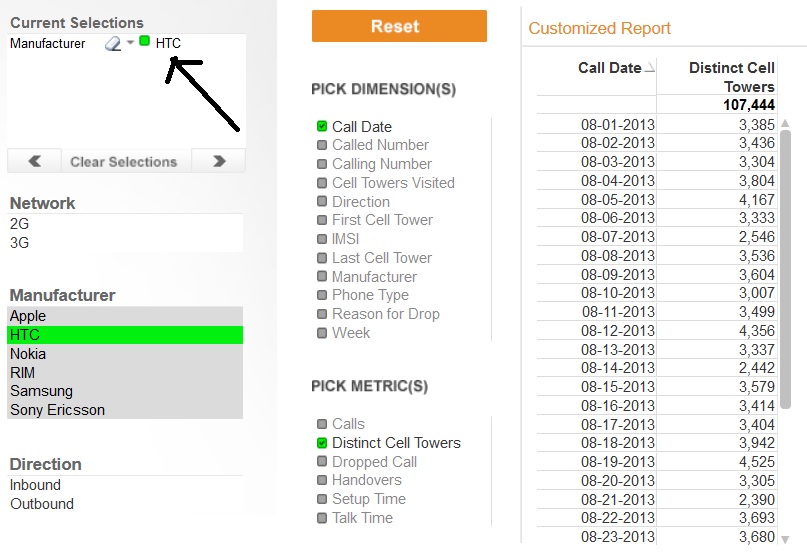
Accepted Solutions

 sunny_talwar
- Mark as New
- Bookmark
- Subscribe
- Mute
- Subscribe to RSS Feed
- Permalink
- Report Inappropriate Content
sunny_talwar
- Mark as New
- Bookmark
- Subscribe
- Mute
- Subscribe to RSS Feed
- Permalink
- Report Inappropriate Content
Check this out:
sergio0592
- Mark as New
- Bookmark
- Subscribe
- Mute
- Subscribe to RSS Feed
- Permalink
- Report Inappropriate Content
Thanks, it works but i had to remove the QUALIFY before the dimension/metrics tables. And i don't like scripting without QUALIFY statement!!
sunny_talwar
- Mark as New
- Bookmark
- Subscribe
- Mute
- Subscribe to RSS Feed
- Permalink
- Report Inappropriate Content
You can always use QUALIFY and then at the very end of the script rename your fieldname
How to rename a field in qlikview
RENAME Field TableName.FieldName to ~FieldName;
