Unlock a world of possibilities! Login now and discover the exclusive benefits awaiting you.

- Qlik Community
- :
- All Forums
- :
- QlikView
- :
- Re: Hiding Sheets
- Subscribe to RSS Feed
- Mark Topic as New
- Mark Topic as Read
- Float this Topic for Current User
- Bookmark
- Subscribe
- Mute
- Printer Friendly Page

 pandreozzi
- Mark as New
- Bookmark
- Subscribe
- Mute
- Subscribe to RSS Feed
- Permalink
- Report Inappropriate Content
Hiding Sheets
I am very new to development and have a question/challenge. Here is my run down.
I am accessing a DB that has multiple tables and of those tables I am bringing in different types of data that needs to be displayed on different sheets in QlikView. On the "Main" page is where I select my client locations and from that selection I would like to show the additional sheets only if there is relevant data that needs to be displayed for the selected client. So in the sheet properties of the sheet I want to hide I see there is a show sheet condition. If there is no data I need to keep that sheet hidden. If there is data associated to the client I need to have the sheet appear with that data in a table.
I hope this is clear.
Thanks, Paul
- « Previous Replies
-
- 1
- 2
- Next Replies »

 vishsaggi
- Mark as New
- Bookmark
- Subscribe
- Mute
- Subscribe to RSS Feed
- Permalink
- Report Inappropriate Content
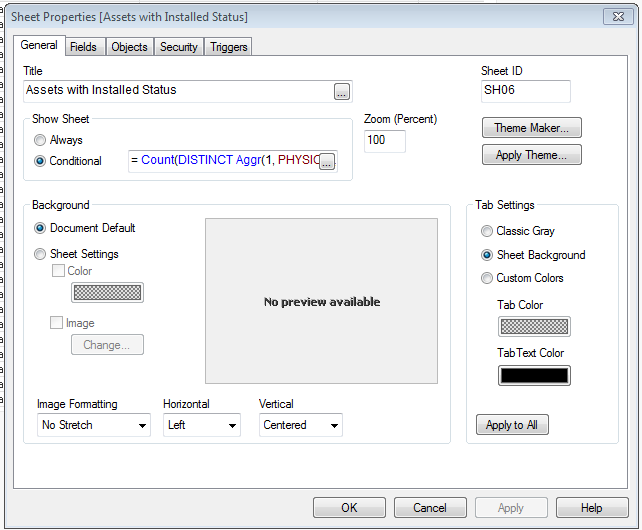
Check this if this is what you are looking for? And when there are no selections do you want the sheets to be shown or hidden? If hidden what sheets needs to be hidden? Check attached.
Expression used in sheet properties conditional check like below:
Check other sheet properties for the conditional expressions used based on table data.
pandreozzi
- Mark as New
- Bookmark
- Subscribe
- Mute
- Subscribe to RSS Feed
- Permalink
- Report Inappropriate Content
Thank You VIshwarath. I was out on Friday and will look at this today and get back to you.
pandreozzi
- Mark as New
- Bookmark
- Subscribe
- Mute
- Subscribe to RSS Feed
- Permalink
- Report Inappropriate Content
Vishwarath. I have tried this and unfortunately it did not work. Let me try to explain better only with two sheets and If I can get this to work than the other sheets will also work.
On what I call the "Main" sheet I have a text box that is populated with data. On the second sheet on what I call "Assets to Billing" sheet is billing information that is associated to the "Main" sheet depending on what the selection in the text object is. If there is no billing associated to the selection on the Main sheet than the Asset to Billing text object is blank so I would like to hide the sheet based on this condition.
pandreozzi
- Mark as New
- Bookmark
- Subscribe
- Mute
- Subscribe to RSS Feed
- Permalink
- Report Inappropriate Content
I also had someone suggest the Set Analysis but I am not sure how this will be used looking for null fields vs populated fields

 RonaldDoes
- Mark as New
- Bookmark
- Subscribe
- Mute
- Subscribe to RSS Feed
- Permalink
- Report Inappropriate Content
Hi Paul,
I think this is what you'll need in the condition for your sheet.
=Count(DISTINCT ATBILLINGSITE)
Please find an example attached.
Hope this helps you.
With kind regards,
Ronald
vishsaggi
- Mark as New
- Bookmark
- Subscribe
- Mute
- Subscribe to RSS Feed
- Permalink
- Report Inappropriate Content
Can you elaborate and give an example selections you make and what has to happen?
pandreozzi
- Mark as New
- Bookmark
- Subscribe
- Mute
- Subscribe to RSS Feed
- Permalink
- Report Inappropriate Content
Hi Ronald that seemed to have worked. I also think someone else gave me a solution like this and I may not have implemented it correctly. Thanks for the quick response.

- « Previous Replies
-
- 1
- 2
- Next Replies »