Unlock a world of possibilities! Login now and discover the exclusive benefits awaiting you.

- Qlik Community
- :
- All Forums
- :
- QlikView
- :
- How Convert Record To Column and Calculate Differe...
- Subscribe to RSS Feed
- Mark Topic as New
- Mark Topic as Read
- Float this Topic for Current User
- Bookmark
- Subscribe
- Mute
- Printer Friendly Page

- Mark as New
- Bookmark
- Subscribe
- Mute
- Subscribe to RSS Feed
- Permalink
- Report Inappropriate Content
How Convert Record To Column and Calculate Difference
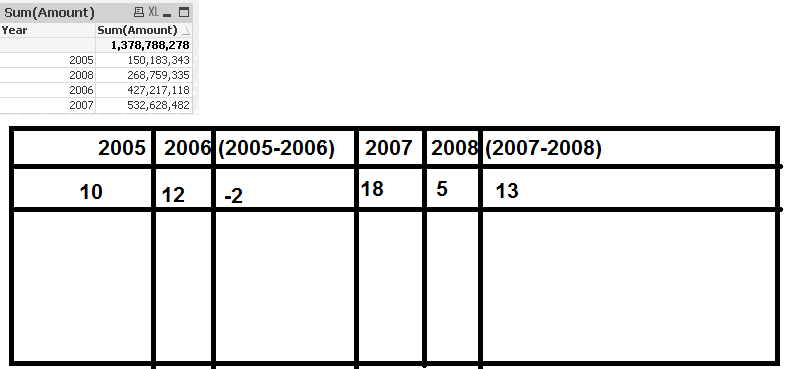
hello Dears
i have One Table Look Like

I would like to give the following
Accepted Solutions

 sunny_talwar
- Mark as New
- Bookmark
- Subscribe
- Mute
- Subscribe to RSS Feed
- Permalink
- Report Inappropriate Content
This looks good (Just need a better sorting):

Script:
Table:
LOAD * Inline [
Year, Value
2005, 10
2006, 20
2007, 30
2008, 40
];
Concatenate (Table)
LOAD If(Previous(Year) > 0, Year & '-' & Previous(Year)) as Year,
If(Previous(Value) > 0, Value - Previous(Value)) as Value
Resident Table;
sunny_talwar
- Mark as New
- Bookmark
- Subscribe
- Mute
- Subscribe to RSS Feed
- Permalink
- Report Inappropriate Content
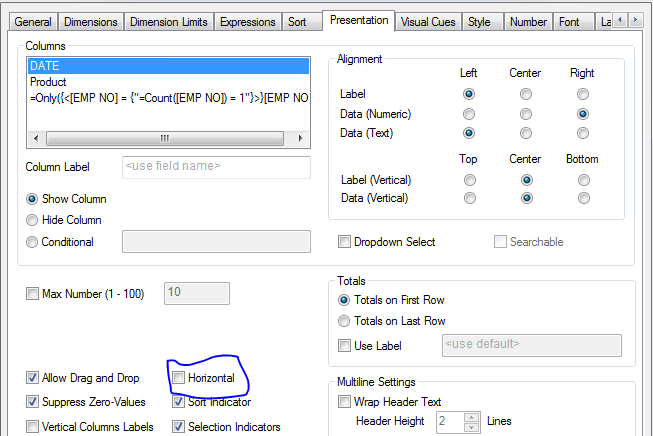
Check 'Horizontal' on the Presentation tab:
.png "Miguel_Angel_Baeyens")
 Miguel_Angel_Ba
- Mark as New
- Bookmark
- Subscribe
- Mute
- Subscribe to RSS Feed
- Permalink
- Report Inappropriate Content
Hi,
GENERIC LOAD is likely what you are looking for. See here for more info:
How convert table from rows to columns
Miguel
sunny_talwar
- Mark as New
- Bookmark
- Subscribe
- Mute
- Subscribe to RSS Feed
- Permalink
- Report Inappropriate Content
Just realized that you need to calculate delta also. It will be easy to add a value for change in the script. A script based solution works?
- Mark as New
- Bookmark
- Subscribe
- Mute
- Subscribe to RSS Feed
- Permalink
- Report Inappropriate Content
Thanks How To Calculate Automatic Difference
2005-2006
2006-2007
2007-2008
...
- Mark as New
- Bookmark
- Subscribe
- Mute
- Subscribe to RSS Feed
- Permalink
- Report Inappropriate Content
yes
but years is dynamic 2005,2006,2007,?
sunny_talwar
- Mark as New
- Bookmark
- Subscribe
- Mute
- Subscribe to RSS Feed
- Permalink
- Report Inappropriate Content
This looks good (Just need a better sorting):
Script:
Table:
LOAD * Inline [
Year, Value
2005, 10
2006, 20
2007, 30
2008, 40
];
Concatenate (Table)
LOAD If(Previous(Year) > 0, Year & '-' & Previous(Year)) as Year,
If(Previous(Value) > 0, Value - Previous(Value)) as Value
Resident Table;