Unlock a world of possibilities! Login now and discover the exclusive benefits awaiting you.

- Qlik Community
- :
- All Forums
- :
- QlikView
- :
- How calculate the percentage?
- Subscribe to RSS Feed
- Mark Topic as New
- Mark Topic as Read
- Float this Topic for Current User
- Bookmark
- Subscribe
- Mute
- Printer Friendly Page

 carlos13
- Mark as New
- Bookmark
- Subscribe
- Mute
- Subscribe to RSS Feed
- Permalink
- Report Inappropriate Content
How calculate the percentage?
From the Field "ESTRATEGICOS_OBJ_NOMBRE" that has the following values

Calculate the percentage

And I want to get the overall percentage including

But using “sum(total<ESTRATEGICOS_OBJ_NOMBRE,Nombre,IND_NOMBRE> OBJETIVOS_OBJ_PORCENTAJE/100) ” not working
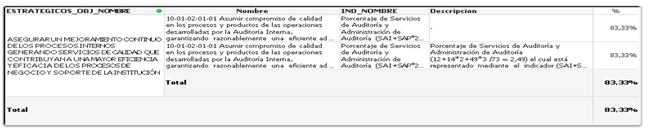
nor with “Avg(total<ESTRATEGICOS_OBJ_NOMBRE,Nombre,IND_NOMBRE> OBJETIVOS_OBJ_PORCENTAJE/100)”
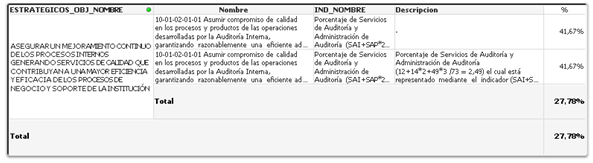
I appreciate any help in advance
I add the example of what I'm working pair to see if I can help.
thanks
Accepted Solutions

 whiteline
- Mark as New
- Bookmark
- Subscribe
- Mute
- Subscribe to RSS Feed
- Permalink
- Report Inappropriate Content
Don't now if its logicaly right, but I think I've got what you want.
Use this expression:
=avg({$<Nombre={"=Len(Nombre)>0"}>}IF(RSP_CLASE=2,OBJETIVOS_OBJ_PORCENTAJE/100))
And UnCheck 'Supress Zero-Values' on Presentation tab.
whiteline
- Mark as New
- Bookmark
- Subscribe
- Mute
- Subscribe to RSS Feed
- Permalink
- Report Inappropriate Content
Don't now if its logicaly right, but I think I've got what you want.
Use this expression:
=avg({$<Nombre={"=Len(Nombre)>0"}>}IF(RSP_CLASE=2,OBJETIVOS_OBJ_PORCENTAJE/100))
And UnCheck 'Supress Zero-Values' on Presentation tab.
carlos13
- Mark as New
- Bookmark
- Subscribe
- Mute
- Subscribe to RSS Feed
- Permalink
- Report Inappropriate Content
thank
