Unlock a world of possibilities! Login now and discover the exclusive benefits awaiting you.

- Qlik Community
- :
- All Forums
- :
- QlikView
- :
- How do we remove "Set by Style"?
- Subscribe to RSS Feed
- Mark Topic as New
- Mark Topic as Read
- Float this Topic for Current User
- Bookmark
- Subscribe
- Mute
- Printer Friendly Page

- Mark as New
- Bookmark
- Subscribe
- Mute
- Subscribe to RSS Feed
- Permalink
- Report Inappropriate Content
How do we remove "Set by Style"?
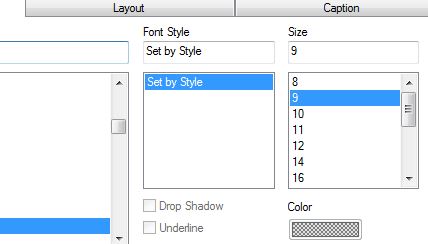
All of a sudden, I can no longer set a Font's style or color. The color selection box is greyed out and the Font style box says "Set by Style". How can I remove "Set by Style" and manually change to bold fonts (without using the expression property workaround),?

 jharke
- Mark as New
- Bookmark
- Subscribe
- Mute
- Subscribe to RSS Feed
- Permalink
- Report Inappropriate Content
Anyone who has an answer to this question?
I find two other threads about this, but with no satisfying solution, only workarounds.
(https://community.qlik.com/message/1094935#1094935 and https://community.qlik.com/message/18265#18265).
I cannot change the color, cannot make it bold or underline it (Font: set by style).
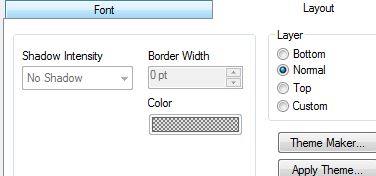
Cannot change border / schadow Intensity (Layout: greyed out)
I even cannot add Special Icons in tab Caption.
When looking at mentioned two threads, more people are searching. There has to be a way to remove the "set by style" I guess.