Unlock a world of possibilities! Login now and discover the exclusive benefits awaiting you.

- Qlik Community
- :
- All Forums
- :
- QlikView
- :
- How to Get Prev Month Value
- Subscribe to RSS Feed
- Mark Topic as New
- Mark Topic as Read
- Float this Topic for Current User
- Bookmark
- Subscribe
- Mute
- Printer Friendly Page

- Mark as New
- Bookmark
- Subscribe
- Mute
- Subscribe to RSS Feed
- Permalink
- Report Inappropriate Content
How to Get Prev Month Value
Hi All,
I need to get Previous Month Value when i make a selection, but struggling to get it right?
E.g if i select May on a list box it must show me values for April.
like -1
i Tried:
=sum({<Dates={'>=$(=only(Dates)-2)<=$(=only(Dates))'}>}Sales)
and
=sum( {$<Year = {$(=Only(Year)-1)}>} Sales )
im i missing something in here?
Regards:
Thabiso
- « Previous Replies
-
- 1
- 2
- Next Replies »
- Mark as New
- Bookmark
- Subscribe
- Mute
- Subscribe to RSS Feed
- Permalink
- Report Inappropriate Content
Hi SunIndia, yours it gives me current month Selected thou i need Previous month from that selected Month.
if on my listbox i select March, it must calculate for February.
Thanks

 sunny_talwar
- Mark as New
- Bookmark
- Subscribe
- Mute
- Subscribe to RSS Feed
- Permalink
- Report Inappropriate Content
Try this expression:
=Sum({<Dates = {"$(='>=' & Date(AddMonths(MonthStart(Max(Dates)), -1), 'YYYY-MM-DD') & '<=' & Date(MonthEnd(Max(Dates)), 'YYYY-MM-DD'))"}, MonthDate = >}Sales)
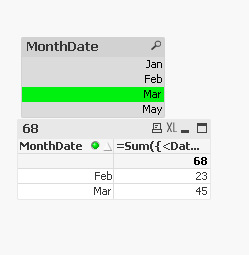
Attaching the qvw for your review purposes.
Best,
Sunny
- « Previous Replies
-
- 1
- 2
- Next Replies »