Unlock a world of possibilities! Login now and discover the exclusive benefits awaiting you.

- Qlik Community
- :
- All Forums
- :
- QlikView
- :
- How to Position "text In Chart"?
Options
- Subscribe to RSS Feed
- Mark Topic as New
- Mark Topic as Read
- Float this Topic for Current User
- Bookmark
- Subscribe
- Mute
- Printer Friendly Page
Turn on suggestions
Auto-suggest helps you quickly narrow down your search results by suggesting possible matches as you type.
Showing results for

Anonymous
Not applicable
2015-09-16
06:42 PM
- Mark as New
- Bookmark
- Subscribe
- Mute
- Subscribe to RSS Feed
- Permalink
- Report Inappropriate Content
How to Position "text In Chart"?
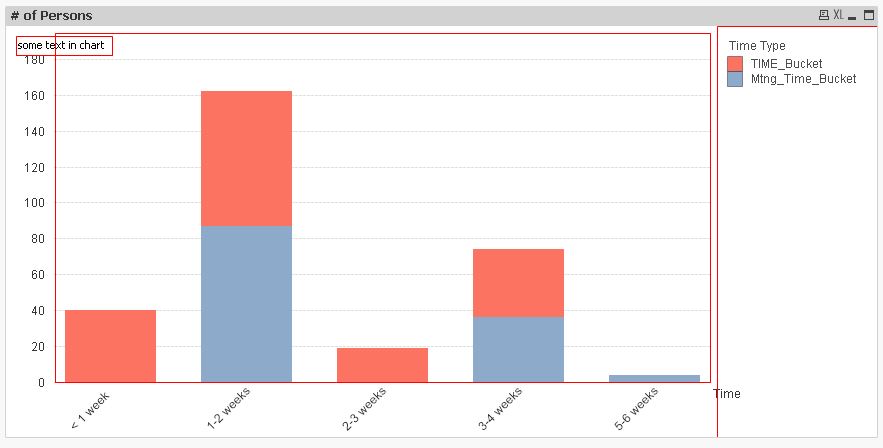
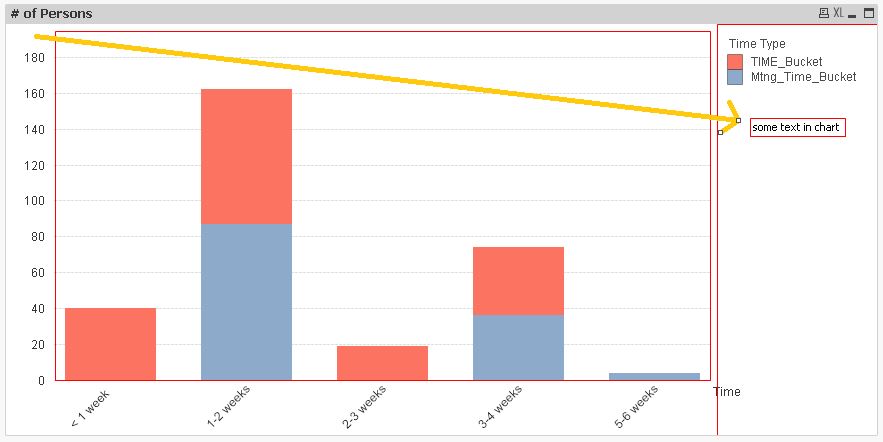
I am trying to show a text and sum function below the legend (bar Chart). It keeps showing up at the left top corner. I want it below the legend. how to position this?
I tried changing the angle by going to Presentation tab-----> edit (text in Chart) ----> angle (degrees). it is not working.
5,059 Views
1 Solution
Accepted Solutions

 MarcoWedel
MVP
2015-09-16
07:06 PM
- Mark as New
- Bookmark
- Subscribe
- Mute
- Subscribe to RSS Feed
- Permalink
- Report Inappropriate Content
Mark the chart object, press ctrl+shift and drag the text box (marked with red box) to a new position.
hope this helps
regards
Marco
3 Replies
MarcoWedel
MVP
2015-09-16
07:06 PM
- Mark as New
- Bookmark
- Subscribe
- Mute
- Subscribe to RSS Feed
- Permalink
- Report Inappropriate Content
Mark the chart object, press ctrl+shift and drag the text box (marked with red box) to a new position.
hope this helps
regards
Marco
MarcoWedel
MVP
2015-09-16
07:11 PM
- Mark as New
- Bookmark
- Subscribe
- Mute
- Subscribe to RSS Feed
- Permalink
- Report Inappropriate Content
3,612 Views

 vishnumogulla
Contributor
2024-01-24
04:26 PM
- Mark as New
- Bookmark
- Subscribe
- Mute
- Subscribe to RSS Feed
- Permalink
- Report Inappropriate Content
It worked, thanks