Unlock a world of possibilities! Login now and discover the exclusive benefits awaiting you.

- Qlik Community
- :
- All Forums
- :
- QlikView
- :
- How to SORT date in Straight Table?
- Subscribe to RSS Feed
- Mark Topic as New
- Mark Topic as Read
- Float this Topic for Current User
- Bookmark
- Subscribe
- Mute
- Printer Friendly Page

 soha1902
- Mark as New
- Bookmark
- Subscribe
- Mute
- Subscribe to RSS Feed
- Permalink
- Report Inappropriate Content
How to SORT date in Straight Table?
Hi All,
I am using one straight table like below. Date is my dimension.
| Date | 2014-June | 2014-Feb | 2013-Dec | 2013-Oct | 2013-Sep | 2013-Aug | 2010-Jan | 2011-Dec | 2009-Oct |
|---|---|---|---|---|---|---|---|---|---|
| Expression 1 | 3 | 2 | 2 | 3 | 5 | 3 | 1 | 2 | 4 |
| Expression 2 | 1 | 2 | 7 | 3 | 2 | 1 | 0 | 9 | 8 |
| Expression 3 | 2 | 4 | 5 | 2 | 1 | 7 | 4 | 2 | 1 |
Now I want to sort my Date Fields like following
| Date | 2014-Feb | 2014-June | 2013-Aug | 2013-Sep | 2013-Oct | 2013-Dec | 2011-Dec | 2010-Jan | 2009-Oct |
|---|---|---|---|---|---|---|---|---|---|
| Expression 1 | |||||||||
| Expression 2 | |||||||||
| Expression 3 |
I done the changes in sort tab. I selected Date field and under sort by box I selected numeric values = desending, but its not working.
Please help me regarding this. In my application its look like below image:


 MayilVahanan
- Mark as New
- Bookmark
- Subscribe
- Mute
- Subscribe to RSS Feed
- Permalink
- Report Inappropriate Content
Hi
Try like this
Chart properties -> sort -> expression (Ascending)
=MonthName(Date)
Please close the thread by marking correct answer & give likes if you like the post.

- Mark as New
- Bookmark
- Subscribe
- Mute
- Subscribe to RSS Feed
- Permalink
- Report Inappropriate Content
Hi Soha,
sure it can't worm like this because you mix different sorting ways.
I understand you want Last year descending but months ascending
you have to build your own sort key for that in the script and sort the table on SortKey
best regards
Chris

 CELAMBARASAN
- Mark as New
- Bookmark
- Subscribe
- Mute
- Subscribe to RSS Feed
- Permalink
- Report Inappropriate Content
I don't think its a numeric/date field. It its so then it will get sorted.
Try with this as calculated dimension
Date(Date#(YourFieldName, 'YYYY-MMMM'), 'YYYY-MMMM')
For consistent solutions in all the places you should the change the way of creating this field in script itself.

 its_anandrjs
- Mark as New
- Bookmark
- Subscribe
- Mute
- Subscribe to RSS Feed
- Permalink
- Report Inappropriate Content
Hi Soha,
Are you sure there is single dimension it looks like 3 expression with different month names.
If it is single then in sort tab select sort by expression and write expression MonthName(DateField) and Descending
soha1902
- Mark as New
- Bookmark
- Subscribe
- Mute
- Subscribe to RSS Feed
- Permalink
- Report Inappropriate Content
Thanks for your reply. I tried to wrote expression MonthName(<MyDateFieldName>) but still its not sorting.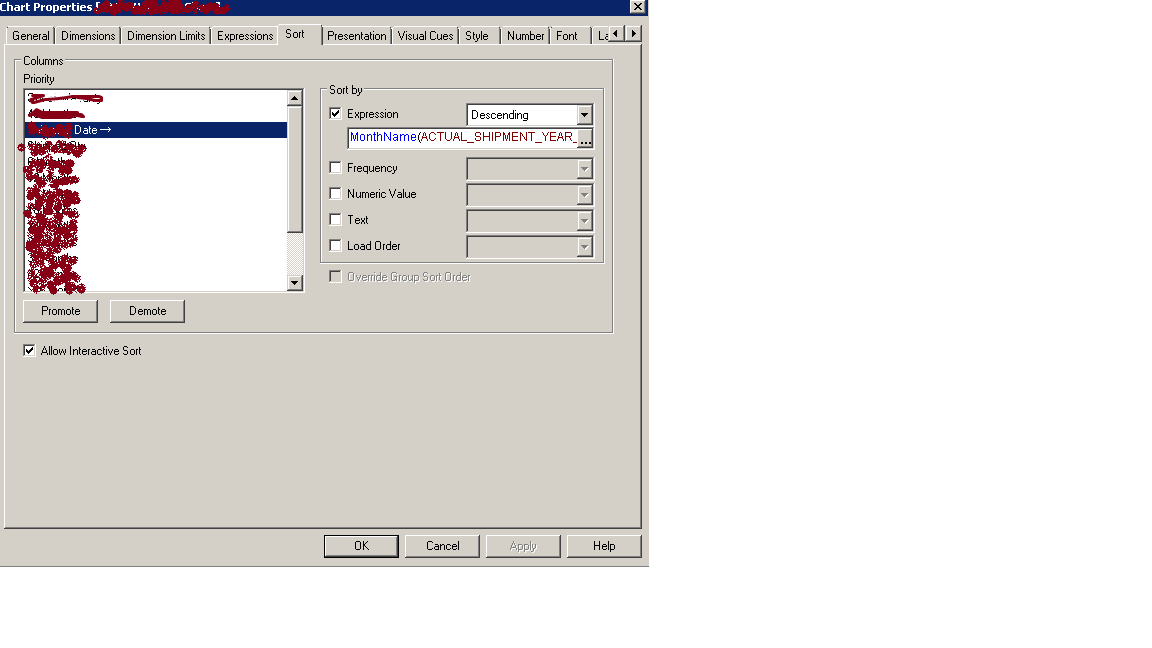

Please help...
soha1902
- Mark as New
- Bookmark
- Subscribe
- Mute
- Subscribe to RSS Feed
- Permalink
- Report Inappropriate Content
Actually from script date is coming in Date(<DateField>,'YYYY-MM') format.
But in chart I am convering in Date(<DateField>,'YYYY-MMM') format.
soha1902
- Mark as New
- Bookmark
- Subscribe
- Mute
- Subscribe to RSS Feed
- Permalink
- Report Inappropriate Content
Please help.
MayilVahanan
- Mark as New
- Bookmark
- Subscribe
- Mute
- Subscribe to RSS Feed
- Permalink
- Report Inappropriate Content
Hi
Bring Number field like Num(Datefield) as DateFieldNum from your script and use DateFieldNum in the expression.
Hope that helps.
Otherwise provide the sample file.
Please close the thread by marking correct answer & give likes if you like the post.
 ajaygcet
- Mark as New
- Bookmark
- Subscribe
- Mute
- Subscribe to RSS Feed
- Permalink
- Report Inappropriate Content
Hi Soha ,
try Date(DateField,'YYYY-MM') in Sort by Expression.
or Convert it into Number like 'YYYYMM'